A demo catalogue that grew well beyond app launches
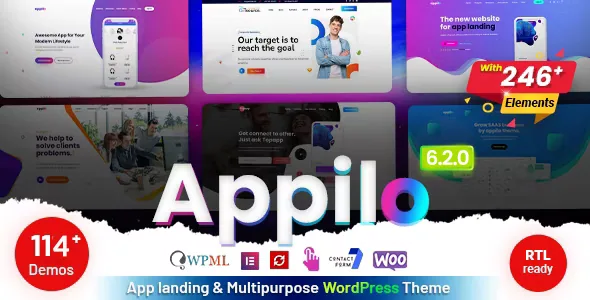
The marketplace listing describes Appilo as an app landing and app showcase theme, and its WordPress metadata calls it a one-page app landing theme. The demo catalogue tells a wider story. The vendor's feature list claims "114 One Page & Multi Pages Awesome Demos", and the changelog shows where the additions came from: NFT demos, Crypto/BTC demos, IT Solutions pages, a Business Agency homepage, and earlier single homepages for restaurant, medical, gym, live chat and CRM software.
If you are launching one app, the useful task is filtering rather than browsing. You are choosing a starting layout from a library the vendor has been filling for years with whatever niches it judged worth a homepage, and the count is the vendor's claim — nothing in the listing measures how different the 114 designs are from each other.
The rest of the feature list supports a specific product shape: marketing sites assembled in Elementor, with the settings that make a landing page feel finished handled outside the page itself.
What one-click import and the two page shapes give you
"One Click Demo Install" is the mechanism that turns a demo into a starting site rather than a screenshot. For a landing page, that is the difference between building a hero, feature strip, testimonial block and store-button call to action by hand and editing versions the vendor already assembled.
"One Page & Multi Pages" describes two structures, not one. A single scrolling page suits an app with a store listing, a handful of screenshots and one message. The multi-page option leaves room for separate privacy, pricing, changelog or support pages when the store submission or the campaign plan needs them. The vendor does not state which demos use which structure, so confirm it against the demo you intend to import.
The listing also names smooth animation, parallax sections, a menu that sticks on scroll, Google Fonts and Font Awesome icons. Those are the details that decide whether a scrolling app page reads as current, and they are listed as theme-level offerings rather than per-demo guarantees.
Elementor builds the page; the Customizer and a slider plugin hold the rest
The feature list says Appilo is "Built on Elementor Drag & Drop Page Builder", and the marketplace attributes declare Elementor compatibility. Gutenberg optimisation is declared as well, so the listing does not rule out the block editor — but the demo layouts are described as Elementor work.
Where the settings live is the part worth planning for. The vendor pairs Elementor with "Advanced Theme Options Via WordPress Customizer", so page content and global options sit in two interfaces: Elementor for layout and sections, the Customizer for theme-wide settings, where the "Unlimited Color Change Option" would be applied. A colour that looks wrong on a page may sit in neither the widget you edited nor the page settings panel, which is the thing to explain to whoever inherits the site.
Two more layers sit outside Elementor. "Revolution Slider added" means slider work happens in a dedicated editor with its own release cycle. "Contact Form 7 Support" means forms come from that plugin and are styled by the theme rather than built with a theme form builder. Both are ordinary arrangements, but they widen the list of interfaces a site editor has to learn.
WPML and RTL support are separate answers to separate questions
The listing treats multilingual support and RTL support as separate entries, and they are not the same feature. WPML appears both in the feature list and in the marketplace compatible-with attributes, so translation of pages and theme strings is declared to run through that plugin rather than through the theme alone.
RTL language support is a layout concern: text, navigation and section alignment for right-to-left scripts. A launch in Arabic or Hebrew needs the mirrored layout whether or not WPML is in use, and an English site publishing a French version needs WPML with no RTL work at all.
Neither declaration says a particular demo ships translated or mirrored content. Check both on the demo you choose, since a landing page's hero and feature sections usually carry the most hand-placed text.
WooCommerce is declared, and the changelog is more revealing than the badge
The marketplace attributes list compatibility with WooCommerce 5.x.x and 6.x.x, and the feature list carries a "WooCommerce Ready" line. Nothing in the listing describes storefront demos: the demos are landing and showcase pages, and the changelog's WooCommerce entries are fixes rather than new shop layouts.
That history is the more useful signal. Earlier entries record "woocommerce issue fixed" repeatedly, and version 6.2.1 records the removal of the woo-products-widgets-for-elementor plugin. WooCommerce looks like something the theme has had to keep working alongside rather than a system it was designed around.
If the project needs a checkout for plans, merchandise or a one-off licence, expect to build and style that side yourself and check the shop pages on a staging install before committing. If WooCommerce is simply a plugin you want to keep active, the declared compatibility is enough to start.
The declared WordPress range and the vendor text do not match, and neither is a test result
The marketplace attributes observed on 4 November 2026 declare WordPress versions from 5.4.x through 7.0.x, alongside a responsive layout, four or more columns, widget-ready sidebars, high-resolution assets, and a package of PHP, HTML, CSS and JS files. Browser compatibility is declared for Chrome, Firefox, Safari, Edge, Opera and IE10/IE11.
Set that against the vendor's own description, which still says "WordPress 6.2.2+ ready", and a changelog whose last entries stop with a bug fix dated July 2024. The two statements do not directly contradict each other — one is a range of declared versions, the other an older sentence left in the copy — but they show the listing was updated later than the description.
The practical reading is that the range is the vendor's compatibility claim, not a record of Appilo running on your WordPress version with your plugin set. On a current install, the combination worth testing yourself is the theme alongside Elementor, Revolution Slider and Contact Form 7. Two listing details are easy to over-read: IE10 and IE11 in a browser list are legacy declarations rather than a statement about rendering today, and the Bootstrap 5.x and 4.x compatibility entries describe the framework the markup uses, not a setting you configure.
Questions & answers
Does the demo count mean Appilo suits non-app sites such as a restaurant or a SaaS launch?
The changelog records homepages added for NFT and crypto, IT solutions, business agency, restaurant, medical, gym and CRM software, so the catalogue does reach beyond app marketing. Whether a given entry is a complete site or a reskinned homepage is not stated. The theme name, marketplace category and vendor description all point at app landing pages, so judge a non-app demo on the demo itself rather than on the total.
Do I need Elementor installed to use Appilo?
The vendor describes the theme as built on Elementor and lists Elementor compatibility, so the demo layouts assume it. The marketplace attributes also mark Gutenberg optimisation as Yes, a separate declaration about the block editor. If you plan to build pages without Elementor, check how your chosen demo is structured on a staging install first.
Is Appilo suitable for selling products alongside the app?
WooCommerce compatibility is declared for 5.x.x and 6.x.x, and the feature list carries a "WooCommerce Ready" line. The description shows no shop-specific layouts or storefront demos, and the changelog's commerce entries are fixes and one removed widget plugin. If a store is central to the project, treat the commerce side as work you configure and style yourself.