Three zones per page, not one content column
Most themes assume a page body sits between a site-wide header and a site-wide footer. Opus's marketplace description argues something different: inside the PremiumCoding Page Builder, pages are "split into three sections (header, footer, body part)."
Read that literally and it changes how you plan a page. The header and footer become part of the layout you assemble, not fixtures applied globally. A landing page can open on a different arrangement than an inner page, and a one-off campaign page doesn't have to inherit the navigation of the rest of the site.
That is a real capability for a multipurpose theme sold to people building several kinds of pages on one install. Whether it is convenient depends on the next layer, because a zone model is only as useful as the things you can put inside the zones.
The builder's building material is shortcodes
The vendor describes the page builder as a rebuilt version of an older in-house tool, and the feature list gives the count that makes it work: "100+ Shortcodes", alongside Font Awesome icons, Google Web Fonts and CSS3 animations.
So the editing model is insertion, not block composition. You pick a shortcode, place it in a zone, set its options. Someone arriving from Elementor or WPBakery will notice the difference immediately, because there is no widget or block panel shared with the rest of the WordPress ecosystem — the vocabulary is specific to this theme.
The upside of a shortcode library that large is coverage: portfolio grids, blog loops, buttons, pricing, team blocks and the rest are all available as discrete items. The trade-off is that the page's structure lives in shortcode syntax and theme options rather than in post content the block editor understands. The marketplace records Gutenberg Optimized as No, which on its own says nothing about whether the block editor runs — only that the vendor did not declare block-level optimisation for it.
Ten headers, an image menu and a video breadcrumb
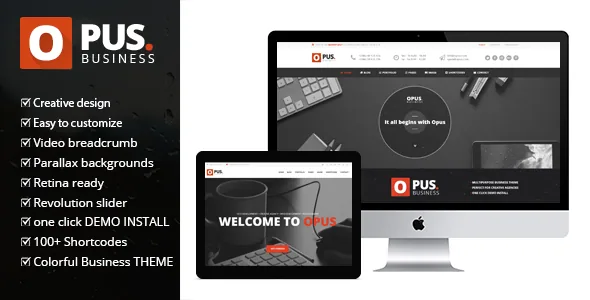
Layout furniture is where a multipurpose theme earns or loses its keep, and the vendor's list is unusually specific: "10 Different Header Variations", an "Image Menu", a "Video Breadcrumb", and a "Mega Menu with icons (font awesome)".
Ten headers is the sort of choice that matters when a business site has to serve a marketing homepage, a services section and a shop without looking assembled from three different products. The image menu and video breadcrumb are narrower: they let a header or a page-intro region carry visual material rather than text, which suits a theme whose demo leans on photography.
The theme is declared responsive and high-resolution, with the marketplace listing files as PHP, CSS and JS. Declared browser support reaches back to IE8 through IE11 as well as Firefox, Safari, Opera, Chrome and Edge; treat that as the vendor's statement of intent from the period rather than a measurement of any current browser.
Filtering, Ajax loading and the templates behind them
Behind the visual claims sits a fairly conventional content set, counted generously: "20+ Different Portfolio Pages", "10+ Different Blog Variations", filterable portfolio items, a team page, and "5 Post Templates (Standard, video, link, gallery, audio)".
Filtering is the part with daily consequences. A filterable portfolio index lets mixed project categories share one page, and the vendor credits Isotope for that behaviour. The theme's front-page project and post lists can also load via Ajax — the vendor notes this "can be turned on and off", which is worth knowing if you would rather keep pagination predictable.
Five post formats indicate the theme expects mixed media in the blog: video posts, galleries, audio and link posts each get their own treatment. For a business site that publishes occasional case studies or announcements, that is more structure than a single standard post template offers.
What the demo importer actually imports
The vendor's importer is described in specific terms: you choose the theme, then decide "whether you wish to import Revolution Slider and Widgets." The same paragraph advises running it on a clean WordPress installation.
The advice is the useful part. An importer that writes pages, menus and widgets into an existing site will mix with whatever is already there, so a fresh install — or a staging copy — keeps the demo's structure legible while you decide what to keep.
Separately, the description says the WordPress version ships "4 Home Page PSD Templates", with a fuller PSD package sold as a standalone product. Those files are design references; they don't affect how the site behaves.
Vendor-stated inclusions, and what they mean for you
According to the marketplace description, Opus comes with Revolution Slider, Isotope for portfolio filtering, and free support, and the vendor offers demo installation through a support ticket. The feature list also points to a 44-page documentation set and video tutorials covering the importer and the page builder.
These are vendor claims about the product, not a description of any particular copy you might install. Slider Revolution in particular has had a long life of its own; the bundled version is whatever the theme was packaged with, and no claim is made here about updating it independently of the theme.
WPML appears in the compatibility attributes as a declared integration. That is a statement about the theme's intent to work with the multilingual plugin, not a description of translated demo content.
The date on the listing is the deciding fact
The vendor's last recorded update is 6 December 2018. The declared software range runs up to WordPress 5.5.x, and WooCommerce compatibility is listed up to 4.3.x. Both are vendor declarations from that period.
For a new build this is the constraint that matters more than any feature count. A theme last updated in 2018 sits several WordPress major releases behind, and its WooCommerce support is expressed against a store plugin version that has since moved well past 4.3. None of that proves the theme fails on a current install, and none of it guarantees it works; it means the compatibility record stops where the vendor stopped updating it.
Where Opus remains a reasonable choice is a rebuild or a fixed-scope project that already targets an older stack, or a site where you accept maintaining the theme yourself. Where it is a poor fit is a shop on current WooCommerce releases or a site that needs block-based editing as the primary workflow.
Questions & answers
Does Opus work with the WordPress block editor?
The marketplace records Gutenberg Optimized as No, and the vendor's own feature list is built around shortcodes and the PremiumCoding Page Builder. That attribute is not proof the block editor is unavailable, but it does mean the theme was not declared optimised for block-level editing. If block editing is central to your workflow, plan on a different theme.
Are the header and footer really different on each page?
The vendor describes the builder as splitting pages into header, footer and body sections, which implies per-page control over those regions. How completely that replaces the site-wide header and footer is not spelled out in the description, so it is worth confirming in the demo before you commit to a design that depends on it.
Do I need Revolution Slider for the theme to work?
The importer lets you decide whether to import Revolution Slider along with the widgets, which suggests the slider is optional rather than a hard dependency. The vendor describes it as included with the theme; the version bundled is whatever shipped with the theme package, so treat its update path separately from the theme's.