The page, not the theme options panel, holds the override
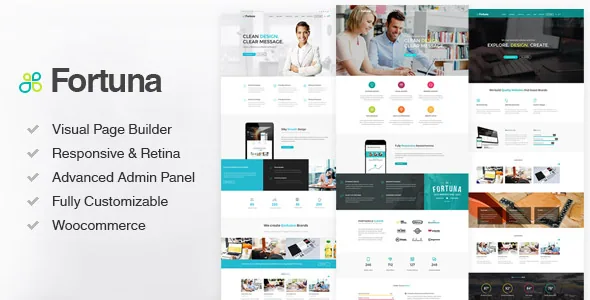
Plenty of themes give you a global settings panel and a handful of page templates. BlueOwlCreative's feature list for Fortuna puts the control one level lower: "Custom Page Settings for each individual page – custom Layout, Background, Page Title, Header, Sidebar etc." Three more lines extend the same idea — boxed or full-width layouts chosen per page, unlimited sidebars per page, and left, right or no sidebar for posts and pages.
That arrangement suits a site with mixed jobs. A landing page can go full-width with no sidebar and a photographic background, while a blog archive on the same install keeps a right sidebar and a plain white canvas. You set those differences where the page is built rather than by carving out a template for each variation.
The cost is bookkeeping. Once a dozen pages each carry their own settings, the site no longer has one source of truth for its layout, so auditing per-page assignments becomes part of maintenance. These are vendor claims from the item description, not observations from a working install.
A header assembled from parts rather than picked from a style gallery
Fortuna's header controls read as a list of independent settings. There is a regular and a transparent logo upload, plus a transition between them described as flip or fade. Background colour, opacity and image are separately adjustable, and sticky and regular heights get their own values. Optional search and contact info can be switched in, a subheader section sits above the content, and social icons appear in the header or footer.
That is a different model from choosing "Header Style 3" and living with the rest. You build the treatment you want — for example, a taller transparent header on the home page and a shorter solid one with search enabled on inner pages.
Because the logo transition and the sticky height are set apart from the rest, test your own logo in both states early. A mark with fine details can disappear at one opacity and read differently at another, and no demo screenshot will tell you that about your file.
Portfolio presentation as a counted preset set
The portfolio section of the feature list is the most numerical part of the item description: 4 custom portfolio item layouts, 14 portfolio design presets and 5 hover effects, applied to unlimited filterable portfolios, with masonry grids alongside and a related-portfolio toggle.
Those three counts control different layers. A layout determines how a single portfolio item is arranged; a design preset sets the visual treatment of a portfolio listing; a hover effect governs what happens when a pointer crosses a thumbnail. Read that way, 14 presets is a library to browse and adapt rather than 14 unique page designs, and 5 hover effects is a palette small enough that most sites will settle on one and stay consistent.
Masonry grids appear for blog and portfolio both, and carousels cover post types through Owl Carousel. If the project is a studio with uneven project imagery, masonry handles mixed aspect ratios better than a fixed grid — worth confirming against your own photography before committing to a preset.
Preloaders, row backgrounds and breadcrumbs scoped to single pages
Several features here are scoped to individual pages even though they sound global. The preloader can run across the site or on selected pages. Breadcrumbs get their own style options and a toggle, and page titles take custom styles and backgrounds. Rows can carry parallax image backgrounds or HTML5 and YouTube video backgrounds.
Using these selectively is the point. A single campaign page can open with a preloader and a video band while the rest of the site stays quick and quiet; a services page can drop breadcrumbs where the trail would only confuse visitors arriving from an ad.
There is also a place for hand-written CSS per page, which matters if you want a tweak without editing the theme's stylesheet. For anything broader, the vendor includes a child theme in the package.
What the bundled and counted claims cover
The description piles up quantities: 30+ heavily customizable elements, 1200+ retina icons, unlimited colours, and Google Fonts options for navigation, headings, buttons and body text.
It also names what the vendor bundle contains — Visual Composer for page building with a stated $43 value, Revolution Slider at $19, premium images at $40+, WooCommerce integration, a simple demo import, and the child theme. Those are statements about what the vendor packages with the theme. Third-party plugins shipped inside a theme usually follow their own update path and licensing, so know which of them your site depends on before you build around them.
The two with the most consequence are Visual Composer and Revolution Slider, because they decide where your layouts and sliders live. Page design happens in the builder's interface, which is a different editing habit from the WordPress block editor.
Declared compatibility, recorded 4 November 2026
The marketplace attributes list WordPress 4.9.x through 6.3.x, WPML under Compatible With, and browsers from IE9 through Edge. The vendor's last recorded update is 22 January 2026, and 3.30 is the latest marketplace version.
The declared ceiling deserves attention. The listing names no branch later than WordPress 6.3, so it does not cover newer releases — which is not the same as saying the theme fails on them. A staging install with your own plugins is the only way to find out.
WPML support is declared alongside translation-ready strings and RTL support, a meaningful combination for a multilingual corporate site. What the listing does not state is how any particular demo reads once translated, so check that with real content if the site is not English-only.
WooCommerce appears in the feature list with custom sidebar layouts and unlimited WooCommerce sidebars, but the supplied attributes give no version range for it. If a shop is central to the project, confirm the shop templates against your WooCommerce release before building around them.
Where the per-page model earns its keep
Fortuna rewards a site that is deliberately uneven: a marketing front page, a filterable portfolio, a blog with sidebars and a few standalone contact pages, each wanting a different header and canvas. The per-page settings deliver that without multiplying templates, and the portfolio presets keep project listings visually consistent.
A site that wants one global look, edited once and left alone, gains little from the override stack and inherits the extra step of setting each new page correctly. Neither outcome is a fault in the theme; it is a question of which habit you would rather keep.
The declared WordPress range is the other thing to weigh — not as a verdict, but as a limit on what the listing promises.
Questions & answers
Do I have to set the header, layout and sidebar for every page?
No. The vendor lists these as per-page options, which means a page can override the sitewide treatment when you want it to. Pages you leave alone follow the global settings from the theme options panel. The work only grows if you deliberately vary many pages.
Does the theme work with the WordPress block editor?
The vendor builds layouts with Visual Composer and lists 30+ elements for it, so that is where page design happens in the documented workflow. The supplied attributes do not record a Gutenberg Optimized flag either way, so the listing does not settle the question. If block-first editing is a requirement, verify it on a staging copy before committing.
Is declared WPML support enough for a multilingual corporate site?
The listing declares WPML compatibility, translation-ready strings and RTL support. Those declarations cover the theme's readiness, not the quality of any specific translation. Menu structure, page title styles and portfolio preset layouts can all behave differently once a second language lengthens labels, so check the pages you actually plan to translate.