Reporting elements built into the theme
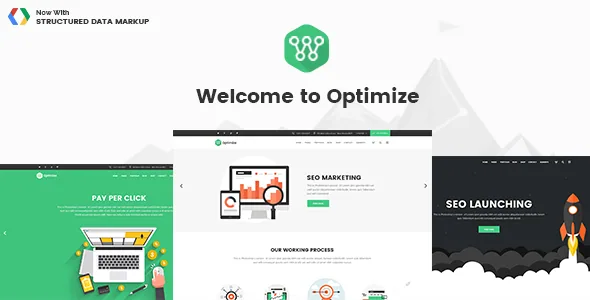
Most marketing themes give you a hero area and a pricing table and leave the reporting to screenshots. Mikado's feature list for Optimize goes into the vocabulary agencies actually pitch with: multiple pie chart shortcodes, progress bars in standard, vertical and icon versions, a process shortcode, an animations holder, a team shortcode and an "Advanced Comparison Pricing Table".
That last item is the one worth pausing on. A standard pricing table shows one service at three tiers. A comparison table puts several plans against a list of features, which is closer to how an SEO retainer gets sold: what is included at each level, line by line. If proposals hinge on that distinction, the element already exists rather than arriving as a separate plugin with its own styling to reconcile.
The chart and bar shortcodes serve a similar purpose for results: traffic split, channel share, ranking progress. Treat the numbers as illustrative of the design pattern, not as live figures. Nothing in the vendor material describes a data connection, so you are placing values, not piping in analytics.
Header skin changes from section to section, and the logos that go with them
One listed detail shapes how a landing page can be sequenced: "Change header skin from section to section". Header colour is not a single site-wide setting here, so a dark hero followed by a pale content block does not force the same navigation colours across both.
That setting arrives with matching assets. Optimize lists separate logos for the regular, sticky and mobile headers, and separate logo variants for dark and light header skins. In practice you prepare a light wordmark for dark backgrounds and a dark one for light, plus the sticky and mobile versions, and the theme switches between them as the header changes.
Mobile is handled as its own case: "Style mobile header separately" appears in the list. If most of your traffic arrives on phones, that is the setting to open first, because a header that reads well on a wide screen can collapse badly on a narrow one.
What the SEO plugin compatibility list covers
The vendor description names four connections: compatibility with Yoast SEO, Google Analytics by Yoast, Rankie and All In One SEO. Alongside those it lists "Optimized for search engines", "Page loading speed optimization" and "Google Data Structure optimization".
Those are two different kinds of statement. The plugin entries describe working alongside tools you install and configure. The theme does not replace them, and meta titles, descriptions and schema output remain the plugin's job. The optimisation entries are the vendor's own description of how the theme was built, offered without measurement.
Neither tells you how the theme behaves with your existing SEO stack. Search plugins interact with title and heading output, so the practical test is to install your chosen plugin on a staging copy and inspect a few rendered pages, particularly archive and single-post templates.
Share buttons remain; the feed plugins do not
Social media is in the product's name, so it is worth being precise about what remains. The feature list includes "Social share functionality" and lists Twitter and Instagram social widgets.
The changelog is the reason for caution here. Version 2.3 removed the Mikado Twitter Feed plugin "due to Twitter API changes" and removed the Mikado Instagram Feed plugin for the same reason. Version 2.5 records an update to the Social Share links. Read together, the pattern is clear: share buttons, the icons that let a visitor post a page to their network, are maintained, while the plugins that pulled a feed of your own posts into the site were dropped.
Plan accordingly. If your design depends on a live Instagram grid in the sidebar or footer, that is now something you solve with a current third-party plugin and its own API access, not with what ships in the theme.
Blocks for a consultancy site, not just its homepage
Beyond the charts, the list carries the rest of an agency site: testimonials, info boxes, a video banner and video background sections, a mega menu, and a footer that runs to four columns with a separate bottom area. Two footer treatments are named: regular and uncovering.
The structural oddity is the side area. Optimize lists three side area types, plus custom sidebars and the optional Mikado search. A slide-out panel is a way to hold contact details, a short service list or a booking prompt without giving it permanent space in the header, which helps when the header already carries a mega menu.
For a single-page sales site, anchor link functionality is listed for one-page builds, so sections can be linked directly. Six font icon sets, 600+ Google Fonts and the dedicated typography options sit underneath all of it as the styling layer.
Bundled plugins, version declarations and the demo image rule
The vendor states that WPBakery Page Builder (given as a $46 value) and Slider Revolution ($26 value) are included with the theme. Those are the vendor's bundle statements; whether a given package carries them is a separate question from what the feature list says, and it is worth confirming in your own copy before planning around either plugin.
The marketplace attributes recorded on 4 November 2026 declare WooCommerce 9.x and 10.x, WPML, WordPress 6.5.x through 7.0.x, responsive layout at four or more columns, and PHP, CSS and JS files in the package. The changelog for version 2.5 additionally says "Added WooCommerce 11.x compatibility", which sits ahead of the plugin versions in those attributes, a reminder that version declarations age at different rates depending on where you read them. These are claims, not results from testing against your stack.
One statement applies regardless of version: the vendor notes that the demo images are not licensed for your site and must be purchased from a stock library if you want to use them. The demo import gives you structure; the photography is your own budget line.
Where the measurement layer earns its keep
The question Optimize answers well is narrow and practical: do you need to publish measured results and plan comparisons inside the page itself? If your service pages show channel splits, ranking progress or feature-by-feature plan comparisons, the chart, progress and comparison-table shortcodes remove a plugin from the stack and keep that styling consistent with the rest of the site.
If your pages are mostly editorial, with case studies in prose, a blog and a portfolio, the reporting shortcodes go unused and the theme is a WPBakery build with strong header and footer controls. That is still workable, but the measurement layer is the reason to choose this over a general-purpose marketing theme.
Questions & answers
Do the pie chart and progress bar shortcodes pull in live analytics?
Nothing in the vendor material describes a data connection for those elements. They are content elements where you set the values, so treat them as a way to present figures you already have rather than a dashboard feed.
Can I still show my Instagram or Twitter feed?
The theme's own feed plugins for both networks were removed in version 2.3 because of API changes, and the changelog does not restore them. Share buttons are separate and were updated in version 2.5. For a live feed you would need a current third-party plugin.
Does Optimize replace an SEO plugin?
No. The vendor lists compatibility with Yoast SEO, Google Analytics by Yoast, Rankie and All In One SEO, which means the theme works alongside those tools. Titles, descriptions and structured data stay with the plugin you configure.
Which page builder does the theme use?
WPBakery Page Builder, which the vendor states is included along with Slider Revolution. Pages are composed with those tools rather than the block editor, so familiarity with WPBakery affects how quickly you can build.