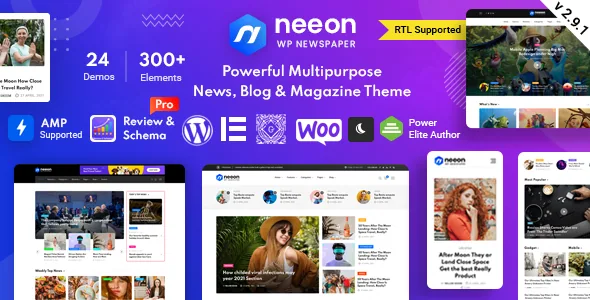
The article page is where Neeon does its most specific work
RadiusTheme groups a set of entries under "Content and Readability Features" in the Neeon listing, and that group is the most useful thing to read first. The theme adds a reading progress bar, an infinite-scroll option on the detail page, and a sticky sidebar — all aimed at someone partway through a long piece rather than at the front page.
Each one changes a reading behaviour you would otherwise solve with a plugin. The progress bar tells a reader how much of an article is left, which matters on the long-form and live-coverage formats news sites lean on. Infinite scroll keeps the reader on the post template while pulling in further posts, so the next item arrives without a click back to an archive. The sticky sidebar keeps related coverage, a newsletter box or trending links in view as the reader moves down.
Dark mode sits in the same group. The vendor frames it as a reader-facing option rather than a sitewide colour scheme, which is the useful distinction: it is a preference you offer, not a redesign you commit to.
One boundary worth noting: the infinite scroll is listed for the detail page only. Front pages and category archives are layouts you arrange from the post addons, not an endless feed.
Category colour and custom width as section-level decisions
News sites rarely look uniform. A markets desk, a culture section and local politics usually want small visual cues telling a reader where they are. Neeon lists "Category wise color" as a feature, which lets a colour follow a category through the theme's output instead of being managed template by template.
Paired with a custom width setting, that describes a theme you configure at the section level rather than the element level: pick a colour per category, set the content width, and the layouts you build on top inherit those choices. It suits a site with a dozen editorial desks more than a single-topic blog where one palette does the job.
The changelog suggests this area needed iteration — version 3.0.7 records a fix for "Theme multi color". Treat multi-colour handling as an active piece of the code rather than a set-and-forget option, and test it against your own category structure on a staging install if category colour is central to your design.
The vendor's layout counts do not agree with each other
The Neeon description and its own feature list count the same things differently, and the gap is worth understanding before you plan around a figure.
The prose says six homepage demos; the feature list says 16 different home pages. The prose says four header styles with 10+ variations; the feature list says 10 header styles with 30+ variations. The prose counts over 15 custom Elementor addons with over 45 layouts, while the feature list gives 19 addons with 60+ layouts. Footers are three variations in one place and five in another.
The changelog explains some of it. Versions 1.2, 1.3, 1.4, 1.5, 1.6, 1.7, 1.8, 2.0, 2.1, 2.2, 2.3 and 2.7 each record home pages, headers or footers being added, so the smaller homepage sentence reads like older copy left standing while the theme grew. The same pattern fits the header and addon numbers.
Treat every count as a ceiling to confirm on the live demo, not a figure to put in a project plan. What matters is whether the specific layout you need exists.
The post addons matter more than the builder choice
Elementor is the declared page builder, and the vendor describes a drag-and-drop workflow with no code required. Gutenberg is offered as an alternative in the description, and the marketplace attributes mark the theme as Gutenberg optimized as well, so a block-preferring editor is not obviously locked out of basic pages.
The addon set is where the practical difference sits. Neeon's custom Elementor addons are not generic spacers and buttons; the changelog names post grid, post list, post box, post overlay, post slider, post tab and an "all post" addon, plus a section title addon. Those are the elements that let one homepage show several treatments of the same feed — a hero grid beside a compact list beside a tabbed block — without repeating manual markup.
It is also where maintenance attention goes. Version 3.0.7 fixed an `ignore_sticky_posts` problem across the post grid, list, box, overlay, slider and tab layouts and corrected the category layout in the all-post addon. Version 3.0.4 added a “popular” tag to the all-post addon and a query order setting for blog archive pages. If your homepage depends on mixing featured and pinned posts, those entries describe the behaviour to test first.
A one-click demo importer handles the homepage demos, and a child theme is included for your own modifications.
Newsroom pieces that arrived through updates
Several of Neeon's most news-specific parts appear in the changelog rather than the headline feature list, which says something about where the work has gone.
Version 1.9 added a news ticker with category and post options and fixed its mobile layout — the scrolling headline strip newspaper homepages use for breaking items. Version 2.7 added a content table, the in-article index that long explainers and investigations benefit from. Version 3.0.4 added a caption field for the single post featured image, and added a TikTok social icon arrived in 3.0.2.
AMP support is listed for the detail page, and the changelog places its introduction at version 1.6. If accelerated mobile pages matter to your distribution, confirm how theme output matches your AMP setup: the feature is declared for single posts, not the whole site.
WooCommerce is supported, with a ShopBuilder WooCommerce builder for Elementor added in version 3.1.1 — a recent addition, so a shop built on Neeon is a newer path than the editorial layouts. Review Schema Pro is updated across many releases, which matters if you publish scored reviews and want structured data behind them.
What the package declares, and what it leaves out
The marketplace file list for Neeon names PHP, CSS and JS files, and documentation is marked well documented.
Images are not included. The vendor states that premium images are used for demo purposes only, with Unsplash and Freepik as sources — so a build that follows a demo closely needs its own photography, which a news site needs for rights reasons anyway.
Compatibility is declared rather than demonstrated. The attributes observed on 4 November 2026 list Elementor, WPML and Bootstrap 5.x, with a WordPress range from 4.9.x to 7.0.x — a span wide enough to describe a claim rather than a test result. Browsers listed are Chrome, Firefox, Safari, Opera and IE11. WPML support and an RTL flag are both present, though the RTL claim rests on a declared feature and the changelog does not itemise RTL fixes the way it does for other areas, so verify a real Arabic or Hebrew layout yourself rather than relying on the flag.
Questions & answers
Does Neeon require Elementor, or can I use Gutenberg?
Gutenberg is offered as an alternative in the vendor's description, and the marketplace attributes mark the theme as Gutenberg optimized. The post and slider addons, however, are Elementor addons, so the magazine-style homepage blocks built from them are an Elementor path. If those modules are central to your layout, plan on Elementor.
Is infinite scroll applied across the whole site?
No. The vendor lists it as an option on the detail page, where it continues the flow of a single article. Front pages and category archives are built from the layout and post addons instead.
Are the demo images included in the theme?
They are not. The vendor states that premium images are used for demo purposes only, drawn from Unsplash and Freepik, and are not part of the package.