A layout catalogue, not a single design
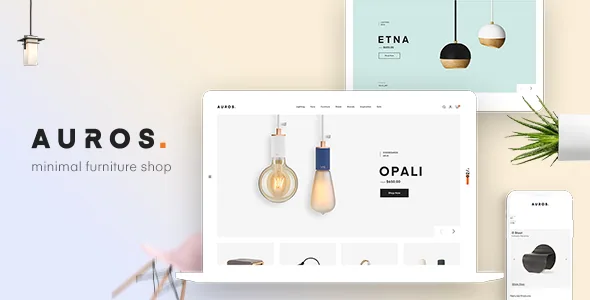
Auros is aimed at furniture, wood, interior and architecture shops, and its vendor spends most of the description counting layouts rather than describing one. The headline is 24+ pre-built shopping homepages built in Elementor. The WordPress theme metadata for the same item says 19+. That gap is small but telling: treat any demo number here as a range and pick from the live preview rather than from the count.
Below the homepages sit three more template layers, each with its own count. Shop pages come in four-plus styles. Product pages come in five. Blog pages come in five. For a store, those three decide more of the daily experience than the homepage does, because they are what a shopper scrolls while comparing a sofa to a sideboard.
Four shop page styles and what separates them
The vendor names the shop variants directly: catalog, categories, sidebar and full width, plus a separate "shop instagram layout". Those are four different answers to the same question — how much room does a product grid get, and how much does chrome take away from it.
Sidebar and full width are the two ends of that. A sidebar shop gives filters or supplementary links a permanent column, which suits a catalogue with many attributes per item, such as finish, size and material. Full width drops the column and puts the grid edge to edge. Catalog and categories layouts rearrange the entry point instead: a categories-first shop asks the visitor to choose a room or a product family before seeing individual items, which works when a single item needs little browsing — a low stool, a lamp — and doesn't when the range is deep. The catalog style is the one to look at if you want a browsable presentation of products; the vendor does not describe whether it strips purchasing, so confirm that behaviour on the demo before relying on it.
Five product page treatments and the photography they demand
The five listed product layouts are bottom thumb, left thumb, image show, slider and brand. Read as image treatments, they place different demands on your photos.
Thumbnail-below and thumbnail-left change where the alternative shots sit and how much width the main image gets. A slider hides the extras behind navigation unless the visitor engages. "Image show" and "brand" are the least defined in the source — image show suggests a large single presentation, brand implies a slot for a manufacturer or line identity, but the vendor doesn't say what either contains. That is worth resolving before you commit to a layout for the whole catalogue, because a brand block on a store selling only your own workshop output is wasted space.
The vendor's stated design intention is that products stand out through wide space and minimal surrounding furniture of their own — no crowding animation. That's a coherent brief for large-format photography, and it also means the product page will look thin if your catalogue uses small, mixed-background images.
Building the parts that aren't a template
Elementor handles page content with front-end drag and drop, which the vendor presents as the reason no coding is needed. The header and footer are also editable without code: the vendor describes a builder that lets you change their content, layout and style. For a furniture shop, that is where practical things live — a room-based menu, a showroom address, delivery terms.
Behind those sits the WordPress Customizer, which the vendor says covers styling, layout, sidebars, social links and header and footer options, plus a sidebar generator for creating extra widget areas and a main/secondary colour setting. One-click import then sets a chosen demo up quickly. Import reproduces a layout; it does not stock your catalogue, price anything or write your policy pages.
Storefront extras come from plugins
The feature list credits third parties for several storefront conveniences. Compare, quick view and wishlist are named as WPC Smart Compare, Quickview and Wishlist, and Contact Form 7 is listed as included. WPML Multilingual CMS, WPML String Translation and Mailchimp appear among compatible plugins rather than bundled components. Slider Revolution is described as included with updates provided.
The vendor also mentions compatibility with Widgets for Google Reviews and says the theme ships premade widgets. What the listing does not itemise is whether companion plugins arrive with their own licence keys or need separate accounts. If a plugin is central to your checkout journey — quick view, for example, if your catalogue is long — confirm that before you plan around it.
What the demo itself warns you about
Three vendor notices are worth carrying into the decision. Some demos use Adobe Fonts, and if those fonts aren't available they fall back to default or Google Fonts — so a headline's feel in the preview may not survive on your install. The images in the preview are demo-only and must be replaced with your own licensed files. And the vendor states that page-speed scores depend on the chosen demo, the theme, the server and the content, adding that some theme features can lower those scores.
The capability list in the marketplace listing, recorded on 4 November 2026, declares Elementor and WooCommerce 5.x through 10.x, WordPress 5.0.x through 7.0.x, and Chrome, Firefox, Safari and Opera. Those are vendor statements about a range, not results from testing your stack. Gutenberg Optimized is marked no; that reflects the item attribute and is not a statement about the block editor's availability.
Questions & answers
Does Auros work with current WooCommerce releases?
The marketplace listing observed on 4 November 2026 declares WooCommerce 5.x through 10.x and WordPress 5.0.x through 7.0.x. Those are declared ranges from the vendor listing, not tests of a particular install, so verify your own plugin and PHP combination on staging.
Is the blog included, or does it need a separate plugin?
Blog layouts are part of the theme: the vendor lists five, covering listing, modern, list with sidebar, single and single with sidebar.
Do the compare, wishlist and quick view buttons come with the theme?
The vendor credits them to the WPC Smart Compare, Quickview and Wishlist plugin. The listing does not state whether a licence for that plugin is bundled, so confirm that before depending on it.