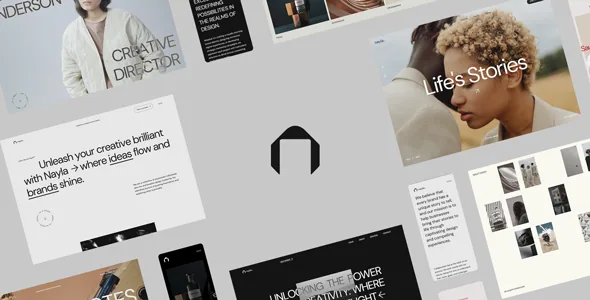
Dark/light modes and alternate layouts are set per page, and switchable in the browser
Most portfolio themes treat colour as one global palette. Pe Themes describes Nayla's display settings as page-scoped instead: dark and light colour modes are available on the site, and you can assign different layouts to specific pages. A layout switcher widget is included so a visitor can move between those layouts while navigating rather than only in the admin.
That turns presentation into a per-page decision. A one-page site and an agency portfolio can share the same theme while sitting in different visual states, and the switcher makes the alternates part of the navigable site. What you can switch between depends on the layouts you build, so the widget is worth understanding before purchase.
The same introduction says the theme targets personal portfolios, agency portfolios, one-page sites and corporate or business sites, which is the range the mode and layout switches are meant to cover.
Elementor builds the frame, not just the content area
The claim that shapes everything else is the vendor's statement that nearly everything can be created or customised in Elementor, headers, footers and portfolio pages included.
Practically, that puts your global chrome in the same editing interface as page content, so changing a footer or a portfolio template is an Elementor task rather than a trip through theme options. Release history points the same way: version 1.5.0 added compatibility with Elementor grid and flexbox containers, and version 1.9.0 fixed Elementor compatibility issues.
The attributes list Elementor and Elementor Pro under Compatible With but do not say which Nayla features depend on Pro, so confirm the specific pieces you need in the author's documentation before deciding the free plugin is enough. The Gutenberg Optimized attribute reads "No," an optimisation label rather than a statement that the block editor is switched off; the design was not built around block patterns.
The motion layer is adjustable, and the changelog is the useful evidence
Nayla's feature list is largely a list of interactions: AJAX page transitions, GSAP included, a smooth scroll plugin, an interactive mouse cursor, parallax scroll effects, a custom page loader, page scroll effects, and Swiper for sliders.
The changelog says more about whether you can live with them. Version 1.6.0 records that AJAX transitions are disabled on the Elementor editor screen, so transitions do not fire while you edit, and that the mouse cursor's loading wait can be disabled. Version 1.4.5 added an option to turn off mouse-wheel navigation on the Fullscreen Slideshow widget. Version 1.9.5 reports ScrollTrigger fixes and resolved video playback issues.
So the heavy animation is tunable exactly where it would otherwise interrupt work or hijack the scroll wheel. A quiet, conventional site would switch the cursor and loader off; a motion design, film or photography portfolio chooses this kind of theme for them in the first place.
Showcase widgets and the two menu styles
The rest of the feature list reads as building blocks: a custom grid layout with four or more columns, Swiper sliders, classic and fullscreen menu styles, Google Fonts, icon fonts and a landing page.
The menu choice is an early layout decision. Classic and fullscreen menus are different ways for a visitor to arrive at the work, and the fullscreen version pairs naturally with the transition layer. Version 1.4.5 added background options for the menu toggle, and 1.4.5 also fixed fullscreen menu open and close animations.
The custom grid layout is named but not detailed; the vendor publishes no template count or layout names here. Individual showcase widgets do appear in the changelog, though: a Showcase Table widget in 1.4.5, and mobile rebuilds or adjustments for Showcase Table, Showcase Wall, Showcase Carousel, Showcase Fullscreen Carousel and Showcase List in version 1.7.0. Projects Grid and Blog Posts widgets gained AJAX load-more in 1.4.5, and dynamic tag support was added to the Text Wrapper and Heading widgets.
If a specific showcase arrangement decides your choice, compare the live demo with those widget names rather than relying on the feature list.
WooCommerce is supported, but it is not a store-building kit
Nayla is listed as compatible with WooCommerce, and the attributes name WooCommerce 5.x, 6.x and 7.x. That is the full extent of the commerce description in the material reviewed: no shop layouts, product templates or commerce-specific features are described.
The release history shows upkeep on that integration, with WooCommerce compatibility fixes and updated WooCommerce template files in 1.9.0 and file-version fixes in 2.0.0. Treat WooCommerce as something the theme accounts for rather than a reason to pick it.
Demo media, declared versions and what they do not settle
Pe Themes states plainly that images and videos used in the demo pages are not included with a purchase. The credits list Envato Elements, Behance, Unsplash, Pexels and Vimeo, so the demo presents layout and motion rather than a bundled media library. Budget for your own licensed photography and footage.
Attributes recorded on 4 November 2026 list the latest version as 2.0.0, the vendor's update date as 9 August 2026, WordPress compatibility from 5.0.x to 6.2.x, responsive layout, widget-ready areas, high-resolution assets, and PHP, CSS and JS files in the package. The declared range ends at 6.2.x, while updates continue into 2026. A range ending there is neither proof the theme breaks on a newer release nor proof it works, so if your WordPress version sits outside it, test on a staging copy before committing.
Questions & answers
Does the layout switcher change the whole site or only the current page?
The vendor frames the setting as page-level: different layouts can be assigned to specific pages, and the layout switcher widget lets visitors move between the layouts you have built. The listing does not specify whether a visitor's choice is remembered across pages.
Do I need Elementor Pro for the headers and footers?
The vendor lists Elementor and Elementor Pro as compatible and says headers, footers and portfolio pages are built with Elementor, but does not state which parts require Pro. Confirm the pieces you plan to use in the author's documentation before you commit.
Are the demo photographs and videos included in the theme?
No. Pe Themes states that images and videos in the demo pages are not included with a purchase, and the credits point to stock and portfolio sources. You supply and license your own media.