Light or dark is the first decision, and the vendor treats it as a genre question
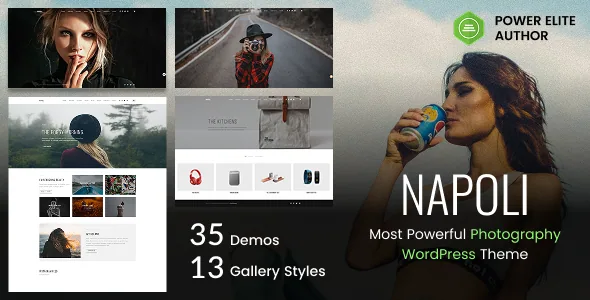
Fox Themes splits Napoli's demo library as 22 light builds and 13 dark ones. The dark set isn't just a recoloured version of the light one in the vendor's framing: the description presents it as built for work a light layout would undercut — nightlife, fine art, fashion, cinematic or moody subject matter.
That makes the demo choice a judgement about your own archive. If your frames are already dark and saturated, a light demo means fighting the theme to keep the images dominant; airy wedding or newborn work tends to pull the other way. The vendor says each demo imports in one click and is customisable without code.
The count says nothing about how far the 35 builds diverge from each other. The vendor lists the range as full-screen sliders, minimal grid galleries, film-strip portfolios and distortion-effect showcases, but whether two demos differ in structure or only in palette is something the live demo settles faster than the listing does.
Seven described gallery styles and the jobs they cover
The listing names seven gallery presentations, and each answers a different problem rather than offering a variation on one:
A filterable portfolio lets visitors narrow the archive by category, which is the layout that works when you shoot across genres and want one portfolio to serve all of them. The Pinterest portfolio is described as a fluid masonry that adapts to portrait and landscape frames alike, without crops or dead space — relevant if you don't shoot to a fixed aspect ratio. Gallery parallax adds scrolling depth for pages meant to feel staged rather than indexed. Gallery detail info places photo metadata, descriptions and context beside the images, which the vendor positions for fine art and editorial work where the caption is part of the piece. Full-width gallery runs edge to edge. Boxed grid and masonry keeps large collections contained and ordered, suggested for commercial and event portfolios. Video gallery displays video work alongside stills.
Fourteen album layouts sit alongside these, and the vendor frames the split as galleries for public showcase and albums for client proof galleries and delivered sessions. The listing counts 13 gallery styles in total; treat the total as inventory and the seven described behaviours as the specification.
Albums are the part to inspect if clients review work through your site
If you plan to send a client a link to review or select from a session, the album layouts carry that job, not the portfolio galleries. The listing says albums cover client proofing and delivered work, which is a different question from how strangers browse your best images.
What the listing does not describe is the mechanics of that flow — whether albums support selection marking, download permissions or password protection is not stated. With 14 layouts to choose from, this is the area where the demo and the vendor's documentation answer what the feature list leaves open.
Booking, shop and video are part of the same theme
Three business tools sit alongside the presentation layer. A dedicated booking page is described as integrated with a scheduling plugin, so clients reserve a session on your site instead of through a third-party booking link. WooCommerce is supported across two dedicated shop layouts, aimed at prints, digital downloads or photography packages. Video support covers YouTube, Vimeo and self-hosted files placed alongside still work on any page.
For a studio selling prints, the shop layouts and the album system divide cleanly: transactions on one side, delivery presentation on the other. For a videographer or hybrid shooter, self-hosted file support is the line that matters, since plenty of photography themes accept only embeds. The listing names those sources; it doesn't describe player controls or how self-hosted files behave on a given host.
Contact pages have a smaller but concrete option: Google Maps styled through Snazzy Maps, so a map can be themed to the site instead of defaulting to the standard palette.
The changelog tells you which plugins this release expects
Napoli's changelog is more useful for planning than most, because it records the recommended stack changing. Version 2.4.8 removed support for the PixProof and Whizzy plugins. Version 2.4.2 replaced Booked with a scheduled-booking plugin. The 2.4.0 entry lists WPBakery Page Builder and Booked among the theme-recommended premium plugins updated at that time, which is how you can tell older write-ups about Napoli are describing a different release.
Two consequences follow. Any guide naming Booked, PixProof or Whizzy as required companions predates the current feature set. And because the booking page depends on whichever scheduling plugin the release expects, confirm that pairing before you build a booking flow around it.
Version 2.4.9 added a licence activation system tied to EDD and Envato purchase-code verification, and removed the Appsero client tracker and theme updater. That last entry is worth knowing if you inherit a Napoli site: updates and activation run through that system now.
What the listing declares about editing and the package
Pages are built with WPBakery, which the vendor describes as a modular block system for rearranging sections without code, and the 21+ inner pages — about, team, services, pricing, booking, contact, shop, product and blog layouts — are assembled from those modules. The marketplace attributes also mark Gutenberg Optimized as Yes, but the attributes don't describe how the block editor handles these templates, so if your team writes in blocks, build one page before assuming the two workflows mix.
Other declared attributes: responsive layout, 4+ columns, widget-ready sidebars, high-resolution assets, and package files limited to PHP, CSS and JS — the theme and its assets, not design sources. Browser compatibility names Firefox, Safari, Opera, Chrome and, unusually, IE10 and IE11, which reads as a legacy statement rather than a claim about current support.
The vendor's demo images notice applies before anything else launches: the photographs in every demo are for demonstration only, are not included with the theme and cannot be used on your site. Budget for licensing or for shooting your own imagery.
Questions & answers
Can I use the photos shown in the Napoli demos?
No. The vendor states the demo images are for demonstration only, are not included with the theme and cannot be used on your own site. Replace them with your own photographs or properly licensed images.
Does the booking page work without an extra plugin?
The listing describes booking as a page integrated with a scheduling plugin, and the 2.4.2 changelog records replacing Booked with a scheduled-booking plugin. Check which plugin the release you install expects, since older documentation names a different one.
How do galleries and albums differ?
Per the vendor, galleries cover public portfolio display across 13 styles, while the 14 album layouts are framed around client work such as proof galleries and delivered sessions. The listing doesn't describe whether albums include selection or download controls.
Can I build Napoli pages in the block editor instead of WPBakery?
The listing marks Gutenberg Optimized as Yes and describes page building in WPBakery. The attributes don't say how the block editor handles the theme's templates, so test a page on staging if block editing matters to your workflow.