Case studies get their own content type, not a blog category
The feature list separates 03+ case study layouts — single and archive — from 04+ blog layouts, also split into single and archive. For an IT services company that division is the most practical thing about the theme.
A client story and a blog post read differently even at the same page width. A case study usually needs a problem statement, the work done, and a result you can measure. A blog post needs an argument and a publication date. Put both in the same post type and the longer proof piece inherits the blog's structure and metadata, while readers scanning your archive see projects mixed in with commentary. A separate type lets the archive hold only client work, which is what someone evaluating you actually wants to browse.
The vendor frames case studies as persuasive assessments that keep readers coming back. The structural claim is the part to rely on when planning: there are distinct single and archive templates. How many variants sit behind the "03+" figure isn't broken down, so check the demo before building around a specific count.
Six homepages, six different first impressions
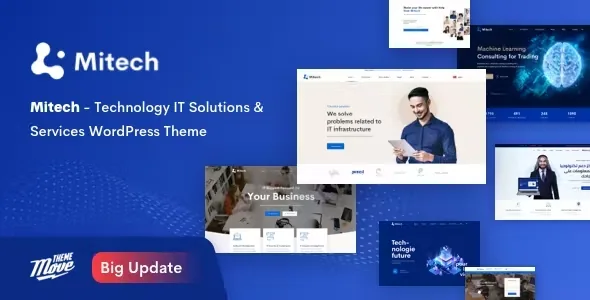
ThemeMove doesn't present Mitech's demos as colour variations of one design. Each is given a stated job. InfoTechno is positioned around news and technology-trend commentary. Processing is for showing off management systems. Appointment is about engaging visitors and opening a conversation. Services leads with service presentation and what the vendor calls social affiliate marketing. Resolutions is framed around converting leads. Cybersecurity is built to establish trust.
That framing settles a decision before you touch a layout: which visitor should land on the front page. A consultancy earning its revenue from inbound enquiries will get more from Resolutions or Appointment than from InfoTechno, which assumes you have insights worth reading. A security firm and a SaaS team selling a workflow tool should not open the same way.
The vendor states 06+ unique homepages rather than exactly six. The descriptions tell you what each page is for; the demo at mitech.thememove.com is where density, imagery and section order can actually be compared.
Blog archive layouts and the sidebar image control
The blog side offers four archive layouts for listings. Four isn't many, but the choice that matters is usually between a grid playing up featured images and a list playing up headlines — decide once, since the archive template governs every category page.
One detail in the description is more specific than most: blog sidebar widgets ship with a feature image configured from the Customize menu. That puts the control in the WordPress Customizer rather than in the page builder or theme options. If you use the sidebar to promote an author, a service line or the company, expect to set that image there.
Mitech is listed as Gutenberg optimized, so the block editor is declared as working for content. Page building, though, is described as WPBakery territory, and the two systems don't share controls.
Headers and mega menu for a services-heavy menu
Six or more header presets are listed, along with an off-canvas menu. The number matters less than what an IT services menu tends to hold: several service categories, a case study archive, a blog, and a contact route. Six presets give you room to try arrangements — a slim bar with a primary menu, a taller header with a tagline, an off-canvas drawer for a long menu — before committing, and before you see how each sits against your own logo.
The mega menu comes with a named access point: a shortcut from the admin dashboard into its settings. On a wide dropdown, grouping services into columns is usually the difference between a usable menu and a wall of links. The description doesn't say which presets support mega menus, so test that against your own menu structure rather than assuming they all behave the same.
WPBakery and Slider Revolution: usable unactivated, slower to update
Pages are built in WPBakery Page Builder, with Slider Revolution handling sliders. Both are described as integrated into the theme, and the vendor states you don't need to activate them or enter a licence key — you reach them from the admin dashboard. Font Awesome 5 Pro is listed among the bundled assets.
The caveat is updates, and it affects planning for a long-lived site. Because the developer can't redistribute plugin licences, plugin updates arrive either with the next theme update or through a licence bought separately from each plugin's author. In practice your WPBakery and Slider Revolution versions track ThemeMove's release cadence. If your design leans on newer features in either plugin, note which versions the theme currently carries and factor the wait into your schedule. The vendor's note that an activation prompt can be ignored describes bundled use; it isn't a statement that the plugins are licence-free everywhere.
What the compatibility list settles, and what it doesn't
The marketplace attributes name Contact Form 7, Jetpack, WPML, Bootstrap 4.x and WooCommerce 5.x through 10.x, with WordPress versions listed from 5.1.x up to 7.0.x. The vendor description separately mentions Polylang and MailChimp for WordPress, and describes WPML-based translation. Included files are recorded as PHP, CSS and JS.
These are vendor and marketplace declarations as listed in November 2026, not results from running the theme against a particular server or plugin set. A range as wide as WooCommerce 5.x–10.x still leaves your specific mix of plugins, payment gateways and checkout customisations untested until you try it on staging.
Translation works the same way. WPML compatibility says the theme is built to work alongside it; it says nothing about how many strings are already wrapped for translation, or whether the case study and blog archives translate cleanly. Build in one language, then test a two-language setup on staging before launch.
Questions & answers
Can I edit Mitech pages without WPBakery?
The vendor presents WPBakery as the builder for Mitech's layouts, integrated so it works without a licence key. The theme is also listed as Gutenberg optimized, but the description doesn't say whether the demo homepages and case study layouts are rebuilt as block patterns. If you plan to work mainly in the block editor, check how much of the design survives without WPBakery.
Do I need separate licences for WPBakery and Slider Revolution?
Not to use them — the vendor states both are integrated and usable without activation. Separate licences matter only if you want plugin updates sooner than ThemeMove's theme releases allow, since the developer can't redistribute plugin keys.
If a case study is a separate content type, do I lose it from the blog?
That's the intent of splitting them. Case studies have their own single and archive layouts while blog posts keep theirs, so each archive shows one kind of content. Whether both types appear in search results or feeds depends on settings the supplied description doesn't cover.