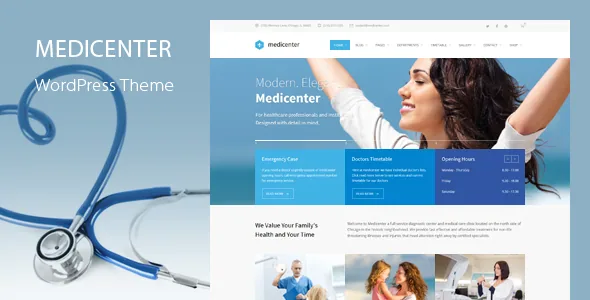
A clinic theme whose real content is the weekly rota
Most medical WordPress themes put their feature budget into appointment buttons and hero photography. MediClinic's vendor description lists something more specific: the Timetable Responsive Schedule For WordPress plugin, included with the theme, plus a Working Hours shortcode among the custom shortcodes. Those two pieces point at the part of a clinic site that actually changes week to week — who is available, on which day, at which hour.
The surrounding pitch is breadth. The vendor describes 12 homepages and layout collections for doctor showcases, laboratories, hospitals, clinics, pharmacies and dental practices, with one-click demo import and no coding required. That breadth is the marketing line. The schedule layer is the part worth evaluating, because it decides whether your site can answer "when can I see Dr. X" without a PDF.
What the bundled timetable plugin actually supports
A schedule plugin attached to a theme means availability can be structured data rather than a table image. The vendor lists the plugin as included and its changelog bumps the plugin release by release, most recently to 7.9, which suggests the integration is maintained rather than shipped once.
The detail that reveals the most sits in the 2.1 notes: a fix for the datepicker when Sunday is the only unchecked working day for a team member. That implies individual team members carry their own working-day settings and that the interface can express irregular patterns. If your practitioners keep varied rotas, that is the difference-maker; if everyone shares identical hours, a simple schedule block does the job and the plugin is extra weight.
The vendor's copy does talk about customers booking an appointment, but the documented mechanics are published availability. Treat the timetable as a way to show schedules, and add a real booking engine separately if you need reservations.
Logos and headers that change from page to page
The vendor's header list is more granular than most clinic themes bother with. It separates logos for regular, sticky and mobile headers, adds dark and light variants for different header skins, and allows a logo to be set per page. Standard and Standard Extended header types are both offered, with configurable behaviour on scroll and an optional header top area carrying its own widget zones.
A single practice may never touch those options. For a group running several locations, or a hospital site where departments keep their own identity, per-page logos mean one install can carry multiple brands without duplicating the theme or the pages. Header Top and Header Bottom widget areas work the same way: an emergency line, a main reception number and opening hours can sit where they belong rather than competing for one slot.
These are vendor descriptions of available controls. How a given combination looks with your own assets is something the live demo can show, and the vendor states plainly that the demo photography is not covered by the theme licence and must be licensed separately — so budget for a replacement image set before launch.
WPBakery is the intended editor; Elementor is the alternative
WPBakery Page Builder is bundled, and the theme's large shortcode collection is built around that composition model: team member, team slider, team list, working hours, horizontal timeline, pricing table, interactive gallery, icon boxes and more. If you want imported demo layouts to resemble the preview, WPBakery is the safer starting point because that is what the demo content was authored for.
Elementor appears in the same list as compatible, and the changelog dates Elementor support to version 2.0 in October 2021, later recording a fix for a Mikado accordion widget inside the Elementor editor. So the choice is real but not symmetrical: your team's existing Elementor habits will work, while some theme-specific elements may need replacing with standard blocks or widgets.
One attribute deserves a careful reading. The marketplace marks the item as not Gutenberg optimized. That describes the vendor's positioning toward the block editor, not a statement that the block editor is unusable.
Release notes show which features depend on someone else's platform
Changelogs are usually dull reading. This one answers a question worth asking before launch: which parts of the site rely on third-party APIs. Two entries stand out. Version 2.1 removed the Mikado Twitter plugin because of Twitter API changes, and version 2.2.1 removed the Mikado Instagram plugin for the same reason. The 2.3 release also drops a remaining twitter-connect script.
The feature list still advertises Twitter and Instagram social widgets, alongside a Social Icons widget and optional social sharing. Read those as link buttons rather than live feeds. On a medical site that is fine — social streams are decoration at most — but it does mean you should not plan any page around an embedded live feed without adding a current embed yourself.
The package and its declared compatibility
The marketplace listing recorded on 4 November 2026 declares compatibility with Contact Form 7, Elementor, WPBakery Page Builder, WPML and WooCommerce 8.x through 10.x, with WordPress versions from 6.5.x to 7.0.x. The latest changelog entry adds WooCommerce 11.x compatibility and refreshed bundled plugin versions. Those are vendor and marketplace statements about ranges, not results from installing the theme against your server, PHP build or plugin set.
The vendor also lists Slider Revolution as included, a child theme for anyone modifying templates, 800+ Google Fonts, WPML compatibility for translation and the ThemeForest file list of PHP, CSS and JS files. Custom post formats, a mega menu, custom sidebars and folder-up footer layouts up to four columns fill out the rest of the admin-driven layout options.
If your practice sells products — pharmacy items, dental care plans, courses — the WooCommerce compatibility matters more than the homepage count. WooCommerce is listed as compatible, not described as a customized storefront experience, so expect the theme to style standard store pages rather than offer dedicated shop layouts in its feature list.
Questions & answers
Can patients book appointments through MediClinic itself?
The vendor's wording mentions customers booking appointments, and the theme bundles a timetable schedule plugin plus a Working Hours shortcode. What the documentation describes is published availability — schedules and per-team-member working days — not a reservation system with its own booking records. If you need actual appointment requests, pair the timetable with a dedicated booking plugin or a form workflow such as Contact Form 7.
Should I build with WPBakery or Elementor?
WPBakery Page Builder is bundled and the theme's shortcodes were built around it, so the imported demo layouts are the safer starting point there. Elementor is listed as compatible, with support added in version 2.0 and an accordion widget fix recorded later. Choosing Elementor suits a team already fluent in it, but theme-specific elements may need substituting.
Why don't the Twitter and Instagram widgets show live feeds?
The theme's own changelog records the removal of the Mikado Twitter plugin in version 2.1 and the Mikado Instagram plugin in version 2.2.1, both cited as API changes, and version 2.3 removed a remaining twitter-connect script. The widget entries remain in the feature list, but the plugins that fetched live content were withdrawn. Treat social icons as links unless you add a current embed.