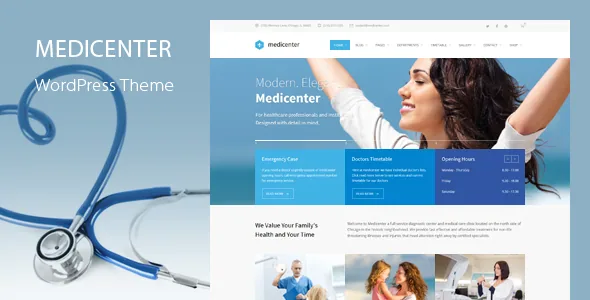
The timetable is a database, not a table you type into
Plenty of clinic themes give you a styled table block and let you fill in Monday to Friday by hand. QuanticaLabs describes something closer to a small directory: a built-in timetable tool where you create departments and a doctor database, define working days and hours, add descriptions or tooltips, and present the result as a timetable or schedule.
That distinction matters for how you maintain the site. A hand-typed table has to be edited every time a doctor's hours change, in every place the hours appear. A stored dataset can be surfaced in more than one form. The vendor's page template list bears this out, with separate templates for Departments / General Info, Departments / Services, Departments / Doctors, Timetable, Single Doctor and Our Doctors in two, three and four columns with expandable details.
Before you plan anything else, decide whether the roster is the centre of your site. If you run a single practitioner practice where the only hours that matter fit in a footer sentence, the timetable machinery is more structure than you need.
What the doctor and gallery lists can do
The vendor lists one set of display options covering both doctor lists and galleries: filtering tabs, pagination, AJAX pagination, a carousel form, a simple listing, and the choice of hover icons or none.
Those options are about volume. Filtering tabs make sense once the roster is large enough that visitors look for a specialty rather than scrolling — a clinic with twelve doctors benefits, a three-person practice barely notices. AJAX pagination keeps a page from reloading as the visitor pages through, which suits long team and gallery pages. The carousel option is the one to think about first: it gives a compact band of doctors on a homepage, at the cost of hiding most of the roster behind arrows.
The hover-icon toggle is a small control with a visible effect. If your doctor portraits are already busy, turning that layer off keeps the faces readable.
Two builders, both with medical components
QuanticaLabs ships the theme with an unusual amount of builder parity. The vendor states 66 Elementor widgets, 30 of them written specifically for MediCenter, and 77 WPBakery content elements, also with 30 exclusive to the theme. Doctors lists, timetables and feature boxes appear in both lists.
So the choice is less about which builder has medical blocks and more about which builder you and your editors already know. Elementor's drag-and-drop front-end editing is the common ground for people coming from other theme purchases; WPBakery is the older, more structured back-end workflow that many agencies still standardise on. The vendor's own description says pages are built without code in the Elementor route.
The constraint is in the import step: the one-click demo importer lets you choose demo content for either Elementor or WPBakery. Pick the builder before you import, because the demo content arrives built for one of them.
Five demos, and what each one assumes
The demo set is small and vertical rather than broad and stylistic: Main, Pregnancy, Ophthalmologist, Veterinary and Dentist. Each choice changes the visual language and, more importantly, the order in which information appears — a pregnancy clinic's home page leads with services and care stages, while a dental demo pushes treatment categories and appointment booking.
The Main demo is the sensible base for a general practice, a physiotherapy centre or a laboratory. The specialised demos are best read as evidence that the same components can be rearranged for a narrower audience, not as a menu you must choose from. Departments and timetables behave the same way in each.
Treat the demos as a structural reference. What sits inside the inner pages of each one is something to confirm on the live preview rather than assume.
Site-wide controls that suit a clinic
The Theme Options Panel, under Appearance, holds most of the global settings: logo and footer, the contact form configuration, Google Fonts, and the colour scheme. Colour management is unusually explicit — six predefined schemes plus a picker, so a blue-accented clinic can be shifted to a warmer palette without rebuilding sections.
The header side is more configurable than the single-header norm. Four header styles are listed, along with a header sidebar that can hold content of its own — useful for a phone number, opening hours line or a booking button. Smart sticky columns let a sidebar stay visible while a long page scrolls, which is the practical way to keep an appointment panel in view beside treatment copy.
One setting is easy to miss: responsive mode can be switched off entirely in the panel. That is a deliberate exception to the theme's stated responsive behaviour, and it is worth leaving alone unless you have a specific reason to serve a fixed-width layout.
Compatibility as stated, and what it does not settle
The marketplace listing, observed on 3 November 2026, records WordPress 4.9.x through 7.0.x, WooCommerce 5.x.x through 10.x.x, WPML, Elementor and Elementor Pro, and WPBakery as compatible-with entries. It also lists Gutenberg Optimized as Yes and the included files as PHP, CSS and JS. Those are vendor compatibility statements, not results from a test run on your hosting, your PHP version or your plugin stack.
WooCommerce deserves a separate note. The theme is described as fully integrated with WooCommerce, and the Theme Options Panel is said to import demo content for the shop as well as the theme. That makes a small online shop plausible — selling a physiotherapy package or a product line — but the vendor's feature list describes store layouts much less than it describes clinic pages, so review the shop demo before assuming it covers your sales flow.
The bundled extras named in the description — Slider Revolution, WPBakery, a premium icon font and a pricing tables plugin — are vendor claims about what the product includes. Check what is actually in your own copy rather than budgeting on the description's valuations.
Open questions worth settling before launch
Two gaps stand out. The first is how the appointment form behaves beyond its description as AJAX-powered: the vendor does not set out where submissions go, what notification options exist or how it connects to a booking system. A clinic that relies on bookings needs to trace that flow in a staging install.
The second is depth of the inner templates. The template names are specific — Single Service, Pricing Plans, Sliding Pricing Plans, Contact Style 1 through 3, Gallery with Expandable Details — but a name does not tell you how much demo content accompanies it. Confirm the pages you actually need exist with content, not only with a template label.
Everything else in the description is a reasonable basis for judging whether the roster model fits your clinic, and that is the decision this theme is built to support.
Questions & answers
Do I have to use Elementor or WPBakery to build MediCenter pages?
The vendor ships theme-specific components for both builders and offers demo content for either, so the intended workflow runs through one of them. The listing also records Gutenberg Optimized as Yes, but the vendor's described component set and demo import are builder-oriented, so plan on Elementor or WPBakery if you want the medical widgets.
Can the doctor list and timetable be used for staff other than physicians?
The vendor describes the timetable tool as covering departments and a doctor database "or other professions." That wording leaves room for therapists, veterinary staff or other roles, though the description does not spell out a separate taxonomy for them.
Does MediCenter require a working online shop?
No. WooCommerce integration is listed as an available capability, and shop demo content is importable from the Theme Options Panel, but the clinic page templates and scheduling tools operate independently of any shop.
Is the responsive layout optional?
The vendor states that responsive mode can be disabled in the Theme Options Panel, so a fixed layout is possible. The theme is otherwise described as fully responsive across devices.