Two sliders, ten-plus combinations, and an off switch for mobile
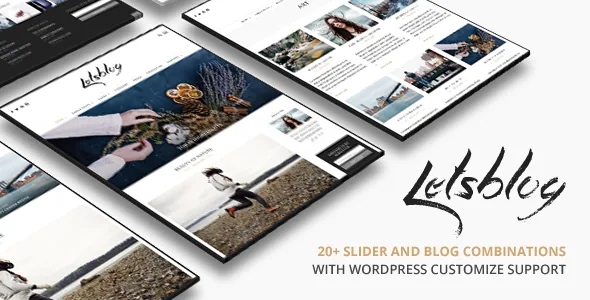
ThemeGoods describes Lets Blog as a blog and magazine theme, and the vendor's feature list leads with layout machinery rather than marketing copy: two blog post slider layouts named "Fullwidth" and "3 Columns Layout", plus more than ten combinations of slider and blog index. Treat the homepage as a set of compounding choices. You decide how featured posts are presented, then how the stream beneath them is arranged, and those decisions stack.
The less common item sits right beside it. The vendor says you can deactivate responsive features with one click in the backend. Most themes promise that they adapt to phones; fewer hand you a deliberate opt-out. It is a real setting, and it changes what mobile readers see.
What Lets Blog does not offer is a builder. The marketplace marks Gutenberg Optimized as No, and the vendor description never mentions the block editor. Styling happens in the WordPress Customizer, which the vendor describes as fully integrated with live preview, with a shortcode generator for two-, three-, four- and five-column layouts alongside it. The design is chosen from options, not assembled from blocks or draggable sections.
What switching responsive off does to readers
The vendor makes two claims that pull in different directions. One is the opt-out from responsive behaviour; the other is optimisation for Google's mobile-friendly check. Both appear in the same feature list.
With responsive features off, you are presenting a fixed desktop layout that a phone scales or scrolls rather than rearranges. That can suit a legacy archive or a site whose traffic is mostly desktop, but for a new blog chasing search traffic it works against the mobile-friendly claim the vendor also makes. Treat the toggle as a diagnostic and legacy tool rather than a design choice, and watch what happens at narrow widths on your own install.
The vendor lists responsive behaviour across iPhone and iPad, with retina-ready high-resolution graphics called out too. Those are layout and asset claims from the marketplace description, not a report of how a particular phone renders your content once you have imported demo data and added your own images.
The Customizer is where you work
Because there is no page builder, the practical question is how much you can change without touching code. The vendor lists typography controls for font size, style and colour, element colours through a colour picker, ready-to-use Google Web Fonts, and a custom background header image. These sit in the Customizer, where the description says previews update instantly as you adjust them.
Live preview helps with iteration: you can try a different accent colour and see the result before saving. It does not push a design across templates you have already built, because there are no saved templates in the builder sense. If you want to restyle individual post layouts and reuse that arrangement elsewhere, this is not that kind of theme.
Shortcodes cover part of the gap. The vendor ships a shortcode generator plugin with column shortcodes from two through five columns, described as flexible page columns with styled typography. Content built that way lives inside the post or page body, so it travels with the content rather than the theme. The marketplace lists the ThemeForest package as PHP, CSS and JavaScript files, and the vendor points to child theme support for customisations that should survive updates.
Unlimited sidebars, chosen page by page
Sidebar control is where Lets Blog offers more editorial structure than a simple blog theme usually does. The vendor says sidebars are unlimited and that you create and select one for each page. A long-running review series can therefore carry its own widget set while the homepage shows something else, without duplicating widget areas in code.
The same description covers unlimited category and post pages, which mainly means the theme does not cap how much archive structure you build. Around that sit a mega menu, a sticky main menu, an off-canvas side menu, and instant AJAX search that returns results without a page reload. The footer supports its own sidebar and widgets, so the bottom of the page can hold a second navigation layer instead of a copyright line.
The vendor also describes a contact page with validation, menus through the standard WordPress menu system, and shortcodes for embedding Vimeo and YouTube video. None of this is unusual on its own; together it means a fairly complete editorial site can be assembled without a pile of companion plugins.
Gallery admin, social streams, and the upkeep they imply
Lets Blog includes an extensive photo gallery admin that the vendor says supports multiple image uploads, and the changelog shows it is a component with its own history: one entry fixes a PHP warning in the LetsBlog gallery plugin. Posts are described as handling mixed content \u2014 photos, galleries, video and SoundCloud \u2014 with Vimeo and YouTube named for video.
The social streams are the part to weigh. The vendor lists Instagram and Flickr photostream integration plus profile links for Instagram, Flickr, Facebook, Twitter, Pinterest and Google+, with Snapchat and 500px added in a 2017 release. The changelog shows how much attention the Instagram side has needed: fixes recur from 2015 through 2020, covering access tokens, business accounts, image quality, proportions, and display problems on Windows and mobile devices.
Read that history as a maintenance signal, not a verdict. If a live Instagram feed is central to your front page, plan for the integration to need attention whenever the platform changes; if it is a strip in the footer, the risk is smaller. Flickr does not appear in the changelog nearly as often.
Declared compatibility against the changelog
Marketplace attributes observed on 4 November 2026 list compatibility from WordPress 4.9.x through 7.0.x, WooCommerce 6.x.x through 9.x.x, WPML, bbPress 2.5.x and Facebook, with a responsive layout marked at four-plus columns, widget ready, high resolution and well documented. Named browsers include Chrome, Firefox, Safari, Opera and Edge alongside IE9 to IE11, which reflects the theme's long life rather than recent testing.
Set that against the changelog. The most recent entry, version 3.4.5 dated 6 June 2025, adds support for WordPress 6.8.1. Earlier entries record PHP 8 and PHP 8.1 fixes and a WordPress 6.1 addition. Nothing in the supplied changelog documents a release for the WordPress versions between 6.8.1 and 7.0.x that the listing claims, and 3.4.5 is the version the marketplace names as latest. The attribute list runs ahead of the release notes.
That does not mean the theme fails on a newer WordPress; it means the compatibility claim is broader than the documented change history. A staging copy with your own plugins active is the only way to know for your setup. The same caution applies to WooCommerce, WPML and bbPress: appearing in an attribute list describes intended support, not a tested combination.
Questions & answers
Can I edit Lets Blog layouts with Gutenberg or a page builder?
The marketplace lists Gutenberg Optimized as No, and the vendor description names no page builder. Layout choices come from theme options and the Customizer, while free-form columns come from the bundled shortcode generator. Gutenberg Optimized concerns the vendor's optimisation claim rather than proof the block editor will not open.
Why would a blog theme let you turn off responsive behaviour?
The vendor provides it as a one-click backend setting without explaining the intended use. In practice it produces a fixed desktop presentation on phones, which conflicts with the mobile-friendly optimisation the same feature list claims, so check the result at narrow widths first.
Do the Instagram and Flickr streams need ongoing attention?
The changelog records repeated Instagram API fixes between 2015 and 2020, so that integration has needed upkeep when the platform changed. Flickr appears far less often. How much it matters depends on whether a stream is a core part of the front page or a small footer detail.