What the shortcode list actually gives a bookshop
Most theme feature lists name a page builder and stop. ChapterOne's list is unusually shop-specific, and that is the part worth reading first. The vendor names a Product List shortcode, a Product List carousel, a Product Info shortcode, distinct layouts for product variations, an Events List shortcode and a Top Reviews carousel.
Read those as display components, not as a shop. They decide how books appear across a page: a grid of new titles on the front page, a sliding shelf of staff picks in a sidebar-sized column, a single book pulled out with its own info block, variation layouts for hardback, paperback or signed editions, a diary of author events, and a reviews reel for social proof. You still need WooCommerce products behind each one, and you still write the copy.
The variation detail deserves pause if you sell editions rather than generic stock. "Distinct Product Variations layouts" is the vendor's wording, and it suggests the variation selector gets treated as a designed element rather than a default dropdown. What it does not tell you is how many layouts there are or which variation types they suit. Treat that as something to confirm on the demo before you promise a client a specific look for a three-format book.
Around those pieces sit six homepage examples and what the vendor calls a large collection of useful inner pages. Six front pages for a bookshop is a reasonable spread: a shelf-led home, a feature title, an events-forward layout are all plausible variations, but the list does not name them, so the demo is the place to see how different they actually are.
Two content streams: products and writing
A publisher's site usually carries two kinds of content that behave differently. Books are catalogue entries with prices, editions and a cart. Articles, excerpts and author news are dated editorial pieces that belong in a feed.
ChapterOne covers both, and the blog side is specified rather than gestured at. The vendor lists a Blog Standard layout and a Blog Masonry layout, plus Blog List and Blog Slider shortcodes and custom post formats for Standard, Gallery, Link, Quote, Video and Audio. Audio and Quote matter for a publishing house in a way they would not for most ecommerce themes: a serialised reading, a podcast clip from an author interview, or a pull-quote post all have a natural home.
The shortcodes are the useful bit in practice. Blog List and Blog Slider let you place editorial content inside a page you are building in WPBakery — a front page with a reading list under the product carousel, for example — instead of relying only on the archive templates. That is how a bookseller usually wants the home page to read: shelf above, writing below.
One caveat about scale. The list mentions layouts and post formats but says nothing about archive structure for large catalogues, such as how many titles a shop page shows or how filtering is handled. If you stock thousands of titles rather than dozens, that question needs an answer before launch, and it is not in the vendor's feature list.
Header choices that make a storefront read as a shop
The theme lists five header types: Minimal, Vertical, Standard, Divided and Centered. It also lists multiple header behaviours, separate logo variants for light and dark header skins, a separate mobile logo, a Header Top area, a Mega Menu, a Side Area, and a Dropdown Shop Cart widget.
For a bookshop the vertical and divided headers are the interesting ones, because a bookshop window is a display surface. A vertical header holds a tall menu beside the content, which suits a shop with departments — fiction, non-fiction, children's, gifts. A divided header splits the bar around a centred brand, which is closer to how a physical shop sign sits above a doorway.
The Dropdown Shop Cart widget is the piece that turns the header into commerce rather than navigation. It puts the basket in view without sending the visitor to a separate cart page to check what they added.
Where the vendor's list stops is worth knowing. Header variations and logo variants are named, but not their configuration depth, and the description does not say whether cart contents appear in every header type or only some. The demo is where you confirm that the header you like carries the cart widget you need. Beyond the listed options, deeper changes are a theme-code question, not a settings one.
The social feed plugins are gone; the social widgets stayed
The current feature list still names an Instagram List shortcode, a Twitter List shortcode, and Twitter and Instagram social widgets. The changelog tells a different story about what sits behind them, and it is worth reading before you plan a homepage around a live feed.
Version 1.7, dated 18 September 2025, removed the ChapterOne Instagram Feed plugin because of Instagram API deprecation. Earlier, version 1.6 in May 2024 removed the Twitter plugin over API changes, and version 1.8 in March 2026 removed the remaining twitter-connect script and its enqueue, along with the changelog's mention of the Twitter feed plugin in prior releases.
The practical reading: don't build a launch dependency on an automatically synced social feed. If you need a feed of author photos or shop snaps, the safer route is importing images into your own media library and using the markup around them, or a current third-party plugin that maintains its own API integration. The listed shortcodes and widgets may still serve as presentation wrappers, but the changelog does not describe what they now pull from. Confirm that on a current install rather than assuming.
The demo is a layout, not a photo library
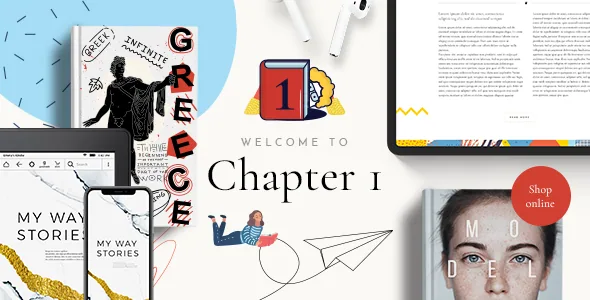
The vendor states plainly that the images used in the theme demos are not licensed for use on a third-party site, that they exist for presentation only, and that you must buy your own licence from a stock image source before publishing them. This lands harder on a bookstore theme than on most, because cover art and shelf photography do the convincing work in the demo.
A one-click demo import, which the vendor lists as a feature, gives you the page structures, typography settings and shortcode arrangements. It does not give you the right to publish the photography you saw in the preview. Budget for either licensed imagery or your own product shots, and expect the imported pages to look plainer than the demo until you supply them.
Cover images are their own question. Your own catalogue covers are usually supplied by publishers or distributors, and those terms come from that relationship, not from the theme.
Builder, block editor and declared versions
ChapterOne is built around WPBakery Page Builder, which the vendor lists as a bundled plugin, alongside Slider Revolution. The marketplace also records Gutenberg Optimized as Yes. Those two facts describe different things and should not be read against each other: the designed homepage and inner-page templates are assembled from WPBakery elements and the theme's own shortcode set, and a Gutenberg Optimized flag says something about how the theme supports the block editor, not that the templates were built with blocks. Which editing surface you end up in depends on whether you start from a demo page or a blank one.
On versions, the marketplace listing observed on 4 November 2026 declares compatibility with WooCommerce 9.x.x and 10.x.x, WPML, and WordPress 6.5.x through 7.0.x. Those are vendor declarations, not results from running the theme against your particular combination of plugins and PHP build. If your stack sits outside that range, or you rely on a plugin the list does not mention, test before committing.
WPML support is worth flagging for publishers with translated editions or regional shops. The changelog shows a WPML config file was added in version 1.7, which is a more concrete sign of attention than a bare compatibility mention.
Questions & answers
Does ChapterOne require WooCommerce to work?
The theme is categorised as a WooCommerce theme and its shop components assume products exist. Its editorial features — blog layouts, post formats, events, team and testimonial shortcodes — can carry a publisher site without a store, but the product list, product info and variation layouts need WooCommerce products behind them.
Can I use the images from the ChapterOne demo?
No. The vendor states that demo images are for presentation only and are not licensed for use on your site; you need to license them from a stock source yourself. This applies to shelf photography and other styled imagery in the preview.
Is the theme edited with WPBakery or the block editor?
The vendor's designed templates and shortcode collection are built for WPBakery Page Builder, which is bundled, with Slider Revolution handling sliders. The marketplace also lists Gutenberg Optimized as Yes, so block-editor support is declared, but the demo page structures you import are WPBakery compositions.