Four layouts that change your site's address structure
The vendor lists four layout options, and they are not four skins on the same page. One-page puts your content on a single scrolling document. 3D animated adds transitions as visitors move around. Boxed frames the content inside a background you can set to a pattern, an image or a solid colour. Multi-page is the conventional arrangement with separate pages and a menu.
That makes the layout the first decision, before typography or colour, because it decides whether your work lives at one URL or many. A designer who links to individual case studies from job applications or social profiles needs the multi-page route; someone building a compact personal brand page may want everything on one scroll. Boxed arrived later than the others: the 5.0.0 changelog records it as a new main layout style.
Motion is a theme-wide setting, not a per-section choice
Kerge's animation layer lives in Theme Settings. According to the vendor, the theme carries 67 page transitions across fade, slide, zoom and rotate families, ten preloader styles and multiple cursor styles. The 5.0.0 changelog fills in how those arrived: a dedicated Preloader section in Theme Settings, seven additional preloader styles with their own customisation, three animated background options, and an animated mouse with a switch to disable it.
The practical reading is that transitions and preloaders apply across the site rather than page by page, so you are choosing a house style rather than decorating a landing page. If the effect you like most is also the one you would want off on a heavy project page, the supplied evidence does not describe that kind of per-page control.
What makes it a resume theme rather than a gallery
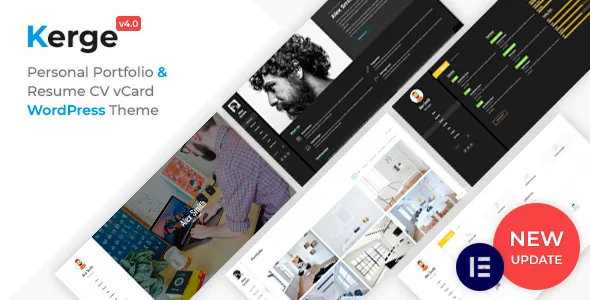
Alongside portfolio work, Kerge ships blocks for the parts of a CV. The vendor names two timeline designs for experience and education, a certificates section, pricing tables, an availability calendar aimed at freelancers and consultants, and two home page layouts with different hero treatments.
The resume side is where the Elementor widget set does its work. The 5.0.0 changelog lists new Skill Dot and Skill Ring widgets, a second style for Testimonials, Pricing, Fun Fact, Block Title and Info Block, and expanded customisation options on Timeline (both styles), Certificate, Clients, Knowledges and Home Page Second. So a skills bar, a dated career history and an award list are widget placements, not layout patterns you rebuild by hand.
Portfolio filtering, media and the blog's secondary role
The portfolio system is described as Ajax-filtered, so category filters update the grid without a page reload. Items are said to accept images, video and audio, with named support for YouTube, Vimeo, Facebook and SoundCloud, and a responsive lightbox opens the item.
The filter behaviour is the part that affects how you organise content: a smoothly filtering grid lets you publish everything and let visitors narrow it, instead of maintaining separate category pages. The blog sits beside this as the secondary content type, with the vendor listing multiple layouts, social sharing and comments. If writing is going to be a main channel rather than a companion to your portfolio, that relative weighting is worth weighing before you commit.
Editing: Elementor columns filled with theme widgets
Page content is built in Elementor, which the marketplace lists among compatible plugins. The vendor also claims 35+ custom shortcodes and a set of theme widgets, and the changelog names them: Timeline in two styles, Fun Fact, Info Block, Block Title, Testimonials, Pricing, Knowledges, Clients and Certificate.
Because those blocks arrive as widgets, their design follows the widget's own options rather than your page settings, so customisation time is spent inside Elementor panels. A child theme and a .pot translation file are part of the package, and RTL support is listed, so right-to-left languages are handled at theme level. Expect the career sections to look like the widget defaults until you change them there.
Declared compatibility and the upgrading question
The marketplace attributes recorded on 4 November 2026 declare WordPress 7.1.x back to 4.9.x, along with Elementor, WPML and Bootstrap 4.x, and list Firefox, Safari, Opera, Chrome, Edge and the older IE10 and IE11. Gutenberg Optimized is marked Yes and the theme is widget ready.
Those are vendor and marketplace declarations, not a record of the theme running against your PHP version, caching layer or plugin stack. The more decision-relevant point sits in the changelog: 5.0.0 introduced a licensing system, animated backgrounds, the boxed layout and new widget styles in a single release. If you are rebuilding an existing personal site, check that the layout and transition behaviour you want is present in the theme options you will actually be running, since a 5.0.0 site will not look or behave like an earlier one by default.
The trade-off the feature list implies
Kerge suits a personal site where presentation is part of the pitch: an animated resume with a filterable body of work behind it, assembled in Elementor within one of the four structures. The resume widgets and the motion settings cover two things you would otherwise piece together from a generic portfolio theme and extra plugins.
The cost is that motion defines the theme. Preloaders, cursor effects and transitions change how the site feels before anyone reads a line, and they are managed globally. A portfolio that should read quietly turns half the feature list into items to switch off. An option to disable the animated mouse is documented; for preloaders and transitions the evidence shows settings sections rather than blanket off switches.
Questions & answers
Can the preloader and animated cursor be turned off?
The 5.0.0 changelog records a setting to disable the animated mouse in Theme Settings, and preloaders have their own settings section with styles and customisation. The supplied description does not state that every motion effect can be removed entirely.
Do the 67 page transitions apply site-wide?
The vendor describes them as a theme setting with 67 effects across fade, slide, zoom and rotate families, which points to site-wide behaviour. Per-page transition overrides are not documented in the supplied material.
Do I need Elementor to build pages?
Elementor is listed as compatible and the theme's resume sections ship as Elementor widgets, so the demo content and specialised blocks are built around it. Gutenberg Optimized is also marked Yes, but the evidence does not describe a block-only workflow for the demo layouts.