Where Katen puts the layout work
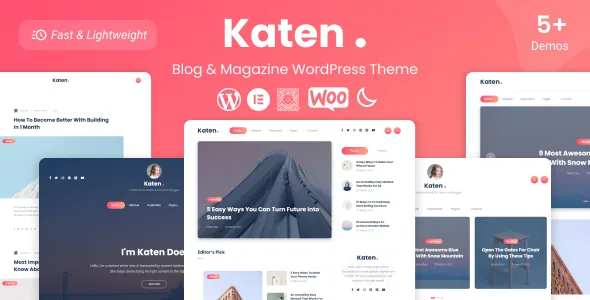
A magazine front page is mostly the same question asked several times: which posts, in what order, at what size. Katen's vendor description answers it with two separate tools. Elementor builds the page, and the theme adds 14 widget elements the seller describes as "highly versatile for creating your own post queries." Everything else persistent — colours, fonts, footer structure, search behaviour — sits in the WordPress Customizer.
That split is worth understanding before you buy, because it decides where each change belongs. If a section needs a different set of posts, or a different arrangement of them, you are working in Elementor. If the whole site needs a different accent colour or a footer with three widget columns, you are working in the Customizer. The seller lists five homepage variations and one-click demo import, so most people start from a demo and then replace the queries with their own.
The theme is not Elementor-only in every respect: the marketplace marks it Gutenberg Optimized: Yes, and the vendor lists Gutenberg optimization in its own feature list. That matters if some contributors prefer writing in the block editor. What the vendor does not describe is the theme's page templates being built from blocks.
What 14 post-query widgets actually let you do
Hand-placing posts into a layout works until the second week of publishing. A query widget asks the site for posts instead — by category, by recency, by popularity — and redraws itself as the archive grows. Katen ships fourteen of these elements, according to the vendor description, which is enough to give different parts of a homepage different logic: a lead slot, a category strip, a popular list, a tabbed block.
The changelog shows this layer being maintained rather than abandoned. Version 1.0.4 records fixes to the thumbnail of the post tabs element and the popular posts widget; version 1.0.7 records a fix to the post views count, which is the kind of number those widgets sort by. The same release mentions the Katen Elementor Addons plugin being updated, so at least part of that widget set travels in a companion plugin.
That last point has a practical consequence. If you deactivate the add-on, the elements it registers stop being available, and a page built on them will not render the same way. Keep that plugin in mind during staging, migration or a cleanup pass.
Dark mode is a pair of designs, not a colour flip
Katen's feature list includes a dark/night mode, and the changelog shows it growing from a single addition in version 1.0.3 into something the vendor tunes release by release. Version 1.0.4 improved the dark mode switcher and fixed a light-and-dark logo issue on the off-canvas menu; version 1.0.6 improved dark mode background colour options.
The logo line is the useful detail. A dark theme has to carry two logos — one that reads on a light header, one that reads on a dark one — and the menu that slides in from the side needs the same treatment. If your masthead is a full-colour wordmark designed for white, budget for a second version before you switch the toggle on sites you hand to clients.
Background colour options in the Customizer suggest the dark palette is adjustable rather than fixed. That is helpful for a publication with an established brand colour, and it also means the dark side is your responsibility to check: text contrast, thumbnail overlays and ad slots all inherit it.
Load more, progress bars and the single-post page
The vendor feature list names "Load more posts" and "Multi post layouts," and supports four post formats: Video, Audio, Gallery and Standard. Those three facts describe a publication that mixes media without needing a separate template for each one — a video review sits in the same archive as a standard article.
Archive behaviour gets attention in the changelog too. Version 1.0.2 fixed an infinite scroll problem on the last page, and version 1.0.3 fixed a social share toggle conflicting with infinite scroll. Neither entry is glamorous, but together they tell you the vendor has iterated on the point where a reader keeps pulling posts and then runs out.
Long-form reading has its own furniture. Version 1.0.3 added a reading progress bar in the header and a previous-and-next post box on the single post page. If you publish essays or serialised reporting, the progress bar is a small signal of length and the navigation box keeps a reader inside a series rather than returning to the homepage. The changelog also records fixes to the previous-and-next styling in version 1.0.4.
The Customizer carries the site-wide settings
The customizer is where Live Customizer support and selective refresh matter. Selective refresh, improved in version 1.0.7, means a change updates the previewed area instead of reloading the entire frame — a small comfort while you tune fonts and colours, listed as an easy-to-customize theme with Google web fonts.
Footer structure is set the same way. Version 1.0.6 added a three-column widget footer layout, and the marketplace confirms the theme is widget-ready. Version 1.0.6 also fixed a menu problem that appeared when building a custom footer with Elementor Pro — evidence that the two layers overlap for some users, not that Pro is required to use the theme.
Two claims in the vendor list need translation into decisions. "Ads ready" means the layout accommodates ad placements; it does not tell you which sizes or where. "SEO optimized" is a vendor statement about markup and structure, not a guarantee of rankings. Treat both as starting points to verify on your own build.
Package contents and version declarations
The seller declares WordPress compatibility from 6.0.x through 6.8.x, with WordPress 6.8.x added in the 2 June 2025 release, and WooCommerce from 6.x.x through 9.x.x. WooCommerce is described as supported rather than built in, so product pages, cart and checkout run on WooCommerce itself with the theme providing the surrounding design. Contact Form 7, Mailchimp integration, an Instagram feed and post social sharing are also listed.
The file bundle is developer-friendly: PHP, HTML, CSS, SCSS, JS and layered PNG files. SCSS sources and layered artwork are useful if a designer will adapt the visuals rather than accept the demo as-is, and the vendor lists high-resolution assets.
The vendor notes that images in the demo are for presentation only and are not part of the theme. Plan for your own photography. On compatibility, remember what those numbers are: declarations attached to the product as observed in the marketplace listing on 4 November 2026, not the results of an install test, and a version number in an archive can differ from the latest listed release.
Questions & answers
Do I need Elementor Pro to use Katen?
The vendor describes the theme as fully compatible with the Elementor Page Builder and does not state a Pro requirement. Elementor Pro appears in the changelog only because a Katen Widgets deprecation and a custom-footer menu issue were fixed when Pro was in use. Build with the free version and add Pro only if you want its own features.
Are the demo images included with the theme?
No. The seller states that images used in the demos are for presentation purposes only. You supply your own photography, though layered PNG source files are listed in the package for design adaptation.
Does the dark mode cover every part of the site?
The vendor lists dark/night mode and dark mode background colour options, and records fixes for the light and dark logo on the off-canvas menu. What the listing does not detail is how each third-party block — an ad unit or an embedded feed, for instance — behaves in dark mode, so check those on your own build.