Post-display shortcodes are the theme's actual substance
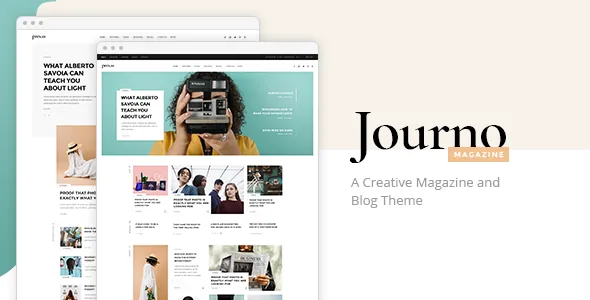
Most of the vendor's feature list is about showing posts in different arrangements: nine distinct post layout shortcodes, three video layout shortcodes, six post carousel shortcodes, a top reviews carousel, masonry, blog list in various layouts, and a blog slider. Alongside them sit smaller composition pieces such as section titles, banners, a swapping image gallery and testimonials.
That vocabulary is the reason to pick Journo over a general blog theme. A magazine front page is mainly a sequencing problem — lead story, second read, image-led grid, then a stream — and these elements give you named arrangements for each slot instead of rebuilding them per project. The vendor pairs the list with nine homepage examples and a one-click demo import, which show how the elements combine rather than prescribing a single layout.
WPBakery holds the page; the shortcodes decide the presentation
WPBakery Page Builder is included according to the vendor, and the changelog tracks it: version 2.1 in September 2025 moved it to 8.6.1. You place the layouts, carousels, banners and testimonials inside the builder's grid, so the editing surface is drag-and-drop with Journo's elements available in the panel. Slider Revolution is also listed as included, which covers animated hero rotation separately from the post blocks.
What the shortcodes settle is the presentation layer — how many posts per row, whether images dominate, whether the block rotates or stays static. The vendor bundles and their versions are claims about the product; confirm what your own copy includes.
Pagination is a three-way editorial decision
Journo lists standard pagination, load more and infinite scroll. Each changes what a reader's back button, page address and footer do.
Standard pagination keeps every archive page addressable and crawlable, which matters if you link to page two in a newsletter or want paginated archives indexed. Load more keeps the sequence explicit while moving through it in place. Infinite scroll removes the stopping point, which suits a fast photo feed and causes trouble when readers need the footer, a specific position or a citable URL. If your footer carries newsletter signup or ad units, infinite scroll hides them behind an ever-extending feed.
Widget areas carry the recurring news furniture
The widget set includes a post carousel widget, a latest news widget, multiple post layout widgets, social icon widgets and a social icons group widget. The vendor also lists header top and header bottom widget areas, custom widget areas and a footer configurable across one to four columns, with separate footer top and bottom areas.
Those positions decide where recurring furniture lives: a breaking-news strip above the masthead, a trending list beside the archive, a social strip at the close. Custom widget areas are the useful part for a publication with distinct channels, since separate areas let culture, politics and reviews hold different sidebar arrangements without bleeding into each other.
The masthead itself offers four header types — standard, standard extended, minimal and centred — with fixed-on-scroll, sticky-on-scroll-up and sticky-on-scroll-up/down behaviours. Separate logos are available for the mobile header and the sticky header, with separate mobile styling. A wide wordmark usually needs that narrower sticky version.
The social feed widgets were removed in 2025
The feature list still names an Instagram feed widget and a Twitter feed widget, but the changelog for version 2.0, dated 24 July 2025, records that the Edge Instagram Feed Plugin and the Edge Twitter Feed Plugin were removed because of API changes at both platforms. Treat those feed blocks as unavailable in the current line rather than as a reason to buy. Social share buttons are listed as a separate feature and are not affected.
Platform APIs for embeds change often enough that this is a maintenance question, not a one-off. If outbound social display is central to your homepage plan, a dedicated plugin that tracks its own API connections is the more durable place to solve it.
Declared WordPress and WooCommerce ranges
The marketplace attributes observed on 5 November 2026 list WordPress 6.5.x through 7.0.x and WooCommerce 9.x and 10.x, plus WPML and WPBakery. The changelog backs the shop side directly: version 2.1 added WooCommerce 10.x compatibility, while version 2.0 added a WPML config file and improved PHP 8.3 compatibility.
These are declarations from the vendor and marketplace, not records of the theme running on your server. A range across six WordPress releases says as much about how long the theme has been maintained as about how it behaves on today's install. A staging copy with your PHP version and your plugin list answers the real question faster than the range does.
The listed package files are PHP, CSS and JavaScript, with a child theme among the vendor's features. No design source files appear, so restyling runs through CSS, the typography settings and the 800+ Google Fonts option.
Portfolio and shop elements inside a magazine build
Journo is not only a blog. The shortcode list includes product info, product list in plain, simple and carousel forms, plus a Google Maps shortcode for contact pages that need a location block. Those fit a publication that sells subscriptions, prints or merchandise beside editorial content, or a magazine with a listings page.
Compatibility is a declaration about how the integration is expected to work, not a description of finished shop layouts. If retail is part of the plan, look at how the shop templates and the newsletter popup are arranged before building the homepage around post blocks.
Demo images are not part of the package
The vendor states that the demo images are not included and cannot be used on a site without a separate stock licence. For a magazine theme, where photography carries most of the visual weight, that is a real budget line rather than a footnote.
The one-click import brings in demo page structures and element arrangements, not your archive. If you are moving an existing body of articles, the import gives you scaffolding to rebuild around, and the post layout shortcodes give you the pieces to fill it.
Questions & answers
Can I still show Instagram or Twitter feeds with Journo?
Not through the theme's own widgets. The changelog for version 2.0 removed the Edge Instagram Feed and Edge Twitter Feed plugins because of platform API changes. Social share buttons are listed separately and remain part of the feature set. For live feed displays, you would need a third-party plugin that maintains its own connection to the platform.
Does Journo work with the block editor?
The marketplace attributes do not state a Gutenberg Optimized value, so the listing is silent on it rather than negative. What the vendor describes is page assembly in WPBakery with Journo's shortcodes. If you plan to build page layouts with block templates, check that combination on a staging copy first.
Does Journo include WooCommerce store layouts?
The vendor lists WooCommerce compatibility and the changelog adds WooCommerce 10.x support in version 2.1. Product shortcodes are also included: product info, product list, product list simple and product list carousel. Compatibility describes the integration, not the finished arrangement of shop pages, so review the shop templates if you plan to sell.