Merchandising elements built for styled outfits
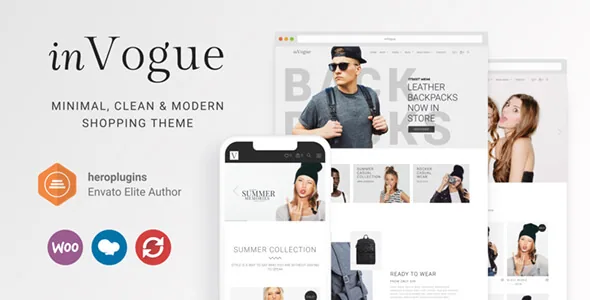
Many WooCommerce themes claim a store. InVogue's marketplace description names a set of custom elements that only make sense for apparel and accessories: Lookbooks, a Get the Look slider, Mosaic Promos, Promo Slider, Product Category Preview, Product Mini List, Mosaic Product List, Product Promo Blocks, Modern Product Slider, Launch Pads and Featured Content.
Each solves a different retail problem. A Lookbook gives a styled outfit its own page instead of burying the pieces in a category grid. The Get the Look slider is the shoppable-editorial pattern: an image with the products attached to it, which is how many fashion shoppers decide. Mosaic promos and promo sliders carry campaign blocks where one sale or collection needs more visual weight than the product grid. Category preview and the mini and mosaic product lists let a front page route visitors into departments before showing individual items.
The practical outcome is that you compose pages from retail ingredients rather than generic headings and image boxes. If your catalogue is editorial — seasonal drops, styled shoots, curated edits — that vocabulary is the reason to look at inVogue at all.
Switches that change browsing, not just styling
The vendor describes several shop behaviours as things you can turn on rather than fixed defaults. Superzoom on single product pages can be switched on. Next and previous product buttons can be activated on single product pages. Lazy loading between pages can be on or off. The sticky menu has its own control.
That group deserves separate treatment because these choices affect how people move through the catalogue. Next/previous navigation keeps a shopper moving instead of bouncing back to the category page — useful for a large clothing range, less so when you want each product considered on its own terms. Superzoom pays off on garments where fabric and detail sell the item, and is unnecessary on simple accessories. Lazy loading is a page-weight decision, and having an off switch means you are not stuck with it if it interferes with something else on your site.
A hamburger menu is also offered for the desktop version, which is unusual and useful when you want the header quiet and the imagery leading.
AJAX cart, product video and variable products
The commerce feature list is short and concrete: WooCommerce enabled, AJAX cart, the superzoom toggle, video on single products, previous/next product buttons, a lazy-load switch, and support for variable and grouped products.
Variable and grouped products are the parts that matter to a fashion catalogue specifically. Variable products are how one garment carries sizes and colours; grouped products let you present a related set — a suit with its jacket and trousers — as one page with separate line items. If your stock is organised that way, the theme is written for your data model rather than forcing a workaround.
AJAX cart means adding to cart updates without a full page reload, which keeps shoppers in the browsing flow rather than sending them to a cart page after every addition.
Two ways to start: full demo or one page
The vendor lists demo importing at two granularities: importing the full demo during installation, and importing individual page demos.
A full import gives you the whole storefront shape — home page, category pages, product pages, blog — so you can see how the pieces relate before changing anything. Page-level imports suit a build where you like one specific layout, such as a lookbook page or a promo-led home page, and want it without adopting every other template.
One caveat the description does not state: a demo import arranges structure and styling, and the photography in a fashion preview does the persuading. Plan to supply your own imagery before the site resembles the demonstration. inVogue's front-end argument rests on visuals, so that step decides the result more than any setting.
How editing splits between WPBakery and theme options
Pages are assembled in WPBakery Page Builder, which the vendor includes, and Slider Revolution is bundled alongside. Theme options hold the settings you would otherwise rebuild on every page: custom CSS, a typography section with Google font support, custom colours for navigation and fonts, custom page headings, two footer layouts and a built-in MegaMenu.
The split matters for hand-off. Layout and content arrangement happen inside WPBakery, so anyone editing a page needs to be comfortable there. Brand-level decisions — type, colour, header behaviour, footers — live in options and change site-wide. Keep that boundary in mind when briefing whoever maintains the store: a designer adjusting colours will not be inside the page builder, and a content editor adding a lookbook will not be in the options panel.
The marketplace records Gutenberg Optimized as No. Read that as a statement about which editor the designed pages target, not as proof that the block editor is unavailable on your site.
A blog path, and the RTL gap
The description explicitly covers running inVogue without commerce: use it as a blog theme if you don't want a shop, with sidebar, no sidebar, masonry or standard layouts. For a fashion publication, or a brand that publishes before it sells, that is a real alternative rather than a fallback.
The vendor also states plainly that RTL is not available yet. If your store or publication needs a right-to-left language, inVogue is not the theme for that build today, and no workaround is offered.
On translation, WPML is listed as compatible, which is the route for translated pages, posts, custom post types, taxonomies and menus. WPML is a separate plugin with its own setup, so budget for adding it rather than assuming it activates itself.
What the version record means for a fresh install
As recorded on the marketplace listing on 4 November 2026, the latest marketplace version is 1.28.1, with the vendor's last update dated 17 April 2024. The declared software range tops out at WordPress 6.5.x and reaches back to 5.0.x, while WooCommerce is listed as compatible through 8.x.x, alongside WPBakery Page Builder and WPML. The package is declared to include PHP, CSS and JavaScript files, and the theme is widget ready, high resolution and well documented.
The browser list still names Internet Explorer 10 and 11, which says more about when the list was compiled than about your visitors. The number that matters is the WordPress ceiling: if your install runs a newer release, test inVogue on a staging copy before committing. Declared compatibility is a vendor claim, not a record of testing against your specific plugin stack.
Questions & answers
Does inVogue require WooCommerce to work?
No. The vendor explicitly supports a non-shop path: use inVogue as a blog theme if you don't want a shop, with sidebar, no sidebar, masonry and standard layouts. The retail elements and toggles described here assume WooCommerce is active, and the theme is listed as compatible with WooCommerce 8.x.x, 7.x.x and 6.x.x.
Can I import only one page from the demo?
The vendor lists two options: import the full demo during installation, or import individual page demos. Page-level import is the way to borrow a single layout without adopting the whole storefront.
Is inVogue right for a right-to-left language site?
Not as described. The vendor states "RTL not available yet." WPML compatibility is listed for translating content, but translation and RTL layout are separate concerns and only the first is covered.