A services theme for connected-home businesses
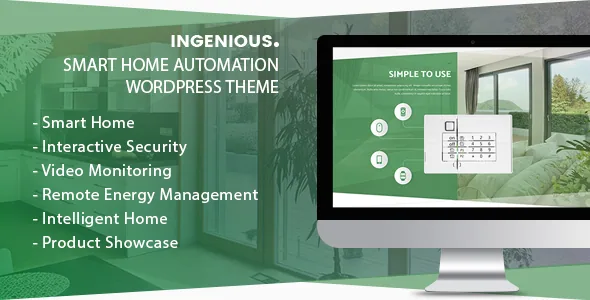
The marketplace description names four jobs for Ingenious: smart home automation services, video monitoring services, energy saving solutions and home security solutions. That sentence is more specific than the surrounding "suitable for a wide variety of websites" line, and it sets the expectation the rest of the product lives up to. The theme is written for a company that sells, installs or monitors connected-home hardware and needs pages that explain those services and show finished installations.
There is no dedicated content type behind that idea. The vocabulary is carried by the vendor's own modules, which appear by name in the changelog: CWS Services, CWS Benefits, CWS Portfolio, CWS Staff, CWS Thumb and a Hover Box module. For an installer or a monitoring company those map onto real page sections. For anything else, you are buying a WPBakery site with a smart-home demo attached.
What the CWS modules give you on a page
Read the module names as page sections rather than as features. Services covers what a company offers — installation, monitoring, energy audits. Benefits covers the reasons to choose this provider. Portfolio holds completed installations with imagery. Staff gives technicians or account managers a profile. Hover Box is a display treatment for the small grid tiles that service pages tend to lean on.
All of these are modules inside the WPBakery editing flow, so a page is assembled from blocks the theme supplies rather than from free-form blocks an editor invents. The changelog shows the set being maintained rather than expanded: one entry fixes a missing icon in CWS Benefits, another adds an icons URL option to CWS-Services, and another resolves a translation problem in CWS Portfolio and Staff. Small items, but they suggest these modules have been in use long enough to accumulate fixes.
One package fact worth knowing before you build: the vendor states that stock photos are not included. The demo photography is a placeholder you replace, not an asset you inherit.
Layout control lives in Theme Options and shortcodes
The vendor's feature list puts layout decisions in two places: a Theme Options panel and a shortcode generator. Theme Options supplies wide and boxed page widths, colour management described as unlimited variations, and font choices that include Google Fonts, with FontAwesome icons alongside. The shortcode generator is how modules and layout pieces get inserted into content.
A sidebar generator is the third piece of the same approach: you define sidebar configurations and assign them, instead of relying on whatever a widget area happens to hold. The marketplace record marks the theme as widget-ready and lists WordPress 6.8.x under declared software versions.
The marketplace attribute for Gutenberg Optimized is No. Take that narrowly: the theme is not described as tuned for block-editor patterns. It does not by itself say the block editor is unusable, but it does point to WPBakery plus shortcodes as the intended editing surface. A team standardised on block themes and theme.json styling should read that as a mismatch rather than a detail.
Bundled builders and the one-click import
WPBakery Page Builder is listed as compatible, and the description names Visual Composer as included — the same product under its older name. Revolution Slider is bundled too, and it appears repeatedly in the changelog as its version is bumped alongside other fixes, so the slider has been a maintained part of the package rather than a one-time inclusion.
The build path is the familiar one for this generation of theme: import the demo, replace content, adjust in Theme Options, then place modules page by page. What the import saves is page structure and styling decisions on day one. It does not supply services copy, licensed images or a booking process — the stock photo notice covers the second, and nothing in the description covers the third.
Package contents recorded on the marketplace are PHP, HTML, CSS and JS files plus a PSD. The PSD matters if a designer needs to extend the visual language beyond what the demos show; it is not needed for ordinary content editing.
Commerce and translation as declared compatibility
WooCommerce appears under compatible-with at 9.x.x, and the changelog is where that claim earns its keep. From mid-2023 the releases are dominated by WooCommerce template file updates: 7.4, 7.9, 9.3, then the September 2024 entry, 9.5 that December, 10 in August 2025 and 10.2 in November 2025. Small shop fixes sit alongside them, such as an out-of-stock product button and WooCommerce subcategory titles.
For a smart home business a shop usually means devices, accessories or paid service plans. The pattern suggests the shop templates have kept pace with WooCommerce releases, which is the practical concern for a store you intend to run for years. Treat it as a vendor compatibility claim, not as verification against your PHP version and plugin mix.
WPML is listed as compatible, and translation fixes recur through the changelog in several forms: missing strings, a text-domain loading notice, a string added after a Woo template update. If you sell into more than one language the theme has been maintained with that in mind, though the setup WPML itself requires is outside the theme's scope.
Reading the maintenance record plainly
Two entries say more than the rest. In August 2022, version 1.2.1 added the Classic Widgets plugin to the required list — a sign that the theme's widget areas are built on the older widgets system and need that plugin to behave on current WordPress. In March 2024, obsolete Twitter-related functionality was removed, and a later release cleaned up the PHP notices tied to it. Those are normal marks of a theme old enough to be shedding integrations that no longer exist.
Since then the rhythm has been steady but narrow: PHP notice fixes and WooCommerce template refreshes. No new layout types appear in the recent entries. That is a maintenance posture, sensible for a theme you intend to keep running, less so if you want a design system still being expanded.
The declared attributes and the release dates sit slightly apart. The marketplace record lists WordPress 6.8.x and WooCommerce 9.x.x while recording version 1.2.8, dated 30 November 2025, whose own notes mention WooCommerce 10.2 template files. Vendor attributes often lag the changelog, so if your stack is newer than the declared versions, confirm the specifics before committing rather than trusting either figure.
The fit, and the commitment it asks for
Ingenious suits a services site for an automation, monitoring, energy or security company, edited by someone comfortable in WPBakery and shortcodes, who wants Services, Benefits, Portfolio and Staff sections that already look like the sector. The module set cuts down the page design you have to invent, and a shop, if you need one, has been kept in step with WooCommerce.
The cost is the same age. A shortcode-driven theme with a Classic Widgets dependency, a Theme Options panel and no block-editor optimisation asks you to maintain a stack the wider WordPress ecosystem has moved away from. If your team edits in the block editor, or you want a theme still gaining design features, this is a commitment to the way it was built.
Questions & answers
Can I use Ingenious with the block editor?
The marketplace marks Gutenberg Optimized as No, and the vendor's described workflow runs through WPBakery and a shortcode generator, with styling set in Theme Options. That attribute means the theme isn't described as tuned for block patterns; it doesn't say the block editor is switched off. If block-based editing is central to how your team works, plan for a mismatch.
Do I need the Classic Widgets plugin?
The August 2022 changelog entry adds the Classic Widgets plugin to the required list. That is the vendor's own record, so check the current installation documentation rather than assuming the requirement has been dropped or still applies in exactly the same form.
Does the package include the demo photographs?
No. The vendor states plainly that stock photos are not included. Demo import gives you page structure and styling; the imagery is licensed separately, so budget for replacement photography or licensed stock.
Is WooCommerce supported for selling devices?
WooCommerce is listed as compatible at 9.x.x, and the changelog shows repeated template file updates through WooCommerce 10.2. That makes a store a realistic use, but it is a vendor compatibility claim — verify it against your own WordPress, PHP and plugin versions before building a catalogue on it.