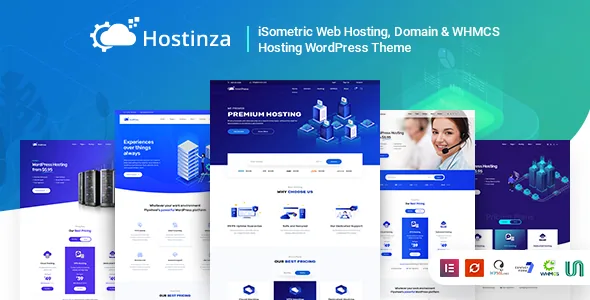
A domain search form that ships with the theme
Plenty of hosting themes sell you a look. Hostinza's more useful claim is a domain search form built into the theme, and the changelog shows it being worked on rather than parked. Version 1.0.8 added an Ajax domain checker; v1.0.5 fixed the domain search; v2.3 removed the TLD selection because it was incompatible, and v2.4 fixed a CSS issue in the domain search. That last cluster is the informative part: the vendor hit a limit on part of the form and cut it rather than leaving it broken.
What you get is a search field styled to match the site, sitting inside your own header instead of a registrar's iframe. It does not replace the registration system behind it — the lookup still has to reach a service that answers. The front-end piece is covered, though, and the vendor's live demo is where to see how the current build behaves.
Pricing tables that follow how hosting is sold
The vendor describes pricing table styles for a VPS slider, for dedicated hosting and for shared hosting, and lists "different pricing tables options" as a feature. The distinction matters when your plan list is uneven: shared plans ladder up to a ceiling, dedicated plans vary by RAM, bandwidth and support level, and VPS sits between them with a slider that maps a price to a spec.
Version 1.4.4 added a load-more option for the pricing table along with an extra table option slider. If you sell enough plans that a single grid becomes a wall of rows, that addition is what keeps a page readable instead of pushing every tier onto the first screen. The vendor describes these tables and the price slider as customizable, so the plans themselves come from what you enter.
WHMCS styling is not WHMCS
The product name leads with WHMCS, so be clear about the boundary. The theme ships a WHMCS portal template, and WHMCS Bridge compatibility was added in v1.0.2 — both concern how the client area looks alongside your marketing site. Neither turns WordPress into a billing system. WHMCS still runs separately and carries its own licence.
The changelog is the best evidence of how closely the template is followed. Entries track WHMCS through 7.8.3, 7.9.1 and 7.10.2, then 8.4, and version 3.2.0 updated the portal to 8.10. That is a repeated job rather than a launch-time extra, and it tells you the vendor treats WHMCS version drift as something to chase.
What the changelog cannot tell you is whether the portal template matches your own WHMCS release and your customisations. Plan to check that against your installation rather than assuming the pairing holds.
Two settings surfaces, and the cost of the split
Hostinza lists both the Kirki Customizer and the Unyson framework, and the vendor says the theme panel carries over 100 options. In practice, changes live in two places: standard site-wide values in the WordPress Customizer, and theme-specific settings in the Unyson panel.
A changelog entry makes the split concrete. Version 3.1.0 fixed footer title colour not working in the Customizer — a control that existed but did not do its job until it was patched. When a setting seems missing, the answer is usually that it belongs to the other panel.
If your team is used to one panel holding everything, allow time to learn which surface owns which option. Handing the site to a client is where the split really bites, so note it down for them.
Five homepages, tier-specific service pages and how you edit them
The package opens with five homepage variants, each with its own header and content, plus 20+ inner design pages. Service layouts for VPS, shared and dedicated hosting are described as separate pages rather than one template with swapped copy, which fits a host whose tiers genuinely sell differently.
Page content is edited in Elementor, and the marketplace also marks the theme Gutenberg optimized. Those are declared paths rather than a promise that every demo block behaves identically in both editors. The vendor's feature list adds the Kirki Customizer, Unyson, Bootstrap 4 as the CSS base, a mega-menu and multilevel drop-down, Google fonts, Font Awesome icons and 200+ line icons, and Revolution Slider is named in the description as part of the build.
One-click demo import arrived in version 3.2.0. Before that, setting up demo content was more manual — version 2.4 lists a fix for page structure breaking after demo content install, so the importer has a history behind it now.
Declared compatibility, and the gap worth checking
The marketplace listing, as recorded on 4 November 2026, declares compatibility with Elementor, WooCommerce 8.x.x and 9.x.x, and WordPress versions from 6.0.x through 7.0.x. Named browsers are Firefox, Safari, Opera, Chrome and Edge. The package is listed as PHP, CSS and JS files, widget-ready and responsive, and the marketplace's latest version is 3.2.2.
These are vendor and marketplace declarations, not results from testing on your server. The vendor's own changelog is more modest than the compatibility list: it records WordPress 6.8 compatibility in 3.2.1 and says nothing later, while the listing extends the range to 6.9.x and 7.0.x. If you run either of those, treat the gap as an open question and ask the vendor before committing.
The other open question is upkeep. The last changelog entry is dated 20 October 2025 and concerns licence activation, and a theme maintained by an independent studio for one business type is doing a specific job well. Whether that job includes your stack is the thing to settle first.
Questions & answers
Does Hostinza include WHMCS, or only a template for it?
Only the styling side. The theme ships a WHMCS portal template and WHMCS Bridge compatibility, so the client area can match your marketing site. WHMCS itself runs separately and is not bundled with the theme.
Can I change the plans shown in the pricing tables?
Yes. The vendor describes the VPS slider, the shared and dedicated pricing tables and the slider options as customizable, and a load-more option was added for longer plan lists. The plans are content you enter, not a fixed list.
Why are some settings in the Customizer and others elsewhere?
Hostinza uses two settings layers: the Kirki Customizer for site-wide options and the Unyson framework for theme-specific ones, with the vendor describing over 100 panel options. A setting that seems missing is usually in the other surface.


