Thirty demos, released in matched pairs
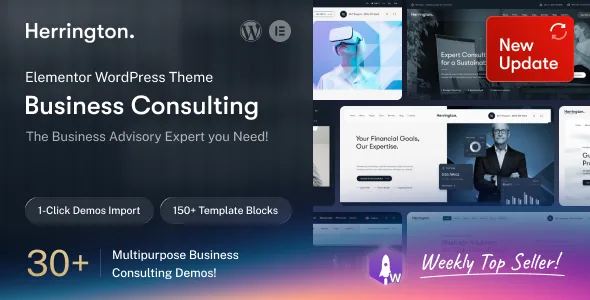
The vendor counts 30+ pre-built websites and spells out the split: 15 multi-page demos and 15 one-page demos. The changelog shows how that number was reached, and the pattern is unusually consistent. Every demo release from version 1.0.1 onward adds a subject in both forms at once — Financial Advisor, Corporate Consulting, Insurance, Tax Consultant, Banking Consultancy, HR Consulting, Startup Consulting with Immigration Consulting, Business Consulting, SaaS and Remote.
That pairing is the useful part. Instead of picking a demo and then deciding whether your practice should be one long page or several, you get both treatments of the same subject and can read them as a comparison of structure. A firm that already knows it needs separate service and team pages can start from the multi-page version and borrow the one-page version's section rhythm.
The header and footer libraries point the same way — 15+ header templates and 15+ footer templates, which the vendor describes as builds you choose from and then adjust to your needs. They matter most if you intend to leave the demo's frame behind rather than just swap copy and images.
The one-page mode is a stated option, not an assumption
Half of the library being one-page builds implies infrastructure, and the vendor names it: in-built onepage navigation options with smooth scroll. That is the mechanism that turns a long Elementor page into something that behaves like a site with sections.
What the description does not cover is how the anchor targets are assigned — whether they come from Elementor section IDs, from a menu setting, or from both. Anyone planning a single-page advisory site should open one of the one-page demos and inspect how the navigation is wired before committing to that model. It is the smallest question in the listing and the one most likely to change your build.
Why the header and footer being Elementor layouts matters here
The theme's builder claim extends past page content. The vendor states that the mega menu, the desktop header and the footer are supported by the same builder, so the consultation CTA, the phone number and the office addresses are edited in the Elementor interface alongside the page sections.
The mega menu gets a specific description: built from navigation items, images, icons and multiple columns. For a firm with six or more service lines, that is the difference between compressing the list into one dropdown and presenting it as a labelled grid. Note the parenthetical in the feature name — the header builder is described as desktop. The mobile header is named separately in the feature list as sticky, and mixed evidence about mobile header editing is a good reason to test on a phone-sized viewport rather than assume parity.
Where the vendor's own numbers disagree
Two places in the listing need care before you rely on a figure.
Element count. The feature list says 60+ Elementor elements. The section headed "60+ Elements have included" then opens by saying the theme comes with 50+ widgets, each with several layout styles. Both numbers come from the vendor, so treat the total as approximate and check the demo for the specific elements your site needs.
WooCommerce version. The compatibility attribute recorded from the marketplace listing on 4 November 2026 covers WooCommerce 5.x.x through 9.x.x. The changelog for version 1.0.8 records full compatibility with WooCommerce 10.4.3. The two statements describe different ranges. Neither is a test on your installation, so verify the pairing you plan to run instead of trusting either line.
The commerce conveniences come from separate plugins
The feature list advertises product wishlist, quick view, compare and a shopping cart as part of the theme's offering. The compatibility list explains where some of that comes from: WPC Wishlist, WPC Quick View and Variation Swatches for WooCommerce are named as plugins the theme integrates with. They are separate installs, not modules inside the theme, so plan on adding and maintaining them.
Compare has no plugin named against it anywhere in the evidence, which leaves its implementation unverified. If a side-by-side product comparison is part of your plan — for example on a set of paid reports or workshop bookings — check that a demo or the documentation shows it working before you depend on it. The layouts the vendor does describe, multiple product display layouts and multiple shop page layouts, are plausible for a consultancy selling a handful of items. Nothing in the material suggests this is built as a full storefront.
What ships in the file bundle
The ThemeForest file list names PHP, SCSS and JS files. A blank child theme is described as included, which is the detail that matters if you plan to adjust templates and keep those changes through parent updates.
The vendor also lists Revolution Slider as included and, separately, describes elements made with the Bravis Addons plugin — plus a Bravis User plugin — as exclusive integrations. Those are vendor statements about the package; how each is supplied inside the download is worth confirming rather than assuming. Documentation is marked well documented, with video guides mentioned in the description.
Gutenberg Optimized is set to No in the listing. That is an attribute about optimisation for the block editor, not a statement that the block editor is switched off. Since pages, headers and footers are composed in Elementor, the block editor is simply not the surface you would build on.
Language support and the sorting question
WPML appears in the compatibility attributes and the vendor separately claims Polylang readiness and RTL language support. Both are useful for a firm serving more than one country, and both are claims about configuration rather than records of a tested multilingual setup.
The category is corporate/business, and the marketplace's own highlight tags run wide — accountant, legal, insurance, human resources, marketing, multipurpose among them. Combined with the demo names, that breadth is a sign of a general business frame with consulting-specific demos layered on, not a theme narrowed to one profession. If your firm sits outside the demo subjects, the header, footer and mega menu templates are the tools for reshaping the frame.
Questions & answers
Do the one-page and multi-page demos cover the same businesses?
Yes, as far as the changelog shows. Each demo release from version 1.0.1 onward adds a subject in both forms — Financial Advisor, Corporate Consulting, Insurance, Tax Consultant, Banking Consultancy, HR Consulting, Startup and Immigration Consulting, Business Consulting, SaaS and Remote — which is how the 15 multi-page and 15 one-page figures are reached.
Is the mobile header editable in Elementor too?
The vendor's feature name refers to a desktop header builder, while a sticky mobile header is listed separately as a feature. The evidence does not say whether mobile header layouts are also Elementor builds, so treat that as something to check rather than assume.
Does the theme include a product comparison tool?
Compare is listed among the WooCommerce features, but no plugin is named against it in the compatibility list, unlike wishlist and quick view which map to WPC plugins. Confirm how compare is provided before making it part of a shop build.