Rooms are records, not pages
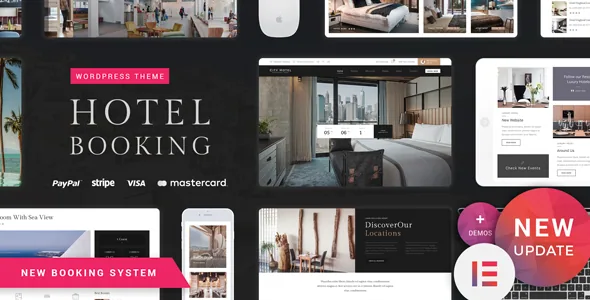
Nicdark's Hotel Booking reads like a travel theme from the outside, but the vendor description centres on two pieces of structure: a custom post type called rooms and a custom booking plugin bundled with the theme. That pairing decides the order of work. You create room records first, and the pages that sell them are assembled from those records.
The vendor says the booking plugin can be downloaded free from wordpress.org, but that the copy inside the theme ships with the add-ons included. If you have tried the free version and found it limited, that is why. The description does not say how those add-ons are updated later, so ask the author before you build a site around a specific one.
The vendor also describes a search filter for displaying rooms and a reservation module that runs in multiple steps. Both pull from the same room data, so the quality of a room record — capacity, size, price — propagates further than the page it appears on.
What the single room page carries
The vendor's breakdown of the room page is the most specific part of the listing, and it is the fastest way to judge whether the theme matches how you sell accommodation. The description area accepts page-builder content, so you are not limited to a text field; you can drop in the theme's own components.
Under it sits a basic information block: maximum guests allowed, room size, and both an average price and a weekly price. A services list follows, and the vendor says services are stored in the database. That turns a service into a maintained entry rather than a paragraph retyped in every room.
Two further slots complete the layout. Similar rooms shows rooms from the same branch as the current one, which helps a guest comparing near-identical units. A free content area takes a video, a map or a gallery built from the theme's components.
Beside the content, an infobox holds the week's prices with a short calendar form for a quick booking. That is the piece worth trying on the vendor's demo: a visitor who already knows their dates should be able to act from the room page without going back to the search results.
One sidebar switch, two very different room pages
Each room can be set to show a custom sidebar or not. The sidebar takes standard WordPress widgets and the theme's own components — the vendor's example is a list of favourite rooms.
That single option lets a suite and a budget double present different companions without maintaining two templates. With the sidebar on, related accommodation and a booking prompt sit beside the description; with it off, the description and gallery take the full width. If your room types differ a lot in how much they need to explain, per-room control beats one global sidebar setting.
Checkout, guest profiles and the option to switch registration off
The vendor describes a checkout where a guest books a room and adds extra services during payment, with PayPal listed alongside other payment systems.
Accounts are optional in the way that matters. The plugin supplies login and registration forms, and the vendor says they can be deactivated whenever you want. With registration on, a signed-in guest sees every reservation they have made — through PayPal and other methods — on a profile page, and the hotel owner can see all orders.
That is the trade-off to settle early. Registration off keeps the funnel short; registration on gives returning guests a history of stays, which is the argument for keeping it when repeat bookings matter.
Two developer switches keep test bookings out of your records
Developer mode, as the vendor describes it, lets you work without saving data to the database, which keeps test reservations out of your booking records and keeps storage use down. A separate developer mode covers PayPal, so transactions can run without real money moving.
Both are relevant before the site opens. A full test reservation is the only way to see how checkout actually behaves, and running it against live payment details is the wrong way to find out.
Elementor components, theme settings and the declared compatibility
Page building runs on Elementor, and the vendor claims full compatibility between the builder and the booking plugin, with custom components such as a room post grid that places rooms in different layouts and column counts anywhere on a page. The marketplace attributes also list WPBakery Page Builder, so the declared compatibility is wider than the vendor's Elementor-focused feature narrative. Gutenberg Optimized is marked yes in the attributes observed on 3 November 2026; Elementor is where the vendor puts the emphasis.
The theme-level options shape the site more than they first appear to: multiple headers, a footer you build with the page builder, the WordPress live customizer, Google fonts, and a custom Google Maps design. Theme settings can be backed up and imported, which is worth having before a redesign because it gives you a route back to a configuration you know works.
The declared compatibility observed on 3 November 2026 covers WordPress 4.9.x through 6.9.x, WooCommerce 5.x through 8.x, plus Contact Form 7, WPForms, Gravity Forms, Easy Digital Downloads, Events Calendar and WPML. The vendor notes that the WPML plugin behind the multilingual demo is not included, so a second language means buying and configuring that plugin yourself. These are listing and vendor declarations rather than results from running the theme on your server.
Questions & answers
Do I need WooCommerce to take room bookings?
No. Reservations run through the theme's own booking plugin, which the vendor describes with PayPal and other payment systems built into the flow. WooCommerce is listed as compatible for running a shop alongside the accommodation side, not as the booking engine.
Can guests book without creating an account?
The vendor says the booking plugin's login and registration forms can be deactivated. Turning registration off also removes the profile page that lists a guest's reservations, so weigh that against how much repeat business you expect.
Are the booking plugin's add-ons included with the theme?
The vendor states that the add-ons are included in the theme's copy of the plugin, while the free wordpress.org version shows only part of them. Treat that as the author's claim and confirm the current inclusion list with them before planning a site around a particular add-on.
Does the theme support more than one language?
WPML appears on the compatibility list and the theme is described as translation ready, but the vendor says the WPML plugin used for the multilingual demo is not included. You supply and configure WPML yourself.