Tours and Destinations are content types, not page designs
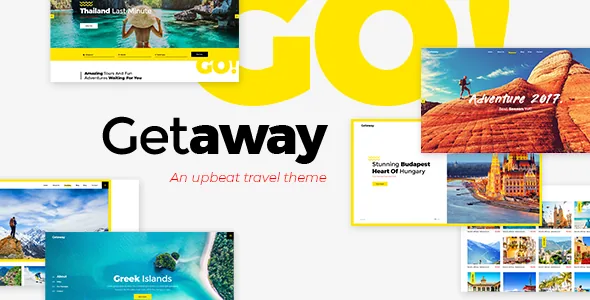
Many travel themes treat a trip as a styled landing page: hero image, itinerary copy, contact button. Getaway's vendor splits the content instead. The feature list names a Tour custom post type and a Destinations custom post type, with destination list and single destination templates called out in the description.
That distinction decides how the site grows. Tours become records you can query, filter, order and attach to a destination, instead of one-off pages rebuilt each season. The shortcodes follow the same logic: Tours List, Tours Carousel, Tours Filter and Destinations Grid each render a set of entries rather than a single layout you paste in.
The vendor also lists three tour list presentations — Standard, Masonry and Gallery. Those are display choices layered over the same entries, so changing the look doesn't mean re-entering the content.
The filter is the part visitors actually use
The vendor singles out an easy-to-use search filter, and the feature list carries a Tours Filter shortcode. On a site selling trips, browsing is the decision step: people narrow by destination, duration or price before committing.
One changelog entry shows how specific that filter gets. Version 1.7 fixed the tour search price range not displaying properly when the currency position is set to the right side — a bug that only appears in a filter with a numeric range. Read it as evidence of price handling inside the search, not as a promise about how many fields the filter exposes.
The booking plumbing sits in theme plugins rather than the theme itself: Select Core, Select Tours and Select Membership all appear as versioned components in the changelog. How far you can reconfigure the booking flow without touching them is not described.
Booking, accounts and a dashboard on the front end
The vendor's framing is a self-service loop: booking functionality for tours with payment enabled through PayPal, plus user login, a user dashboard and login through social networks. A visitor creates an account, books a trip and manages it from the front end instead of emailing you.
PayPal is the only gateway named anywhere in the supplied material. No card processor, currency list or deposit model appears, so if your business needs those, treat them as open questions rather than assumed features.
The vendor also publishes a way to look at the account area without buying: test credentials (username and password both "test") for signing in to the user dashboard on the demo site. That shows the vendor's demo configuration, not what your own customers will see.
WPBakery builds the pages, and two plugins are claimed as bundled
Pages are assembled in WPBakery Page Builder. The vendor states that WPBakery ($46 value) and Slider Revolution ($26 value) are included with the theme, and the marketplace compatibility attributes separately list WPBakery as a compatible plugin — one is a bundle claim, the other a compatibility claim.
Those dollar figures describe what the vendor says the marketplace product includes. They say nothing about licences you already hold or about update entitlements. If the bundled arrangement is central to your plan, confirm it against the copy you actually receive.
The shortcode list is broad and occasionally travel-specific: Customizable Google Map, Vertical Split Slider, Video Button, Banner, Countdown, Text Marquee, Pricing Tables and Elements Holder, alongside the tour and destination ones. Google Maps gets its own changelog attention — version 1.7 fixed deprecated addDomListener and google.maps.Marker calls, and 1.8 records improved Google Maps API compatibility — which suggests the map is a live dependency rather than a static image.
Translating tours depends on WPML, which is not part of the theme
WPML appears both in the compatibility attributes and in the vendor's feature list as translation ready with WPML plugin compatibility. Version 1.7 added a WPML config file, the artefact that tells WPML how to handle custom post types and taxonomies — relevant here precisely because Tours and Destinations are non-standard content.
WPML is a separate plugin and nothing in the supplied material says it ships with the theme. Selling the same tours in more than one language means budgeting for that plugin and for translating tour meta as its own piece of work.
The same release added a Disable Google Fonts option. With 800+ Google Fonts on offer, that switch matters where Google-hosted fonts are unreliable or blocked. It affects new page loads; it won't retroactively change fonts already cached in visitors' browsers.
The changelog shows which integrations have already broken
The update log is unusually candid about dependencies the vendor could not keep alive. Version 1.7 removed the Twitter plugin and the Instagram plugin, both attributed to API changes, and dropped the Google Plus login and share options. Version 1.8 removed the twitter-connect script.
The practical reading: anything leaning on a third-party social API is the most likely thing to vanish between releases, and the feature list still mentions Twitter Feed, Instagram Feed and social-network login. Those are vendor feature claims; the changelog shows some of them have already been trimmed. Check what your build really provides before designing a homepage section around an Instagram grid.
Other entries show how the theme is maintained. Version 1.5 added PHP 8 compatibility and 1.7 improved it; the Countdown shortcode gained a dynamic year span in 1.7; 1.8 improved framework scripts and theme security and updated WPBakery to 8.7.2 and Revolution Slider to 6.7.51. None of that establishes a support period or future updates.
Declared compatibility, and the photography you must supply
The marketplace attributes, as observed on 4 November 2026, list WordPress 6.5.x through 7.0.x and WooCommerce 9.x.x and 10.x.x alongside WPBakery and WPML under Compatible With. The 1.8 changelog states WooCommerce 10.x compatibility was added. These are vendor and listing declarations, not a test matrix; nothing supplied documents hands-on checks of any specific combination.
The browser list is worth a glance for what it reveals about the theme's age — IE10 and IE11 stand next to Chrome, Firefox, Safari, Opera and Edge. It is an inherited attribute, not a modern recommendation.
One caveat the vendor states plainly: the demo images are presentational only and it does not own their copyright. Photos in the preview cannot be reused on your site without a separate stock licence. For a travel site that is the first real cost to plan, because the theme's appeal rests almost entirely on destination photography you supply or license yourself.
WooCommerce compatibility widens the picture beyond tours: a Dropdown Cart widget is listed among the theme's widgets, and one changelog entry says the cart widget was stopped from loading on the cart page. Whether a shop belongs in your plan is up to you — the compatibility attribute alone doesn't mean any demo requires WooCommerce.
Questions & answers
Does Getaway handle bookings, or only present tours?
The vendor describes booking functionality for tours with the option to enable payment via PayPal, plus user login and a user dashboard. Those features belong to the theme's tour system, which the changelog shows running on the vendor's Select Tours and Select Membership plugins. PayPal is the only payment method named in the supplied material.
Can I try the user dashboard before buying?
The vendor publishes demo credentials — username "test", password "test" — so you can sign in on the front end of the demo site and look at the dashboard. It reflects the demo configuration rather than your own setup.
Are the demo photos included with the theme?
No. The vendor states it does not own the copyright for the demo images and that they are used for presentation only; putting them on your own site requires a separate stock licence.