Expanding Tiles: the one layout with Ajax built in
Elated-Themes lists an "Innovative Blog Expanding Tiles Layout" and, separately, the "Opening of Blog Posts via Ajax" inside that layout. Read the pairing closely: the Ajax behaviour belongs to that one template, not to every index in the theme.
What it gives a reader is continuity. Someone scanning tiles keeps their place, and the article opens over the listing instead of replacing it, so sampling several short posts does not mean a back-button round trip each time. The thing to test before you commit a deep archive to it is your sharing setup: a post opened inside the tiles is not the same experience as a visitor arriving on its permalink. Check that whichever sharing or social plugin you use produces a working link.
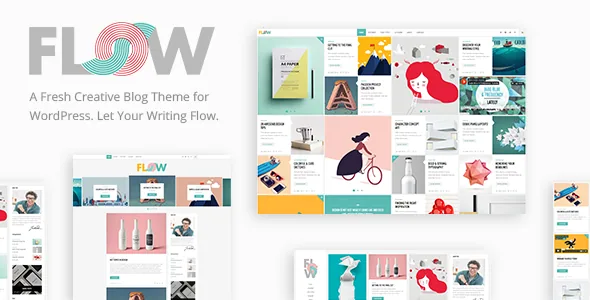
The larger point is that Flow treats the blog index as a designed page rather than a default listing. If the articles are the product on your site, that emphasis is the reason to keep reading.
Sorting the layout roster by how people read
The vendor copy counts nine homepage layouts, and the feature list adds a long set of blog list templates underneath them. Sorting that list by reading behaviour is more useful than sorting it by name.
Expanding Tiles, Masonry and the Waterfall Slider reward scanning. They give thumbnails the visual weight, which suits a photography, illustration or design blog where the image is the entry point. Blog Post Slider and Blog Post Carousel push that further by moving content on their own, which works for a small set of featured posts and works against a reader trying to browse a long archive.
Split Column, Standard and Whole Post are sequential. Whole Post puts the article text on the index itself, which fits short essays and fights anything long or image-heavy. Split Column sets image and text side by side, which holds together when posts share a consistent media format. Standard is the least demanding of your thumbnails and the most tolerant of plain excerpts. Pick the index your publishing rhythm can actually feed.
Post formats and what they change on the page
Flow registers custom post formats for Audio, Video, Standard, Gallery, Link and Quote. The vendor copy also mentions support for SoundCloud audio links, which points at a music, podcast or audio-journal direction: an audio entry can present a player rather than a header image.
The formats let one index hold visibly different kinds of entry — a quote with a source, a link with a short note, a gallery of images. That variety pays off only if you assign formats deliberately; inconsistent tagging produces an index that looks arbitrary rather than varied. Related posts are listed as appearing on blog pages, and social sharing is included both as post functionality and as a Social Share shortcode you can place inside content.
WPBakery for pages, anchors for one-page sites
Composition outside the blog runs on WPBakery Page Builder, which the marketplace lists under compatible tools and the vendor says ships with the theme. That is how a landing page, an About page or a custom archive gets built from rows and elements.
The feature list also names one-page site support with anchor functionality, a Call to Action shortcode, video backgrounds, full-height parallax sections and parallax background images in content. Together that covers the non-blog side of a creative site: a single scrolling page with menu items that jump to sections and a CTA block where the scroll ends.
On the block editor, the changelog shows compatibility with the Gutenberg plugin added in version 1.6 in 2019, and the current listing does not declare Gutenberg optimisation either way. That tells you nothing definitive about editing posts in blocks today, so confirm it against the theme version you actually run rather than assuming either answer.
Logo variants and header states
The header settings are granular for a blog theme. The vendor lists multiple header types plus sticky header behaviour, sticky-on-scroll-up, a fixed header, a header top bar, and separate widget areas for header top, header bottom and a sticky header.
The logo system is the part worth planning around. There are separate logo variants for the sticky header, the mobile header, and dark and light header skins, plus separate options for the mobile header. A long wordmark that looks balanced at desktop width usually collapses on a phone; a dedicated mobile file lets you supply a shortened or stacked version instead of letting the theme squeeze the desktop one. The dark and light variants matter as soon as you change the header skin on a page — without them, a light header leaves a dark logo sitting on a light background.
Footers follow the same pattern: multiple footer widget areas, an optional one-to-four column layout, separate footer top and bottom regions, and an "Uncovering Footer" effect, with a content bottom area and a sticky sidebar widget rounding out the structure. Set the column count around the widgets you will keep populated; four columns with one footer widget reads as an empty shelf.
What version 1.9 changed, and the gap before it
The 1.9 changelog entry, dated 31 October 2025, contains one line that changes what the theme ships with: the Elated Instagram Feed plugin was removed because of Instagram API changes. The feature list still advertises an Instagram Feed Widget. Those are not necessarily in conflict — a widget area can exist without a working feed behind it — but if an Instagram strip is part of your homepage or sidebar plan, assume you will add a third-party plugin and check what remains in the installed theme.
That same release added WordPress 6.8.x and PHP 8.3 compatibility, moved WPBakery Page Builder to 8.7.2 and Elated Core to 1.4, revised the WPML config, and lists Google Maps API and theme security improvements. The previous entry is version 1.8 from December 2022, which is the detail worth noticing if you expect frequent feature work.
Two practical limits come from the vendor's own copy. The demo images are presentational only and cannot be reused without a stock licence, so a fresh install will not look like the showcase until your own photography is in. Older entries still mention IE10 and IE11 in the declared browser list, which reflects the theme's 2016 origins rather than a recommendation; the packaged files are PHP, CSS and JS.
Reading the WordPress compatibility claim
The marketplace attributes recorded on 4 November 2026 declare support from WordPress 6.4.x through 7.0.x, while the 1.9 changelog itself only records 6.8.x. Those statements were written at different moments, and only the attribute list names the 6.9.x and 7.0.x lines.
That gap matters more here than on a lightweight blog theme, because Flow delegates a lot of behaviour to plugins: Elated Core carries shortcodes and theme framework code, WPBakery carries the page-building interface, and the WPML config was rewritten in 1.9. Each of those has its own release schedule, so a theme declaring a newer WordPress line is only as current as the oldest component in that group. None of this reflects an install on your stack; treat the ranges as declarations and check them against your own PHP version and plugin set.
Questions & answers
Does the Ajax post opening work on every blog layout?
The vendor scopes it to the Expanding Tiles layout. Other index templates such as Standard, Masonry, Split Column, Whole Post and the sliders are listed separately without that behaviour, so a click there behaves like a normal link.
Can I still show an Instagram feed?
The bundled Elated Instagram Feed plugin was removed in version 1.9 because of Instagram API changes, although an Instagram Feed Widget still appears in the feature list. Plan on a third-party plugin if the feed is essential.
Is WPBakery required for publishing blog posts?
WPBakery is how the theme composes pages — landing pages, About pages and similar layouts. Blog posts are authored with the standard editor and the registered post formats. You need the builder for designed page layouts, not for writing an article.