Schedule layouts render the same event record eight ways
The vendor's feature list counts 8 Event Schedule Layouts, and its description says a schedule row carries the date, title, time and the people attached to a talk, workshop or event. Those fields stay the same; only the presentation changes. So the layout choice is a question about your programme, not about which screenshot looks best.
A single-track day with long session titles reads well in a stacked list. Parallel tracks across rooms need a grid a visitor can scan by time, and the same event records can look tight there. Because the layouts share their fields, switching to a different rendering later is a re-selection rather than a rebuild of content.
The event display addon also has controls the changelog attributes to version 1.3: Day-01 and Day-02 label text, and a date format setting. Those are the settings to look for when your programme says "Friday" rather than a numbered day.
Speakers exist as their own content, with a documented limit
Speakers are not just names inside a schedule row. The vendor lists 3 Speakers Layouts and describes a separate speaker section that helps attendees recognise familiar faces before they buy a ticket.
The changelog shows this area developing: version 1.5.2 added a single speaker page and support for 5 speakers per event, version 1.5.8 fixed speaker detail page content, and version 1.6.7 raised speaker support to 10 per event. Check the 10-speaker figure against the panels on your programme before you commit; if a session carries more names, find out how the overflow renders in your installation instead of assuming it is handled.
Version 1.6.7 also lists a fix for date and time localisation. That matters for any countdown or start time shown to visitors in another time zone, so look at the front end from outside the event's zone before you publish.
The one-page and multi-page sets are different site plans
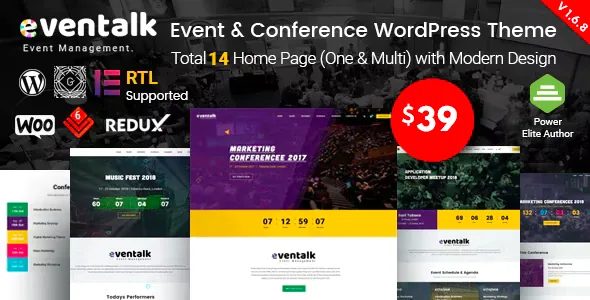
The vendor describes 12 unique homepage layouts and the feature list splits them evenly: 6 Home Pages (Multi Pages) and 6 Home Page (One Page). Version 1.6.3 later added a music-events homepage in both forms, which suggests the paired arrangement is deliberate rather than incidental.
That split decides more than a front page. A multi-page build gives registration, venue, travel and ticket information their own URLs, which matters when a link goes into a confirmation email, a sponsor deck or a printed programme. A one-page build compresses everything into anchors on a single scroll, which suits a compact event with a short schedule and little that needs a standalone address.
Whichever set you choose, the layout also fixes the section order you will work inside. Pick the sequence that already matches how your event is explained, then replace copy and imagery.
Headers under 4 styles, and the navigation job they do
The vendor lists 4 inner Header Styles that can produce 15+ header variations, plus a dynamic page header. On a conference site the header carries the schedule, speakers, tickets and venue, so the variation affects how quickly a visitor can reach a session time.
A one-page build leans on the menu as anchor navigation, which puts more weight on a header that stays visible while the page scrolls than on a large hero-only arrangement. The changelog records header work in several releases, including a 1.4.9 fix for top-bar icon spacing when icons were empty and a 1.6.2 fix for the mobile header button. Check the mobile state of your chosen header, since attendees look up times on a phone inside the venue.
Where a rebrand actually happens
Pages are assembled in Elementor, which the vendor lists as included. Site-wide styling lives somewhere else: the vendor points to the Live Customizer for real-time option changes and to a Redux admin panel, with unlimited colour combinations and Google Fonts listed as the font source.
The consequence is a two-place rebrand. Section content and arrangement belong to Elementor; accent colours and typography come from the Customizer and Redux. Change a brand colour and you may still need to revisit any Elementor section where a colour was set by hand.
Two starting-state tools are worth knowing. A one-click demo importer gives you a working page to inspect rather than an empty canvas — the content is the vendor's demo material, so treat the imported copy as a starting point. A child theme is also included, which is the safer place for template edits.
The marketplace compatibility attributes observed on 4 November 2026 name Elementor, WPML and Bootstrap 4.x, and Gutenberg Optimized is marked Yes. That declaration does not tell you how a page mixing blocks and Elementor sections will behave, so pick one editing route per page.
Countdowns, translations and the upkeep trail
A theme for dated events depends on its countdown staying accurate. The changelog records a new countdown layout in 1.7.1, a responsive countdown banner fix in 1.7.7, and a countdown issue fix in 1.7.9. The two most recent entries, 1.7.8 and 1.8.1, list PHP security fixes, PHP error fixes and a licence issue.
Plugin upkeep is the recurring pattern: LayerSlider, Eventalk Core and RT Framework appear in release after release. The vendor states that a premium LayerSlider licence is bundled with the theme, so read the terms attached to that bundle rather than assuming it tracks the plugin's own release schedule indefinitely.
For multilingual sites, WPML is listed as supported and a .pot file is included for custom translations. The changelog records multilingual data-format and translation fixes in 1.5.0 and 1.5.1, and an RTL version was added in 1.1. If the event runs in more than one language, test the schedule and speaker records first — they carry the most structured text.
The remaining declarations come from the marketplace attributes observed on 4 November 2026: WordPress 4.9.x through 7.0.x, browsers listed as Chrome, Safari, Firefox, Opera, Edge and IE11, a 4+ column layout, a widget-ready sidebar, and PHP, CSS and JS files. These are vendor statements rather than results from running the theme against your own PHP build, caching layer and plugin mix. The theme is sold on the marketplace under Regular or Extended licence terms.
Questions & answers
Does Eventalk support selling tickets?
The vendor describes the theme as a way to start an event, an event shop and an event schedule, and the changelog records WooCommerce upkeep — an outdated template fix in 1.7.6 and a ShopBuilder addition in 1.7.5. Treat ticket sales as a WooCommerce configuration task and confirm the shop requirements on the current listing rather than assuming a demo ships with a working checkout.
Can I change the date format and the day labels in the schedule?
Yes, according to the vendor changelog: version 1.3 added a date format control plus Day-01 and Day-02 text controls to the event display addon. Those settings are where you adapt the schedule to your programme's wording instead of editing templates.
How many speakers can a single event list?
Version 1.6.7 of the changelog lists support for up to 10 speakers per event, raised from 5 in version 1.5.2. If your programme includes larger panels, check how the extra names display before publishing.


