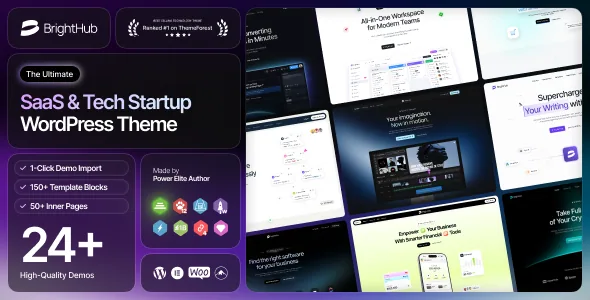
A demo library that keeps gaining new product angles
Most startup themes ship their demos once and then spend changelog space on bug fixes. BrightHub's release history reads differently. Version 1.0.5, dated 10 January 2026, added three homepage concepts at once: Home AI Video Generator, Home SEO Audit & Optimization SaaS and Home B2B SaaS Studio. Earlier releases follow the same pattern — Home Company SaaS in 1.0.1, Home Fintech Saas in 1.0.2, Home E-commerce Chatbot Saas in 1.0.3.
That is the practical reason to consider this theme. The concepts are named after real SaaS categories, so you can tell at a glance whether one matches the product you are marketing. A company selling an audit tool or a video generator has a closer starting point than a generic startup hero would give.
According to the marketplace description, the count stands at 24+ pre-built websites, split between 12 multipage and 12 onepage designs, alongside 25+ inner pages. The description also mentions 14+ homepage concepts in one place and 24+ websites in another; read the 24+ figure as the fuller statement of what is available.
Headers, footers and mega menus are edited in the builder
The vendor describes the mega menu, desktop header and footer as builder-supported, and says you adjust them with Elementor rather than through a fixed set of header styles. With 12+ header templates and 12+ footer templates listed, the workflow is: pick the closest arrangement, then change it in the builder.
For a product site this matters more than it sounds. A SaaS navigation usually has to carry several different paths — product, pricing, docs, customers — and a mega menu is often where those paths are organised. Having that menu editable in the same tool as the page means one editing environment instead of two.
Sticky behaviour is listed separately: a sticky menu on scroll and a sticky mobile header. Those are toggles in the theme's own settings, not builder creations.
Multipage or onepage: two routes through the same theme
The 12 onepage demos go with a stated Onepage Navigation feature, described as built in with smooth scroll. So the onepage route is a supported way of working, not a demo you have to disassemble.
That said, the two formats serve different buyers. A launch page for a pre-release product can live on a single scrolling page with anchor links, and the smooth-scroll navigation gives that page its menu without extra plugins. A site that has to explain pricing tiers, integration details and a docs section usually needs separate URLs that can be linked to and indexed on their own.
The 25+ inner pages are the other half of that decision. Blog, portfolio, testimonial and shop pages are all named in the description, so the inner-page inventory covers the standard company pages rather than only product marketing ones.
Global options, then per-page overrides
BrightHub keeps two levels of settings. Theme options hold site-wide choices — colours, fonts, and general layout — and the vendor says the colour options are unlimited, which in practice means a picker rather than a fixed palette.
Page and post options sit below that and override the global settings for a single entry. This is the setting that lets one install carry a bright campaign landing page and a plain legal page without those two designs fighting each other in the global panel.
The changelog adds one small point worth knowing for anyone who cares about on-page markup: version 1.0.6, dated 8 April 2026, introduced title tag options for each widget under an SEO optimisation entry. If heading hierarchy matters to your build, that gives you control at the widget level.
What the declared compatibility covers, and what it leaves open
Observed on 4 November 2026, the marketplace attributes list compatibility with Elementor, Contact Form 7, WPML and WooCommerce from 6.x through 9.x, with WordPress versions running from 5.0.x to 7.0.x. Declared browsers are IE10, IE11, Firefox, Safari, Opera, Chrome and Edge. The included files are PHP, SCSS and JS.
The same attributes mark Gutenberg Optimized as No. That is a statement about optimisation for the block editor, not a claim that the block editor is unusable; on a theme whose pages, headers and footers are all built in Elementor, plan to edit in Elementor.
The vendor's own plugin list goes further than the attributes: Case Addons and Case User as exclusive plugins, Slider Revolution as a bundled slider, plus MC4WP, Booked, Tidio Chat, WPC Wishlist, WPC Quick View and Variation Swatches for WooCommerce. Treat all of these as declared integrations you install and configure separately. The child theme is stated to be included in the package, which is where structural customisation belongs if you want it to survive an update.
Settle the concept list before you commit
The listing tells you how many header templates, footer templates and homepage concepts exist, and the changelog names several of them. What neither can tell you is whether the specific combination you want — say, the fintech homepage with the B2B header — sits in the build you receive.
The vendor's demo URL is the place to check that, and the changelog is worth a read for the same reason: it shows which concepts arrived when, so you know whether the one you picked is long-established or brand new.
Questions & answers
Does BrightHub work with the block editor?
The marketplace listing marks Gutenberg Optimized as No, which describes optimisation rather than availability. The theme's page, header and footer layouts are built in Elementor, so that is the editing workflow the demo content assumes.
Is WooCommerce required to use BrightHub?
No. WooCommerce appears as a compatibility entry covering versions 6.x through 9.x as observed on 4 November 2026, and the theme lists shop-related templates and wishlist, quick view and compare features. A marketing site without a shop does not need it installed.
Can I run a one-page site instead of a multipage one?
Yes. The vendor lists 12 onepage demos plus an Onepage Navigation feature with smooth scroll, and the remaining demos are multipage for sites that need separate, linkable URLs.


