Category colour and category image change how you plan sections
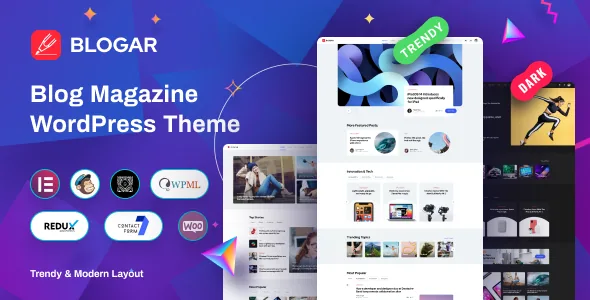
Most blog themes give you a front page and a post template. Blogar's feature list adds two controls that belong to the category term itself: category colour and category image. A Tech desk, a Lifestyle desk and a Travel desk can each carry their own identity without three sets of page templates.
The June 2026 release, version 1.3.4, paired those with something logical: integrated category search. Once categories are visually distinct, finding the right one matters more.
Planning shifts accordingly. You decide how many sections the site runs and what each looks like, then let archives inherit that identity. The vendor description does not show the admin screens or say whether the colour reaches archive headers, post labels or both, so treat the exact scope as something to confirm rather than assume.
Post format and single post layout are two different choices
Blogar lists post formats as Standard, Video, Audio, Gallery, Quote and Text Only, and separately lists 5+ different single post layouts. These meet on the same page but come from different places.
Post format is a property of the individual article and describes what it is: a gallery feature, an embedded video, a pulled quote. Single post layout is a template-level choice about framing, such as header arrangement and sidebar behaviour. In practice you pick a frame per template and a format per article.
A site that publishes mostly reviews can settle on one layout and leave the other setting alone. A site mixing video interviews with photo-led galleries will feel the format list, because each format implies different material to prepare. The seller does not map layouts to formats, so don't promise a client a specific pairing until you have seen it working.
Unlimited sidebars, and the widgets that fill them
Sidebar placement is listed as left, right or none, and the theme lets you create unlimited sidebars. That, more than the placement toggle, is what a multi-section magazine needs. One global sidebar becomes a compromise as soon as the site has a travel archive and a tech archive with different readers.
Separate sidebars, combined with per-category styling, let each section carry its own page furniture. The theme's own widget list is a sketch of the intended furniture: recent posts, about, categories, contact info, information and social network. A newsletter signup box or an author grid isn't covered, so plan on a third-party widget or an Elementor-built block, and check how it renders inside whichever sidebars you create.
Ads manager and AMP support are separate commitments
Two entries in the feature list read like one line about monetisation. They aren't.
The ads manager concerns inventory you control. If it places and rotates your own banner inventory instead of you pasting code into widgets, that shapes the editorial plan: how much room a sponsored slot takes above the fold, whether banners need mobile variants, and whether placements survive a change of post layout. The description doesn't detail the manager's controls, so scheduling and device-specific slots are open questions to settle from the demo or the documentation.
Google AMP ready is a different kind of claim. AMP output constrains what a page can run, and ad slots are often the part that needs separate handling. Nothing in the supplied material explains how ad placement or the dark/light switcher behaves under AMP. If advertising is part of the revenue plan, test the two together before launch.
What the changelog reveals about the dark/light switcher
A dark/light mode switcher is more than a cosmetic option on a reading-heavy site: long sessions, evening browsing and OLED screens all make it useful.
The release history is unusually candid about it. Version 1.1.2, from July 2021, fixed "Dark Mode Not Looking Right on Mobile" along with a featured image cropped on mobile; 1.2.1 in November 2021 and 1.2.2 in March 2022 both fixed colour issues on the dark version. That record shows the switcher received attention through the theme's first year and a half, and shows that a second colour scheme has to be maintained across layouts.
If you build heavily with Elementor and third-party widgets, check those pieces in both modes. The vendor confirms the switcher exists; it doesn't promise that every plugin you install will respect it.
Where the pieces live: Blogar Core, ACF, Redux and Elementor
The vendor names Blogar Core and Blogar Demo as its own plugins, with Elementor for page building, Advanced Custom Fields, Contact Form 7, MC4WP for Mailchimp, Redux Framework and Smash Balloon Instagram Feed alongside. Gutenberg is marked as optimized, so the block editor remains usable rather than being shut out.
That arrangement tells you where your work ends up. A core plugin plus ACF means much of the content behaviour is registered outside the theme files, which usually survives theme updates better. Redux sits behind the admin options panel the vendor calls fully customizable; Elementor handles layout; Contact Form 7 handles enquiries while Mailchimp signups go through MC4WP. The .pot file and listed WPML compatibility cover translation.
The changelog reinforces the dependency: ACF PRO is updated in nearly every entry from 2022 onward, and version 1.3.3 in October 2025 also refreshed the WooCommerce template and added an AI Job Listing plugin. A theme that ships its own ACF PRO updates is one where you shouldn't drop in a separate ACF PRO copy without checking compatibility.
Demo content supplies structure, not photography
The vendor states plainly that images and videos are for demo purposes only and are not included in the bundle, crediting Unsplash, Pixabay and Shutterstock as sources. Blogar's demo photography is what demonstrates the category colour and category image features, so this is a working constraint: the import gives you layout, typography and page relationships, and you supply the images that make it look convincing.
Both import routes are listed, the one-click demo importer and manual XML import for an existing site, which matters if you are reworking a running blog. Red Hat Display from Google Fonts and Font Awesome Pro are the named type and icon sources, and the declared file package contains PHP, CSS, SCSS and JavaScript with a child theme.
The declared compatibility record, read carefully
On the marketplace listing as recorded on 4 November 2026, the latest marketplace version is 1.3.4 with a vendor update dated 26 June 2026. The theme is listed as compatible with WordPress 5.0.x through 6.2.x, Elementor, WooCommerce 5.x.x, WPML and Bootstrap 4.x. It is built on the Underscores framework, is widget ready, high resolution and well documented, and the browser list runs from IE11 through Chrome and Edge.
The Internet Explorer entry says more about when that list was assembled than about what a current build needs. The more consequential detail is the WordPress ceiling: declarations stop at 6.2.x while releases continued into 2026. Check the version you actually install and test it against the WordPress release you run. The same caution applies to WooCommerce 5.x.x, which is declared even though templates were updated in later releases. These are vendor and marketplace claims, not results from testing Blogar against your plugin stack.
Questions & answers
Can each category have its own colour and image?
Category colour and category image are listed as separate features, which points to styling applied per category term rather than one global accent. The description doesn't show the admin screens or say whether colours affect archive headers, post labels or both, so confirm the scope before building a section strategy on it.
Do ad slots still work on AMP pages?
The listing claims Google AMP readiness and lists an ads manager separately, but nothing in the supplied material describes how advertising placements behave in AMP output. Test the two together if ad revenue is part of the plan.
Can I use the block editor instead of Elementor?
The theme is marked Gutenberg optimized and the vendor lists Gutenberg Ready, so the block editor is a supported route. The designed demos and page layouts are built in Elementor, so a block-based build means composing those pages yourself.