Three feeds instead of one blog archive
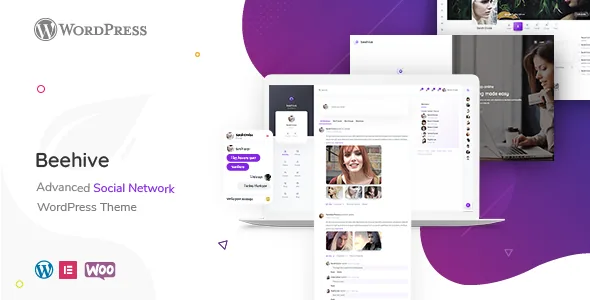
The vendor's feature list separates member content into three streams: a news feed that shows what is happening among friends and around the site, a photo feed that collects every image members post into a Pinterest-style grid, and a video feed that aggregates posted videos. Those are described as theme features, which matters because they change what your site is for. A blog theme asks you to write posts; Beehive assumes members generate the material and gives each content type its own browsing surface.
That distinction should shape your planning more than any colour setting. If your community is mostly text discussion, the photo and video feeds will sit fairly empty, and the news feed carries the experience. A photography or clips-driven audience is the opposite case, where the two media feeds do the visible work and the written activity stream is secondary.
BuddyPress does the data side; the theme decides how it is presented. The vendor lists compatibility with BuddyPress 9.x and 10.x, so the activity, profile and group structures behind those feeds come from the plugin.
Friends, groups, chat and messages
Behind the feeds sits the interaction set the vendor names: member search and friend connections, groups that users create and join, comment/like/notification activity, private messages, and chat that includes group chat. Read as a list, these are the mechanics of any social network. What you actually need to decide is how much of that surface you want to expose at launch, because each one gives members another place to be and moderators another place to watch.
The vendor points at two plugins that extend this layer. BP Better Messages is described as a drop-in replacement for the standard BuddyPress messaging system, adding realtime messaging, file sharing and an emoji selector. Block, Suspend and Report for BuddyPress is named for blocking, suspending and reporting users. Neither is described as bundled with the theme, so treat both as separate installations and check their current status against your BuddyPress version before committing.
One boundary in the vendor's description is easy to miss: the Paid Memberships Pro integration is listed with the note that demos are coming soon and more integrations are on the way. The feature exists as a stated capability, not as a demonstrated setup.
The optional routes: forums, jobs, classifieds, shop
Four additional features sit on top of the community layer, and each one pulls in its own plugin. Forums run through bbPress, listed as compatible in versions 2.5.x and 2.6.x. A job board comes from WP Job Manager, which the vendor says inserts job search functionality. Classifieds let members post ads. A WooCommerce shop, listed as compatible with 5.x and 6.x, handles products.
These are not interchangeable add-ons; they serve different communities. A forum suits a support or hobby community where threads are the main content. A job board suits a professional network. Classifieds suit local or secondhand marketplaces. A shop suits a community that sells something to its members or the public. Dropping all four into one site produces four moderation queues and four sets of member expectations.
The membership note is the part that ties them together. Paid Memberships Pro is described as able to restrict certain BuddyPress, WooCommerce and bbPress features by membership level — which means the paid tier gates multiple systems rather than a single content area. If you plan to charge for access, decide early which of those systems is the reason people pay, and leave the rest open.
Private community and moderation as one decision
The vendor describes a private community setting that blocks internal content from guests and turns the site into a private social network. It is presented as a single capability rather than a set of granular permissions, and it is the most consequential structural choice in the theme. A public site with gated extras and a closed member-only site are different products, with different onboarding, different search visibility and different expectations about what a stranger can see.
That choice becomes sharper when you read it alongside the moderation plugin. Blocking, suspending and reporting users only earns its keep once strangers can join — a strictly invitation-only network makes much of that toolkit redundant, while an open registration network needs it from day one. The vendor does not describe the granularity of the guest blocking, so how much of a profile or an activity stream stays visible is a question for the documentation rather than something to assume.
The vendor's own summary sentence is worth holding onto: Beehive is described as a social network theme with social features, a shop, a job board and classifieds. Every one of those is a plugin relationship rather than theme-only code.
Editing pages in Elementor while members own the content
Page building happens in Elementor, listed as compatible, and the marketplace record marks Gutenberg Optimized as Yes — which speaks to block-editor readiness rather than proving how every template behaves. Alongside the builder, the vendor lists a theme options panel, unlimited colours chosen with a colour picker, unlimited widget-ready sidebars, Google Fonts selection, AJAX search that filters without a page reload, and an AJAX login form that signs members in without sending them to the WordPress login screen.
The AJAX login detail is small but relevant to this kind of site: a community that keeps people inside its own pages benefits from not pushing them through a default WordPress screen. The unlimited sidebars are the feature most likely to become clutter, since a social network already presents a lot of navigation.
The vendor also claims a setup of installing the theme and plugins, importing demo data, and finishing, with a child theme included. Builders and options panels govern the static pages — the landing page, the about page, the shop copy. The activity inside Beehive is rendered from member data, so most of the visible design comes from the theme's templates and options rather than from page-by-page layout work.
Package contents and what the compatibility list does not say
The ThemeForest file list names PHP, CSS, SCSS and JS files, and a child theme is included according to the vendor. One exclusion is stated plainly: preview images are copyright protected and not included, so photography for a community site is your own cost.
Compatibility attributes observed on 4 November 2026 declare WordPress 5.6.x through 6.7.x, BuddyPress 9.x and 10.x, bbPress 2.5.x and 2.6.x, WooCommerce 5.x and 6.x, Elementor and Bootstrap 4.x. Those are vendor and marketplace declarations, not results from running the theme against your PHP version, caching setup or plugin combination. Gutenberg Optimized marked Yes describes the theme's block-editor posture; it says nothing about how a specific BuddyPress template renders in the block editor.
The Bootstrap 4.x reference is the one to watch if you plan custom templates, since it tells you which grid and utility classes the theme's own markup follows. If your project depends on newer BuddyPress or WooCommerce releases than the declared range, verify that before building on the theme rather than after.
Questions & answers
Do I need to install BuddyPress for the feeds to work?
The feeds are described as aggregates of member activity, images and videos, and BuddyPress is the plugin the vendor lists for that member data. The theme's declared compatibility covers BuddyPress 9.x and 10.x; check the documentation for the exact plugin requirements of your demo.
Can I run the shop without the community features?
The vendor presents Beehive as a social network theme with social features, a shop, a job board and classifieds together. Nothing in the supplied material describes a shop-only mode, so treat Beehive as a community theme where WooCommerce is an addition.
How does the membership restriction work in practice?
Paid Memberships Pro is named as compatible, with the vendor saying it can restrict certain BuddyPress, WooCommerce and bbPress features by membership level. The vendor also notes that demos are coming soon and further integrations are planned, so this is a stated capability rather than a documented walkthrough.