Custom fields per category, used for both posting and filtering
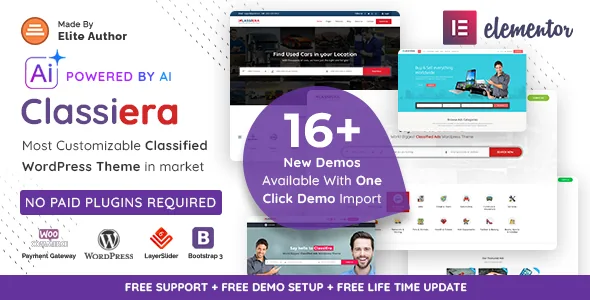
The most consequential thing in Classiera's feature list is small: custom fields for each category. In a classifieds site, that single choice decides whether a car listing can ask for mileage while a flat rental asks for deposit, and whether the buyer's search can filter on either.
JoinWebs pairs the feature with advanced search with custom fields, which tells you the same field set is intended to feed both the submission form and the result filters. That is the workflow worth checking first in the demo: define fields for two very different categories, post an ad in each, and see whether search exposes the right fields per category rather than one generic filter bar.
A theme without that arrangement forces every category into shared fields, which usually means a catch-all text box where structure should be.
Pay Per Post priced at the category level
Classiera's monetisation is category-based rather than item-based. The vendor describes Pay Per Post as setting a single ad price on a category basis, so the rate is attached to the category rather than typed in for each listing. A jobs board and a free furniture section can then carry different economics without you editing anything per ad.
Featured placement sits alongside that as a separate toggle. The vendor lists an on/off switch for featured ads, featured ads by category, and the ability for an admin to promote a regular ad to featured or demote a featured ad back. Membership plans cover the recurring side, and the listing declares WooCommerce 8.x.x and 9.x.x compatibility, which is where those plans are handled. Membership plans and Pay Per Post are described as parallel options, so expect to decide which model each section of your site uses rather than assuming they stack automatically.
Quotas: image limits and free-post limits
Two admin-side limits address the practical risk of a free tier. The vendor says the image upload limit for free and paid users is manageable, and that free ad posting limits are likewise set by the admin. That second control is the one that matters on a public classifieds site: without it, a free posting allowance is effectively unlimited and the paid tier has nothing to sell against.
Both are described as settings the admin manages. The vendor does not document how the limits are enforced or what a user sees when they hit one, so test the over-limit state rather than assuming it. Where those messages appear is exactly the kind of detail that shapes whether sellers trust the site.
What the buyer sees: search, views and location
The browsing layer is where a classifieds theme earns or loses repeat visitors. Vendor-described features include a most intelligent search claim, advanced search built on the custom fields above, grid and list view options, responsive list and grid layouts, and infinite scroll.
The changelog adds two smaller details that change day-to-day browsing. A Price Low to High filter arrived in version 4.0.36, and earlier updates refined custom fields inside the search filter. Google Maps with a Google API key and geo-location support are listed, so location-led categories such as real estate or local services can surface listings on a map.
Beyond the listing grid, the vendor also lists Buy/Sell and Sold tags, a report-an-ad system, making an offer to the ad author, and AJAX comments. Report and offer actions are the moderation and negotiation tools a marketplace needs; both are worth running through once with a test account.
AI-generated listing text is a seller convenience
Version 4.0.38 of the changelog records OpenAI, Google Gemini and DeepSeek being added for auto-generated text content, and the vendor summary describes generating listing titles, descriptions and SEO tags.
The useful framing is narrow: this sits inside the submission flow, helping a seller who would otherwise leave the description blank. It is not a substitute for the category fields, and nothing in the description suggests it decides where a listing appears. If you plan to use it, you will need your own API credentials for whichever provider you pick, and you should confirm in the demo account how the generated text is presented to the seller before it is published.
Elementor builds pages; Redux configures the marketplace
Two different tools do two different jobs here, and mixing them up leads to confusion. Elementor is the drag-and-drop page builder the vendor lists for page layout, and the changelog shows theme-specific Elementor widgets being added over time, including a FAQ widget and a header widget.
Listing behaviour sits elsewhere. A Redux Framework admin panel is described as the theme options home, and the changelog shows it updated to Redux 4. Layout controls that exist as switches include a home page layout manager, a top search bar on/off option for the whole site, sidebar-first on mobile, and list style on mobile. Think of Elementor as the place you design the homepage and content pages, and Redux as the place you decide how the marketplace itself behaves.
The theme files are listed as PHP, HTML, CSS and JavaScript, with a child theme included and .po/.mo translation files for localisation.
Seventeen named layouts, one of them Arabic
The vendor's demo list is unusually specific: Cherry, Plum, Lime, Strobe, Coral, Canary, Ivy, Iris, Allure, Ruby, Jade, Onyx, Pearl, Lilac, Opal, a Google Maps variant and Minimal. Changelog 4.0.40 also notes property, mobile and pets demos being included. A separate Modern RTL/Arabic demo covers right-to-left layout.
These are starting arrangements, not seventeen products. One-click demo import brings a structure in, and the named variants mostly differ in palette, header treatment and how listings are shown. That means the honest way to choose is by content fit: pick the layout whose listing density and category emphasis resemble your actual inventory, then restyle it. The vendor also publishes a shared demo login for the frontend user dashboard, which is the fastest way to see the seller-side screens rather than the marketing pages.
Ad slots as an operator revenue line
Version 4.0.19 of the changelog records Google Ads, HTML ads and banner ad positions on category pages, different placements for single ad posts, and an option between the content of a single ad. A later update added a Google Ads option for the single ad details page.
For a classifieds operator, those slots are a second revenue stream next to paid listings, and placement control matters because ad positions on a listing page compete with the seller's own photos. Because the changelog only records that the options were added, treat the exact positions and rotation as something to verify in a staging install before you sell inventory against them.
Declared compatibility, and one contradiction to note
The marketplace listing, observed on 3 November 2026, declares WordPress 6.0.x through 7.0.x, WooCommerce 8.x.x and 9.x.x, WPML, Elementor and Facebook, responsive layout, widget-ready areas and high-resolution assets. The marketplace version recorded at that time was 4.0.41. These are declarations attached to the listing, not results from installing or exercising the theme here.
One inconsistency is worth flagging because it affects styling work: the vendor feature list says the theme is built with HTML5, CSS3 and Bootstrap 3, and mentions Bootstrap 3.3.7 specifically, while the compatibility attributes list Bootstrap 4.x. If you plan custom CSS or child-theme overrides, confirm the framework version in the package you receive rather than trusting either entry alone.
The listing also records Gutenberg Optimized as No. That marks the theme as not tuned for block-based editing; it does not by itself prove the block editor is unavailable, and Elementor is the builder the vendor documents.
Questions & answers
Does Classiera charge sellers per ad or per category?
Both models appear in the vendor description. Pay Per Post is described as a single ad price set on a category basis, while membership plans handle recurring access and are tied to WooCommerce. How the two interact for a given category is not documented, so test the combination you intend to run.
Can I limit how many free ads a user posts?
Yes, the vendor lists an admin-managed free ad posting limit and a separate image upload limit for free and paid users. What a seller sees when they reach either limit is not described, so check it in a test account.
Is the theme RTL-ready?
The vendor lists RTL support and publishes a Modern RTL/Arabic demo alongside the English layouts, with .po and .mo translation files included in the theme package.
Does the AI listing generator require a paid subscription?
The changelog records OpenAI, Google Gemini and DeepSeek support being added for auto-generating listing text. The description does not say whether the theme supplies credentials, so assume you connect your own provider account and confirm the setup in the documentation.