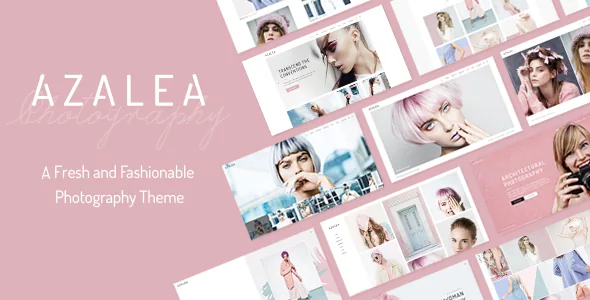
A photography theme that also has somewhere to put the client
Most photography themes solve one problem: showing finished work in public. The Azalea feature list names a second audience. "Password Protected Proofing Galleries," a "Proofing Gallery List shortcode" and a "Client Archive page" appear among the theme's listed features.
Read together, those describe a workflow that runs during a job rather than after it. A shoot is assembled into a gallery that only the client can open, those galleries are indexed for you to point people to, and the people you shoot are kept as their own archive instead of a row of logos. For a fashion or editorial photographer, that is a different site from a portfolio that stops at the public grid.
One limit is worth stating plainly, because it determines whether the theme can replace your proofing tool. The vendor does not describe selecting, approving or commenting on images inside a gallery. What is claimed is protected galleries plus a gallery index and a client archive, so check the actual interaction you need before you plan a job around it.
Twelve homepages, and demo photos you have to replace yourself
The short description is built on "twelve absolutely beautiful & completely customizable homepages." Twelve front-page arrangements inside one theme is a practical number for fashion work, since an editorial front page, a lookbook-led front page and a booking-led front page ask different things of the first screen.
The vendor adds a licence condition that shapes a launch more than any layout choice: it does not own the copyright for the images used in the demos, and those images are presentational only. You need your own photography or a separate stock licence for anything you publish. The page structure imports; the pictures do not.
Portfolio lists: three layouts, a filter and a pagination decision
The portfolio side is where a visitor actually moves through a body of work. The vendor gives a portfolio list three layouts \u2014 Gallery, Masonry and Justified Gallery \u2014 plus a category filter, hover animations, loading animations and optional parallax on the list. A portfolio item can then open in a Masonry, Gallery, Slider or Images single layout, so a series can be a grid, a slideshow or stacked frames.
Pagination is the choice that changes how an archive feels, and the theme offers three modes: Load More, Infinite Scroll and Standard Pagination. Load More keeps the scroll position stable and gives a clear stopping point; Infinite Scroll maintains the flicking rhythm; standard pagination makes pages addressable. Because the setting is applied per portfolio list, an editorial archive and a personal series can behave differently on the same site.
The shortcode catalogue, and the frame around the whole site
Azalea's components are shortcodes placed on the WPBakery canvas: banner, parallax, video button, testimonials, team, pricing table, clients carousel, call to action, animation holder, Google Map, social share and blog list. Contact Form 7 compatibility is listed separately, with multiple contact form styles.
Site-wide decisions sit outside the page canvas. The vendor lists five header types \u2014 Standard, Minimal, Centered, Vertical and Vertical Closed \u2014 with three behaviours (sticky, sticky on scroll up, fixed), separate mobile header styling with logo sizing, dark and light logo variants, multiple logo versions for specific headers, a mega menu and a boxed layout. There is also an option to enable a passepartout border around the website, the outer frame that makes a gallery site read like a printed book. If you want that frame, set header and footer spacing around it early rather than adding it after the pages are built.
Why the Instagram and Twitter widgets cannot be counted on
The feature list names an Instagram Feed Widget and a Twitter Feed Widget. The version 2.0 notes, dated 18 June 2025, record that the Elated Instagram Feed was removed because of Instagram API restrictions and the Elated Twitter Feed was removed because of Twitter API deprecation. The release notes are the later statement, so a current install should be expected to arrive without those feed plugins, whatever the feature list still advertises.
That turns social presence into a decision rather than a toggle: a third-party feed plugin, a curated gallery updated by hand, or outbound links through the social share elements. The same release is otherwise maintenance \u2014 PHP 8.3 compatibility, WooCommerce 9.x compatibility, Elated Core at 1.4, an improved WPML config, Google Map API work and security improvements, with WPBakery at 8.4.1 and Slider Revolution at 6.7.34 in the vendor's record of that release.
The package, the shop side and what the listing declares
Observed on the marketplace listing on 3 November 2026: the theme is recorded at version 2.0 with a vendor update of 18 June 2025, declared compatible with WordPress 6.3.x through 7.0.x, WooCommerce 8.x and 9.x, WPBakery Page Builder and WPML. Files are listed as PHP, CSS and JavaScript, documentation as well documented, and a child theme is included. The layout attribute describes a responsive design with four or more columns, and the theme is marked widget ready and high resolution.
WPBakery and Slider Revolution are described by the vendor as included with the theme. What actually arrives with a particular copy is a separate question from that description, so check the plugins screen after installing rather than assuming a version number.
WooCommerce matters if you want to sell prints, lookbooks or licensing, but the shop templates come from the plugin, so product and checkout behaviour follows WooCommerce and your settings rather than the theme. The child theme is the right place for changes you want to keep through updates.
Questions & answers
Can clients select or approve photos inside the proofing galleries?
The vendor lists password-protected proofing galleries, a proofing gallery list shortcode and a client archive page, and does not describe selection, approval or commenting tools. Test the workflow you need on a staging install before relying on the theme for client sign-off.
Are the Instagram and Twitter feed widgets still available?
The feature list names both widgets, but the 18 June 2025 version 2.0 notes record removing the Elated Instagram Feed and the Elated Twitter Feed because of API restrictions and deprecation. Plan a different route for social feeds.
Do I need my own photographs for an Azalea site?
Yes. The vendor states it does not own the copyright for the demo images and that they are presentational only, so you need your own photography or a stock licence for anything you publish.