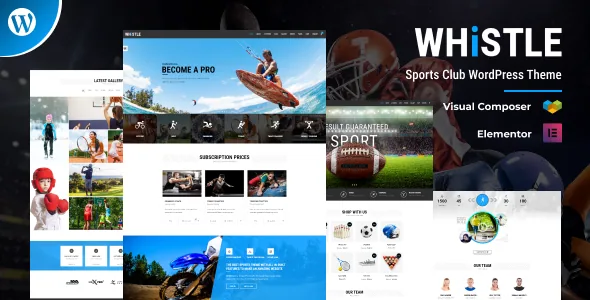
The signup form is the part that behaves like a club
Most fitness themes put their detail into hero images and class grids. Whistle's vendor description spends it on intake instead. The signup form has an optional image and a tabbed view that separates male and female responses, which the seller says is there so submissions can be split for later newsletter campaigns.
Whether that split matches how your club actually segments its list is your call. What matters is that the theme treats a signup as data you will sort, not a single email field. If you run separate training groups, that division has somewhere to live from the first day.
The enquiry form carries field validation. The vendor states that a completed submission returns a success message, while an incomplete one returns a notice asking the visitor to confirm the fields and submit again. Small, until you are collecting membership interest from people who abandon a form over one empty field.
Six views for an events schedule
Events are the second operational layer the vendor documents: management with list, day, week, month, map and photo views, plus a schedule block showing upcoming events at a glance.
Those views answer different visitor questions. A day or week view suits someone deciding whether to come tonight. A month view suits planning around a tournament or a holiday closure. Map view is the useful one for a club running sessions at more than one ground or hall, and photo view gives a gallery-style read of past fixtures.
The vendor does not name the calendar plugin behind any of this. If your schedule depends on a specific events plugin for ticketing or recurring rules, confirm what the event pages are built on before you commit to the layout.
Two home pages, three headers, and a color count that needs reading carefully
Whistle provides two home page layouts and three header styles. That is a modest set next to themes shipping a dozen demos, and enough if you want one public front page plus a variation for a campaign or a second club section.
The color story appears in two places and does not add up neatly. One passage claims more than 20 skin colors and patterns; another says the style picker offers 8 colors, and that combining them with light and dark variants gives 16 displays. Treat the second, more specific statement as the description of the actual picker.
Full width and boxed layouts are both listed, and the style picker is where the dark and light options combine. Sticky navigation keeps the menu within reach while someone scrolls a long fixtures page.
Galleries, carousels and the shortcode layer
Photos do a lot of work on a club site: facilities, teams, past events, sponsors. Whistle offers Grid and Masonry galleries filterable by category, full width or with a sidebar in two, three or four columns, plus a detail gallery.
Team and course sections use carousels according to the vendor, which keeps a large roster from pushing the rest of the page down. That suits a club with more coaches than fit in a static grid.
The composition layer is a shortcode collection covering buttons, lists, callout boxes, pricing tables, carousels, progress bars, columns, quotes, fancy boxes, tabs, toggles, icon boxes and typography. The vendor also lists Slider Revolution for image and video sliders, 700+ Google fonts, FontAwesome icons and a separate Stroke Gap icon set. Pages are assembled from these pieces rather than from a fixed template set, so the layout freedom you get depends on how comfortable you are arranging shortcodes.
What the listing declares about plugins and versions
Observed on 4 November 2026, the marketplace attributes list compatibility with Elementor and Elementor Pro, WPML, and WooCommerce from 5.x.x through 10.x.x, alongside WordPress versions from 5.6.x up to 7.0.x. The block editor attribute is marked optimized, and the theme's own metadata description says it works with Gutenberg as well as page builders.
These are declarations attached to the product, not results from an install. A long WordPress range does not prove that your particular combination of theme, Elementor and PHP build runs cleanly, and the block editor attribute does not tell you how deeply the theme styles blocks.
Commerce here is compatibility rather than a built-in shop. If you plan to sell memberships, merchandise or class credits, WooCommerce supplies the cart, accounts and checkout while Whistle supplies the surrounding design. The vendor's PayPal integration note relates to courses; check gateway setup against WooCommerce's own documentation for your region and currency.
Files and demo imagery
The marketplace file bundle lists PHP, CSS and JS files, and the listing marks the documentation as well documented with widget-ready sidebars and high-resolution assets. Support is described as knowledgebase articles, forums, videos and documentation.
One limitation appears plainly in the vendor's notes and affects budgeting: the photographs used in the demo are copyrighted and are not included. If you want the look from the preview, license comparable sports and fitness photography or shoot your own before you set a launch date.
Questions & answers
Does Whistle include the photographs shown in its demo?
No. The vendor states that the demo images are copyrighted and excluded, and offers to point buyers toward licensing the originals. Budget for your own photography or stock licenses.
Can I sell memberships or merchandise with this theme?
WooCommerce is listed as compatible from 5.x.x to 10.x.x, so a shop can run alongside the club pages. The theme provides the design around WooCommerce's cart, account and checkout rather than replacing them.
How many color schemes does the style picker actually offer?
The vendor gives two figures. One passage claims more than 20 skin colors; another describes 8 colors in the style picker, which combined with light and dark variants gives 16 displays. The second is the more specific description.


