Tours and destinations are content types, not pages
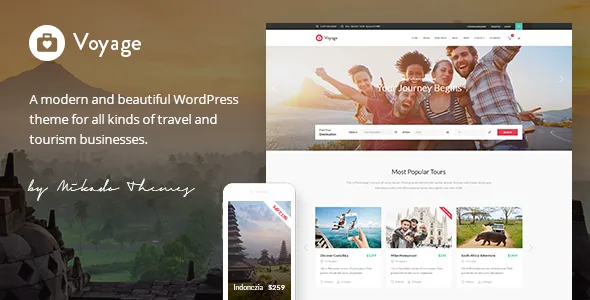
Most travel themes ask you to build trip pages one at a time and arrange them in a layout. Voyage's feature list starts from a different premise: it names a tour custom post type and a destination custom post type.
That distinction matters for a catalogue that grows. A tour stored as its own post can carry tour-specific fields, be listed by a filter, appear in a carousel, and be pulled into a sidebar widget without you rebuilding the layout each time. Destinations work the same way, which is what makes a destination-to-tour relationship possible at all — a destination page can list the trips that point at it.
If your content is twelve fixed pages describing twelve fixed holidays, this structure is more machinery than you need. If you are adding and retiring departures through a season, it is the part of Voyage that does the heavy lifting.
What the booking loop involves
The vendor describes booking functionality, a PayPal connection, a user dashboard for logged-in users, and custom review criteria. Read together, that sketches a flow: a visitor reserves a tour, the reservation is tied to an account, payment runs through PayPal, and past travellers can be reviewed against criteria you define rather than a single star rating.
These are vendor descriptions of what the theme supports, not results from a test booking. Nothing in the listing says how deposits, availability calendars or cancellation rules are handled, so if your operation depends on those, the demo and documentation are the places to confirm it. The changelog does record booking-related fixes over the years — a correction to bookings when the database prefix is not the default `wp_`, and a fix for tour list filtering by price where discounted and regular prices were equal — which suggests the area has been used and maintained rather than left untouched.
One useful signal: the changelog's earliest release notes describe adding send-mail functionality when a user reserves a tour. That is an email notification, not a payment processor, so treat the booking feature as an enquiry-and-reservation layer that connects to PayPal rather than a full reservation system with inventory control.
How the tour catalogue gets assembled
The vendor lists advanced tour search with filtering, and then five shortcodes aimed at showing tours: Tours List, Tours Carousel, Tours Cover Boxes, Tour Type List and Tours Filter. Those are not five ways to do the same thing. A carousel is for promoting a handful of trips in a strip; cover boxes suit a featured selection; the filter shortcode implies a visitor-facing narrowing control.
Around that sit widgets that behave like travel furniture: Destination Tours, Tour Items, Weather, Contact Form and Login. A weather widget on a destination page is a small touch that a general-purpose theme would leave you to find a plugin for. The Destination Tours widget is the one that shows whether the destination post type actually connects to the tour post type in practice.
The shortcode collection extends well beyond travel — info boxes, video banners, working hours, pricing tables, team members. Those are standard for a Mikado theme and useful when an agency needs a services page or a price grid. They are not what makes Voyage a travel theme; the tour layer is.
WPBakery is the editing surface
Voyage includes WPBakery Page Builder, which the vendor values at $46, and Slider Revolution at $26. Those figures are the seller's own arithmetic about the marketplace package.
The changelog is where the more useful evidence sits. Release 2.4, dated 30 January 2026, records WPBakery at 8.7.2 and Revolution Slider at 6.7.40, alongside updates to the vendor's own plugins — Mikado Core, Mikado Membership and Mikado Tours. A theme whose bundled builder and slider are refreshed in the same release as its own modules is being kept in step rather than left at launch.
The practical consequence is that your page editing happens inside WPBakery. Teams already working there will recognise the row-and-column arrangement and the theme's custom elements; teams committed to the block editor should plan on a different editing route for pages.
The social widget caveat in the changelog
The feature list still advertises Twitter and Instagram social widgets. The changelog tells a more recent story: version 2.3, September 2025, records removing the Instagram plugin and the Twitter plugin because of API changes on those platforms, and version 2.4 records removing the twitter-connect script.
If social feeds in the sidebar or footer were part of your plan, do not count on the bundled widgets. Plan on a current third-party feed plugin or a manual link block instead. This is also a reasonable reminder that a long vendor feature list accumulates over years, and the release notes are the place where features get retired.
Shop, translation and the image licence you still need
WooCommerce appears in the compatible-with attribute at versions 9.x and 10.x, and the feature list names WooCommerce integration and a dropdown shop cart widget. That supports a small store beside the tour business — guidebooks, gear, gift vouchers — without making Voyage a storefront theme. WPML is listed as compatible, and version 2.3 added a WPML config file, so a multilingual site is a supported path rather than an afterthought.
The vendor also states plainly that it does not own the copyright on the demo images and that they are presentational only; using them on your site requires a stock image licence you buy yourself. For a travel site, photography is the main visual expense, so budget for it before you plan the homepage.
Marketplace declarations, as observed on 4 November 2026, put software compatibility at WordPress 6.5.x through 7.0.x, the layout as responsive, files included as PHP, CSS and JS, and documentation as well documented. These are vendor claims, not results from running the theme on a particular host or PHP build.
Where Voyage stops fitting
Voyage suits an operator who sells a changing catalogue of tours and wants reservations, accounts, reviews and a destination structure inside WordPress. The custom post types and the tour shortcode family are the reason to choose it over a well-designed general theme.
It is a weaker fit in two cases. If you need real inventory management — departure dates, seat counts, automatic pricing — the listed features describe a booking request connected to PayPal, not a reservation engine, and that gap should be settled before you build. And if your pages must be composed in blocks, WPBakery is the declared editing path here.
Questions & answers
Does Voyage handle payments itself?
No. The vendor describes booking functionality with a PayPal connection. Nothing in the listing indicates card processing, deposits or inventory control inside the theme, so treat it as a reservation layer that hands payment to PayPal.
Can I use the demo photos on my site?
The vendor states it does not own the copyright on the demo images and that they are for presentation only. You need to license equivalent stock photography yourself.
Are the Instagram and Twitter feed widgets still available?
The feature list still mentions them, but releases 2.3 and 2.4 removed the Instagram and Twitter plugins and the twitter-connect script because of platform API changes. Use a current third-party feed plugin instead.