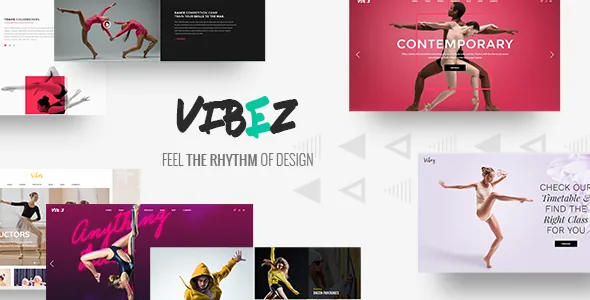
Two shortcodes carry the class schedule
Most dance studio sites answer one question before any other: which classes run this week, and who teaches them. Elated Themes treats that as the theme's centre rather than a page you improvise. The vendor description lists Timetable Responsive Schedule For WordPress as included, and the changelog revises that plugin's version in release after release.
What the theme adds on top is presentational: "Timetable Event Hours" and "Timetable Event Info Holder" are theme-level shortcodes for displaying a class's time slot and its supporting details. That matters for planning because the schedule becomes content the theme can render inside a page layout, rather than a table you paste in as an image or an iframe you cannot edit.
So decide the structure of your week before you choose a homepage: how many recurring classes you run, how they split by style and level, and whether one instructor's schedule spans several rooms. The schedule is the part of the site you will edit every term, and it is the part to understand first.
The recurring week and the one-off date are different systems
A studio tracks two kinds of time. The weekly timetable repeats and changes slowly. Recitals, workshops, open days and guest intensives happen once. Vibez touches both, but through separate tools, and mixing them creates maintenance work later.
The marketplace attributes observed on 4 November 2026 name Events Calendar among compatible plugins, and the feature list includes an Event List shortcode. That is a compatibility statement from the listing, not a promise that every demo ships with an events archive you can keep.
Keep the split deliberate. A class's weekly slot belongs in the schedule plugin, where it is entered once. A recital with a date, a venue and a ticket link belongs in the event system. Put one-off events in the timetable and the grid fills with clutter; put the weekly class in the event system and you re-enter the same class every week.
Instructors and performance photography
The vendor frames the site's jobs plainly: introduce each instructor, showcase classes, sell online. The Team shortcode covers staff presentation, and the portfolio tooling is wider than a dance site strictly needs, with several list layouts, several hover treatments, several single-project layouts and standard, load-more or infinite-scroll pagination for those lists.
That range is most useful for class photography and performance work rather than case studies. A grid with a hover treatment handles a wall of dance styles; a single portfolio layout gives a production or a showcase gallery a page of its own. The stacked images, expanded gallery and image-with-text shortcodes sit in the same territory.
The vendor lists seven homepage examples with one-click demo import. Treat them as starting points that already contain instructor and class sections you would otherwise assemble, and note that an import supplies structure and styling, not a schedule. Your class data still comes from you.
WPBakery builds the pages, Slider Revolution runs the motion
Vibez is edited through WPBakery Page Builder, listed as included, with Slider Revolution also bundled. The marketplace attribute for Gutenberg optimization reads No, which says the theme is not described as tuned for the block editor, not that the block editor is switched off. If your team writes and designs in blocks, expect an adjustment period.
The surrounding layout controls are granular for a niche theme. Three header types (standard, centred, minimal) and three behaviours (sticky, sticky on scroll up, fixed) are listed, with separate mobile header styling, a mobile logo size setting and multiple logo versions for default, mobile and sticky headers plus dark and light variants.
Two choices change the frame around every page, so make them early: a boxed layout option and an optional passepartout border around the whole site. Header, menu and smooth page transitions all get vendor controls too, including separately enabled intro and outro transitions.
Selling passes or merchandise with WooCommerce
WooCommerce compatibility is declared for versions 9.x and 10.x, and the changelog backs it with repeated entries, with version 2.1 adding WooCommerce 10.x. The feature list adds product list, product info, product list carousel and simple product list shortcodes, plus a WooCommerce dropdown cart widget.
Read that as storefront support inside your pages, not a finished shop. The shortcodes let you drop a few products into a WPBakery layout, which suits selling class passes or a small run of merchandise on a homepage or a class page. A catalogue with variations, shipping and tax rules remains ordinary WooCommerce work on top of the theme.
One changelog line is worth knowing: version 2.1 stops the dropdown cart widget from loading on the cart page. That is a fix rather than a feature, but it shows the cart flow has been touched recently.
What the latest release changed, and one thing it removed
Version 2.1, dated 11 December 2025 on the marketplace, added a WPML configuration file and WooCommerce 10.x compatibility, improved Google Maps API, PHP 8.3 and security handling, and updated the bundled builder, slider and timetable plugins.
The removal matters more than most release notes: Elated's Instagram Feed was dropped because of Instagram API changes. If an Instagram grid was part of your plan, don't count on the theme's own feed widget. A separate plugin or an embed is the workable route, and it is better to decide that before committing to a layout built around a live feed. The vendor's Twitter Feed widget is a separate item in the feature list, so its presence says nothing about Instagram.
The declared WordPress range observed on 4 November 2026 runs from 6.3.x to 7.0.x, with changelog entries showing compatibility work across earlier releases. Regular updates suggest upkeep, but a vendor compatibility statement covers the vendor's tested environment, not your plugin mix or PHP build.
When the bundled schedule earns its place
Vibez fits a studio whose week is the product: several recurring classes, a few instructors, term dates that shift, and the occasional ticketed event. In that setup the timetable plugin, its two display shortcodes, the Team element and the gallery layouts each do real work.
A single-instructor site running one weekly class uses little of it. The schedule tooling, the portfolio variants and the product shortcodes would sit mostly idle. The decision narrows to one question: does your site need a recurring schedule that visitors check and you revise each term? If yes, the timetable is the reason to pick this theme. If not, the bundled plugins are not a reason to choose it.
Questions & answers
Does Vibez include the Timetable plugin, or do I buy it separately?
The vendor lists Timetable Responsive Schedule For WordPress as included with the theme. That is a statement about the theme package; confirm what is actually in the files you receive before you build your term structure around it.
Can I use the block editor instead of WPBakery?
The marketplace attribute says the theme is not Gutenberg optimized, which describes how the theme was built rather than whether the block editor exists in WordPress. The demos and the theme's shortcodes are designed to sit inside WPBakery layouts.
Is the Instagram feed in the theme still usable?
Version 2.1 records that Elated Instagram Feed was removed because of Instagram API changes. If you want a feed, use a separate Instagram plugin or an embed instead.
How should I handle one-off events such as recitals?
Keep them out of the timetable. Events Calendar is listed among compatible plugins and there is an Event List shortcode, so dated, non-repeating happenings can live apart from the weekly class grid.