Skins that travel with a section, not the whole site
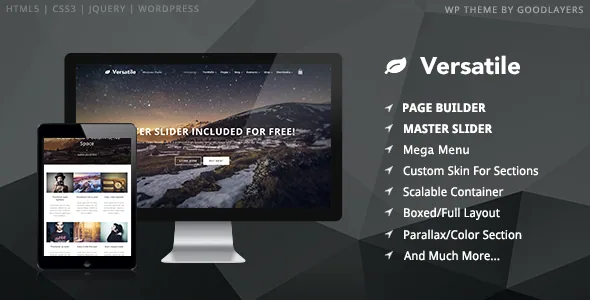
GoodLayers describes Versatile as suitable for lawyers, schools, creative agencies, restaurants, churches and online shops, which is the usual multi-purpose claim. The feature that actually carries that range is narrower: a customizable skin for each parallax or colour section. You build a skin in the admin panel, then assign it to the sections that need it, so font colour and link colour can change from one band of a page to the next while the rest of the site keeps its own palette.
That is a different editing model from a global colour set. A dark hero above a light services block above a tinted testimonial strip is a composition decision you make per section rather than a site-wide theme you commit to. If your pages tend to run long and switch tone, the skin assignment is the setting worth understanding first.
Parallax speed, fixed backgrounds and video behind a section
The parallax controls are unusually granular for a theme at this level. Per the vendor's feature list, you can place a parallax background in any section, set its parallax speed, or fix the background instead. The speed value is a per-section decision, so two scrolling bands on one page need not move at the same rate.
Video is treated as another section background rather than only a slider slide. The description lists YouTube video as a background option for a section, which lets a heading and a call to action sit over moving footage without building that layout as a slider frame.
A landing page template sits alongside these. Its distinguishing option is the ability to disable the header, the footer, or both on a page. That is the tooling for a standalone campaign or product page that carries its own navigation and should not inherit the site's chrome.
The layered PSD is part of the package
The marketplace file list for Versatile names PHP, CSS and JavaScript files, and also Layered PSD and PSD. Design source files shipping with the theme changes the handoff between a designer and whoever builds the site: mockups can be prepared against the same section structure the builder uses, rather than being redrawn to fit finished templates.
Two practical notes follow. The preview-site photography is not included in the package, so imagery has to be licensed or shot separately, and the theme is marked high resolution and retina ready, which sets the bar for the files you supply. The existence of layered PSDs also says nothing about whether they cover every template the theme ships. Treat their scope as something to confirm rather than assume.
A built-in slider with several distinct behaviours
Versatile does not delegate the space above the content to a third-party plugin. The vendor describes a built-in slider with full-screen, full-width and boxed formats, plus variants that include vertical thumbnails, a mobile mockup frame, a carousel and a showcase layout, with video allowed as a slide background.
The choice of format is really a choice about the page. Full-screen suits a single message that should fill the viewport; full-width keeps the hero tied to the container; boxed pulls it inward with visible margins. The thumbnail and mockup variants put navigation or device context on screen, which changes how much content the hero can carry before it gets crowded. Pick the format before you write the headline, because the headline has to fit it.
How a page skeleton arrives in GoodLayers
Pages are assembled in the GoodLayers page builder, described as drag-and-drop. The feature that affects day-to-day speed is the Page Builder Setting Shortcut Button: one click applies builder settings modelled on Homepage, About, Service, Contact 1, Contact 2, Pricing, and a WooCommerce page with slider. The vendor also ships an importer with a step-by-step video for reproducing the demo site.
Use the shortcuts as starting points rather than finished pages. They give you the section order and spacing pattern for a page type, which removes the blank-canvas problem; your copy, images and colours still replace the demo's.
Layout controls sit outside the builder. Sidebar width is chosen from five values (16, 25, 33, 41 and 50 per cent), with 25 and 33 per cent also available for two-sidebar layouts, and the container width can be set in pixels. Boxed and full-width layouts, floating navigation and a built-in mega menu are listed as well, so the navigation does not depend on a separate plugin.
WooCommerce, WPML and the declared version range
The marketplace attributes observed on 4 November 2026 list WooCommerce 6.x.x through 10.x.x, WPML, and WordPress 6.1.x through 7.0.x. Those are declarations, not results from testing against your plugin stack, PHP version or caching setup, so a staging install is still the sensible step before launch.
On the shop side the description is about styling and navigation rather than checkout logic: WooCommerce elements are restyled to a minimal, modern look, and a cart button is built into the main navigation. WPML support matters for a multi-purpose site that serves more than one language, and it brings its own configuration work.
One note on the version figures: the vendor's feature text and the marketplace compatibility list were written at different times, and the listed range should be read as the seller's current claim rather than a guarantee for every point release.
Reading the feature list against a real build
Two themes can both say multi-purpose and behave nothing alike. Versatile's distinguishing controls are per-section — skin, parallax speed, fixed or scrolling background, video behind a section — and that only pays off if your pages are built as stacked bands with varying treatments. If your site is a handful of similar pages with one palette, you will not use most of it.
The other items that matter are concrete: layered PSDs for a designer handoff, a page builder with named presets so page types start pre-structured, blog and portfolio lists offered in four styles each (column, medium, full and masonry for blogs; classic and modern, with and without spacing, for portfolios), and a landing page template that can drop the header and footer.
What the description cannot settle is how any of it behaves once your plugins are active, and how much of the demo the importer actually reproduces. Those answers come from the demo and a test install, not from this page.
Questions & answers
Do per-section skins replace the theme's global colour settings?
No. The vendor presents them as two layers: unlimited colour options for the site overall, plus skins you create in the admin panel and assign to individual parallax or colour sections to adjust font and link colours locally.
Can a Versatile page be published without the header and footer?
Yes, according to the vendor's landing page template description, which offers options to disable the header, the footer, or both on a page.
Are the demo photographs included in the theme package?
The description states that images in the preview site are not included in the theme package. Layered PSD and other source files are listed as included, but that is a different item from demo photography.