The navigation runs down the side of the page
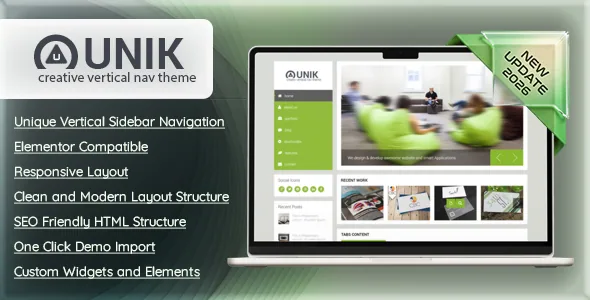
The seller puts the vertical sidebar first in its own feature list, describing it as a "Unique Vertical Sidebar Navigation" and a signature experience that carries across desktop and mobile. That is the decision this theme asks you to make, because a left-hand menu changes more than the header. It removes the wide horizontal bar that usually holds the logo, primary menu and call-to-action in one row, and turns navigation into a standing column that shares the viewport with your content.
Plan for it before you design anything. A sidebar menu rewards a short label list — five to seven items read well stacked vertically — and punishes deep nested trees, since third-level items push the column taller and eat the space beside the content. It also constrains hero sections: a full-bleed image either starts after the column or has to sit underneath it, so the layout you picture when you say "full width" needs a second thought here.
The upside is a page that never loses its navigation. With a horizontal header you usually add a sticky behaviour to keep the menu visible; a vertical column is already in place while the reader scrolls. The seller's live demo is the quickest way to judge whether that trade suits your content, and the marketplace tags confirm the intent — "vertical menu", "left menu" and "vertical navigation" all appear among the listing's highlights.
Version 2 is a rebuild, not an update
The most decision-relevant text in the listing is the seller's own upgrade notice. Unik 2.x is described as completely rebuilt and not backward compatible with 1.x. The notice states that old layouts, Elementor data, theme options and content will not transfer correctly, that installing it on an existing site will likely break layout and design, and that it should go onto a fresh WordPress installation with content recreated or migrated by hand.
Take that at face value. If you already run Unik 1.x, this is not a version you apply and then fix; it is a new theme that occupies the same name. Rebuilding means exporting your text and images, standing up a clean install, importing the demo you want, and then reconstructing pages in the builder — the old page data does not come across.
If you are starting fresh, the notice barely affects you, but it does explain something useful about the listing: the theme you are evaluating is a 2026 rebuild of a much older product, and the feature list describes the new codebase rather than the accumulated behaviour of earlier releases. Anything you read about Unik from before the rebuild may describe a different theme.
Pages are assembled in Elementor
The seller lists "Elementor Compatible" and describes drag-and-drop customization of layouts, sections and content blocks. That is the editing model: you compose pages in Elementor rather than through a theme-specific block set or a shortcode panel.
One detail is worth checking before you commit. Elementor compatibility is a vendor claim in the description, but the marketplace attribute record captured for this listing does not name Elementor among the theme's plugin attributes. That does not mean the builder is missing — the seller's text is explicit — but it does mean the exact requirement, such as whether any theme feature depends on the free or the Pro version, is not documented in the attribute data. Confirm it against the seller's documentation before you plan a site around a Pro licence.
Gutenberg Optimized is marked No in the same attribute record. Read that narrowly: it says the theme is not tuned for the block editor, not that the block editor has been removed. On a site built in Elementor, the distinction rarely comes up, but it tells you the theme's demos and templates were not authored as block patterns.
A child theme and a one-click import are both listed
Two items in the feature list matter more for day-to-day work than they look. The seller includes a child theme and a one-click demo import.
The child theme is the practical answer to customisation. When you add CSS for the sidebar width, adjust a template, or register a custom post type, those changes belong in the child so a future theme update does not overwrite them. That matters more than usual here, because this listing has already done one full rebuild; keeping your modifications in your own files is the only way to survive the next one.
One-click demo import is the standard starting point: import a demo, then replace its copy and imagery with your own. Treat imported content as scaffolding, since demo layouts are built around demo text lengths and demo photographs. The listing also names custom widgets and theme elements, and says the theme is widget ready, so sidebars and widget areas are part of the structure you can populate rather than something you have to code.
Multilingual output and the declared WordPress range
WPML Compatible appears in the seller's feature list, which is the usual signal that the theme's strings are prepared for translation through a multilingual plugin rather than hard-coded. If your site will publish in more than one language, that moves WPML into your build plan alongside the theme, and a vertical menu column needs a language switcher placed somewhere that does not crowd the navigation.
The platform attributes recorded on 4 November 2026 declare support from WordPress 4.9.x through 5.4.x, with the marketplace listing at version 2.0.0. That range is the seller's declaration, not a record of testing against your own plugin stack, PHP build or caching setup. If your WordPress installation is substantially newer than that ceiling, the honest position is that the listing does not claim support for it — worth raising with the seller before you commit a project.
The same record lists the package as PHP, CSS and JavaScript files, retina ready and marked responsive, with compatibility declared for Firefox, Safari, Opera, Chrome and Internet Explorer 9 through 11.
What the marketplace tags tell you about demo content
The listing's highlight tags read like a catalogue of demo variants rather than a feature list: corporate and business sit alongside cars, charity, eco, food, furniture, medical and dark. These are the subjects the seller has prepared demo content for, and they are useful as a filter. If you run a clinic, a restaurant or a green brand, there is likely a layout whose structure you can borrow.
The tags also include live customizer and theme customizer, which suggests colour and typography are adjustable without touching files — the counterpart to the child theme for changes you would rather make in the admin. That split is worth honouring: site-wide palette and fonts in the customizer, structural overrides in the child theme, page content in Elementor.
The marketplace category for the item is corporate and business, and the seller frames it for agencies, creatives, portfolios and corporate sites. Given the sidebar navigation, it suits a brand that wants an editorial or gallery feel more than a dense corporate intranet.
Questions & answers
Can I update an existing Unik 1.x site to this version?
Not in place, according to the seller's upgrade notice. Version 2.x is described as a complete rebuild that will not carry over old layouts, Elementor data, theme options or content, and the notice says installing it on an existing site will likely break the design. The stated path is a fresh WordPress installation with content recreated or migrated manually. Back up first, and treat the move as a rebuild rather than an update.
Does the vertical sidebar work on mobile?
The seller describes the vertical navigation experience as carrying across desktop and mobile devices, so the mobile treatment is part of the theme rather than something you add. How a stacked column collapses on a narrow screen is a visual detail to check in the live demo, since it affects where your primary actions end up on a phone.
Do I need Elementor Pro?
The seller lists Elementor compatibility and describes building pages with drag-and-drop, but does not state whether the free or Pro version is needed. The marketplace attribute record captured for this listing does not name Elementor at all, so the requirement level is not documented there. Confirm it before budgeting for a licence.
Which WordPress versions are declared?
The attributes recorded on 4 November 2026 list WordPress 4.9.x through 5.4.x. That is the seller's declared range, not proof of testing on your own setup. If you run a significantly newer WordPress version, ask the seller before starting.