An album is a track list with metadata, not a page you rebuild
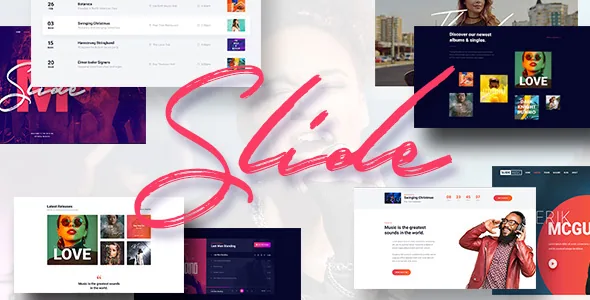
Most music themes give you a homepage and leave the discography to you. Slide's vendor description goes the other way and starts from the data: a music album post type with its own taxonomy, fields for artist and release date, label and producer, three customizable purchase options per release, and a player on the album page. The admin side is described as a media upload area where you add the audio files and rearrange them by dragging, with that order becoming the order in the player.
That last detail is the one worth weighing. If you publish EPs, singles or a label catalogue, track sequencing is the repetitive job, and doing it visually means the numbers stop drifting out of step with the audio.
The player is a player. The description does not claim streaming royalties, download gating or a checkout behind it, and the purchase options are flexible slots whose destinations you set.
Event entries separate the facts fans look for
The event post type gets its own taxonomy and fields for date, time, venue, venue URL, a tickets link with an accompanying message, and a link to the Facebook event, plus support for Google Maps and YouTube or Vimeo video. Because those values are stored as fields rather than typed into the body, an events archive built from them reads consistently across a tour.
The changelog shows this area being refined rather than left alone: category filtering arrived for the events list and events cards Elementor widgets, an option lets you set image width per responsive view in the events list widget, and another lets you edit single event content manually instead of relying on generated output. Separately, the events list widget gained an option to remove links to inner event pages, and events list and events cards both gained per-category filtering.
What the tickets field does is hold a link and a message. Nothing in the vendor's description suggests inventory, reserved seating or payment processing, so treat events as structured listings that send people to whichever box office you already use.
Two more entry types: photo sets and videos
Photo albums get a taxonomy, media upload and a preview area with drag-and-drop image sorting. Videos are a dedicated post type with their own taxonomy and YouTube or Vimeo support. A later release added an Elementor widget for showing multiple Slide videos at once, and a theme option decides whether images on single gallery pages open in a lightbox.
The practical consequence is that a label's image archive and video section are content types you curate, not galleries assembled per page. Related releases added author support for photo albums, events and discography, which matters on a multi-writer site where entries should be credited rather than pooled under one account.
WPBakery and Slider Revolution are bundled without their own keys
The vendor states that WPBakery Page Builder and Slider Revolution come with the theme under extended licences held by the author, and that bundled plugins ship without individual licence keys, so they update through the theme's own mechanism. Practically, your builder and slider move when SmartWPress ships a theme update, not when you choose to update them.
The changelog bears this out: most releases are dominated by bumping the bundled builder and slider, alongside smaller fixes and new theme options. That is evidence of active maintenance of the bundle, and also of the coupling — you are adopting the vendor's release rhythm for two plugins you would otherwise manage yourself.
If independent control of those plugins is a requirement, plan for it before you build rather than after.
Elementor is the second route, with music-specific widgets
Elementor appears in the marketplace compatibility list next to Elementor Pro, and the vendor describes around twenty Elementor widgets designed for music content. The changelog tracks that set being extended: a flexible countdown timer, a widget for multiple videos, Slide Page Title, Slide Event Tax, Slide Event Details and Slide Share Icons, plus options for showing post categories in a blog posts widget.
There is also a documented improvement to compatibility with Elementor's schemes mechanism, which is where you would set global colours and typography. If your team already works in Elementor, the widget set means event details and artist taxonomy can be placed as elements rather than reimplemented.
Whichever builder you take, choose one. The vendor offers both, and running WPBakery and Elementor on the same site adds maintenance without adding output.
WooCommerce, WPML and the small operational settings
WooCommerce 9.x and 10.x appear in the compatibility attributes, and the changelog records WooCommerce template updates and a fix to the player purchase button. Read that as a shop that sits inside the theme using standard WooCommerce templates — the commerce behaviour is WooCommerce's, not something the theme invents.
WPML is listed as compatible and the theme is described as translation ready with .po/.mo files included. A package plugin for hosting Google Fonts locally was added in an earlier release, which is relevant if you would rather not send font requests to a third party.
Elsewhere the settings work at theme level: a changeable full-screen background, an individual background image or colour per page, unlimited colours through the customizer, several blog page layouts, switchable menu styles, and custom logo and favicon images. That suits a site whose visual identity is settled early, since pages inherit it instead of each release page being restyled by hand. The marketplace file list also names Layered PSD and PSD files, which are useful for design work before a build and do nothing for the running site.
Where Slide stops being the answer
Slide earns its place when the site's substance is releases and dates: albums with track lists and a player, a run of gigs with venues and ticket links, photo sets and a video section. In that case the post types save you from bending a generic theme around music content, and the Elementor widgets or WPBakery layouts handle the surrounding pages.
It stops being the answer at three points. If you need booking logic, seat allocation or payment inside the event listing, the description does not offer it. If the shop must be the centre of the site rather than a section within it, WooCommerce will do the work and the theme only needs to not get in its way. And if every bundled plugin has to update on its own schedule, the vendor's own bundling policy rules that out for the builder and slider.
Questions & answers
Can I sell music directly from an album page?
The album entry carries three customizable purchase options and a player whose purchase button is maintained in the changelog, and album posts can be set to open on an external link instead of an internal page. The vendor description does not describe a built-in checkout for audio files. For direct sales, pair the album pages with WooCommerce, which is listed as compatible at 9.x and 10.x.
Do the bundled WPBakery and Slider Revolution plugins come with their own licence keys?
No. The vendor states the plugins are distributed under extended licences held by the theme author without individual keys, so they are updated through the theme rather than from each plugin's own update channel.
Is Elementor required, or is it an alternative to WPBakery?
Both are offered. WPBakery Page Builder and Slider Revolution are bundled, Elementor is listed as compatible with a set of music-oriented widgets built for it, and Elementor Pro also appears in the compatibility list. Pick one editing route rather than running both.


