One product, four points on its timeline
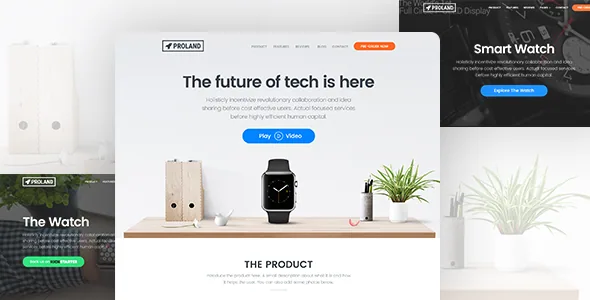
Proland assumes your product exists in a state rather than a catalogue. Ninetheme's description names four situations outright: a product still in development, a crowdfunding campaign in progress, a pre-order window, and a product ready to sell.
The page set follows that logic. The vendor lists separate starting points for a WordPress PayPal landing page, a WooCommerce landing page, a Mailchimp subscription page, a pre-order subscribe page, a Kickstarter or Kickstarter-style campaign page and an Indiegogo campaign page. That is six different jobs, not six skins on one layout. Decide which stage you are in first, then choose the page built for it, because a campaign page needs a funding target and rewards while a pre-order page needs a price and a delivery expectation.
The vendor also counts eight homepages with different variations. Treat the campaign pages and the homepage count as overlapping groups rather than a total; the description does not map one list onto the other.
PayPal payment and Mailchimp capture, and what the listing leaves open
Two integrations carry the transactions. Ninetheme declares PayPal payment integration and a Mailchimp subscription integration, and separately lists PayPal and Mailchimp among the plugins it works with in the summary text. Both are declared connections rather than described workflows: the listing does not say which currency or button configuration PayPal uses, whether pre-order payment is captured immediately or authorised later, or which Mailchimp list a form subscribes to.
Those gaps matter if money or a mailing list is the deliverable. Plan on testing the PayPal round trip with a real small payment in a staging site, and confirm where subscriber records land before you send traffic to a subscribe page. WooCommerce is listed among compatible plugins across versions 5.x to 9.x, so a checkout-based launch is possible, but the vendor's own framing puts PayPal and campaign pages ahead of the shop.
Exit-intent modal, product popup and timeline
Three items in the feature list are about persuasion rather than layout. The exit-intent modal popup interrupts a visitor who is leaving, which is a reasonable fit for a launch page where collecting an email is the whole conversion, and a poor fit if your visitors are existing customers checking a release note.
The dedicated product popup is more unusual. It gives the product its own overlay rather than sending a visitor to a separate detail page, which keeps a one-page campaign intact. The timeline view suits products whose appeal is the build story, such as a gadget with several development milestones.
The description stops at naming these. It does not specify how the exit-intent trigger is configured, whether the popup content is a builder row or a fixed template, or how many timeline entries you can add. Budget time to look at the live demo for the interaction rather than inferring it from the feature names.
Editing inside WPBakery, not the block editor
The marketplace attributes mark Gutenberg Optimized as No, and the vendor's instructions describe building pages from WPBakery Page Builder shortcode elements, with more than 40 shortcodes available across pages, posts and custom post types. That is a shortcode-and-grid workflow: you place rows and elements, then control logo, menu and sidebar components from Theme Options, where they can be hidden or removed without code.
The vendor says pre-made pages can be edited after one-click import, and that sections carry their own options for hiding unwanted elements. Theme options cover colours, typography through Google web fonts, footer and inner-page structure, with metabox controls for per-page menus and background images.
Marking Gutenberg Optimized as No does not mean the block editor refuses to load. It means the vendor has not declared block-editor styling, and the page composition the theme documents happens in WPBakery. If your team writes in the block editor by default, expect to hand layout work to whoever knows the builder.
Presentation switches and the supporting pages
Boxed layouts with more than 15 background patterns, a right-to-left version, video backgrounds and CSS3 animations are listed as presentation options with no further detail. The RTL version is the one with a practical consequence: it is a declared variant of the theme rather than a per-page toggle described in the copy, so confirm it styles your content properly before committing to an Arabic or Hebrew launch.
Beyond the landing page, the feature list includes About and FAQ pages and Terms of Use and Privacy Policy pages. For a product launch those pages do real work: they hold the answers that keep support requests down and the disclosures a payment page needs nearby. The vendor also names custom post types for portfolio, staff and price tables, which can carry a specs table or a team section without a separate plugin.
The declarations to check against your own stack
The compatibility attributes observed on 4 November 2026 declare WordPress 4.9.x through 7.0.x, WooCommerce 5.x through 9.x, Bootstrap 4.x and 5.x, and plugins including Contact Form 7, WPForms, Gravity Forms, WPML, bbPress, Jetpack, Events Calendar and Easy Digital Downloads. The vendor copy elsewhere refers to Bootstrap 3.3.2, so the attributes and the prose do not agree on the CSS framework. The marketplace listed version 1.9.7 at that observation.
Package files are declared as PHP, HTML, CSS, JS and PSD. The PSD inclusion is worth noting if a designer wants the source artwork; it is not a claim about image assets in the demo. None of these attributes are results from installing Proland against your PHP version and plugin set. Where the listing is thin — PayPal behaviour, Mailchimp list routing, popup configuration — the demo is the better place to form expectations than the feature names.
Questions & answers
Does Proland handle pre-orders without WooCommerce?
According to the vendor's description, yes: a PayPal landing page and a pre-order subscribe page are listed alongside the WooCommerce landing page as separate starting points. The listing does not describe the pre-order fulfilment logic, so test the payment and confirmation flow yourself before taking orders.
Can I build more than one landing page on the same install?
The vendor states that one theme equals unlimited one-page sites, built from menus, logos, content, shortcodes and colour and size options. The eight homepage variations are described as starting points rather than separate installs.
Does the video background option need a specific plugin?
The feature list names video backgrounds without naming a dependency. Nothing in the supplied description indicates which source formats or hosting it expects, so treat that as something to verify in the demo or documentation.


