Shortcodes in a companion plugin, not the theme itself
Version 2.24 of SimpleKey moved every shortcode and its supporting code out of the theme and into a separate SimpleKey Extension plugin. That is the first thing to understand about the theme's content model: the 33 custom shortcodes the vendor describes as the way you build portfolios, team blocks, price tables and post sliders only exist once that extension is installed and active.
The changelog shows the extension being versioned alongside the theme afterwards, reaching 1.0.5.4 in release 2.6.2. So the theme and the plugin are updated as a pair. If an editor deactivates the extension, the shortcode tags remain in post content but render as bare text rather than layout.
This also fixes what the pages are made of. Content is stored as shortcode tags with attributes, and the theme's own CSS styles the output. Moving that content to a block-based theme later means rewriting sections, because shortcode markup does not become core blocks on its own.
WPBakery as the canvas, Slider Revolution for the hero
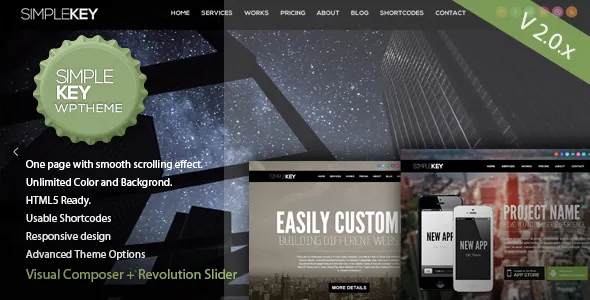
The vendor states that from version 2.0 onward, Revolution Slider and WPBakery Page Builder are included, and the changelog confirms 2.0 as the release that integrated the slider and retired the theme's original one. WPBakery is where shortcode rows are arranged visually; Slider Revolution handles the top slider.
Both ship as bundled third-party plugins, and the changelog shows them updated inside theme releases rather than through their own update channels — Slider Revolution reached 6.3.3 and WPBakery 6.4.2 in version 2.6.3, dated 16 December 2020. If you want a plugin feature added after that, the theme's release history is the limiting factor.
A separate plugin path exists for contacts: version 2.4.1 recorded Contact Form 7 compatibility, while the vendor also lists an integrated Ajax contact form as a built-in feature. You can run either, not both by necessity.
What makes the single page read as designed
SimpleKey's structural choice is a responsive single-column page with smooth scrolling between sections, aimed by the vendor at a one-page portfolio, a landing page or a small business site. Within that constraint, the controls that carry the look are section-level and header-level rather than template-level.
The vendor names a customizable background colour for each page section, and version 2.23 added a Section settings option directly on the page edit screen, which is where that colour is set. Header behaviour has its own history: three new header layouts arrived in 2.3 and one more in 2.3.2, a switch to disable the parallax effect came in 2.06, and 2.06 also added a sticky top area above the menu bar for custom content.
The upshot is a vertical stack of blocks, each with its own background tone, under a header you can restyle. That is a good fit for a portfolio that reads top to bottom and a poor fit for a site that needs many distinct inner page templates.
Portfolio-specific controls recorded in the changelog
Because the theme is sold as a portfolio, the changelog entries about portfolio items are the most project-relevant. Version 2.3 added password protection for portfolio items — useful when a client needs to see work that is not ready to be public, though the vendor does not describe how access is granted beyond the item.
Version 2.5.6 added a custom link field to the gallery metabox and fixed the portfolio hover image. Version 2.4.1 added Ajax loading for the portfolio on mobile. Earlier, version 2.03 made it possible to display blog posts in the portfolio grid view, which lets a writing archive share the same grid styling as project entries instead of looking like a separate site.
On imagery, the vendor is explicit: demo photographs are not part of the package and are credited to their creators under Creative Commons. Sample data XML and PSD files are described as included, but you supply the photography that makes the page look finished.
WPML and the translation files the theme ships
WPML is the one plugin named in the marketplace's compatibility attribute, and the changelog supports it with a long trail: a wpml-config.xml file was introduced in 1.22, updated in 1.23, and multilingual support was listed again in 2.3.5 alongside language-file work. A POT file was created back in 2.13.
For a one-page site, translation has a particular shape. WPML lets you produce a version of the page per language and the language files cover the theme's own strings, but the vendor description says nothing about how section anchors or the scrolling navigation behave on a translated page. Treat that as something to verify on a staging copy rather than something the attribute list settles.
The WPML listing is the vendor's declared intent to support multilingual setups; it is not evidence that a specific WPML version has been tested against this build.
The declared support window ends at WordPress 5.2.x
Marketplace attributes list compatibility from WordPress 4.9.x through 5.2.x. The vendor's last listing update is dated 3 December 2021, and the marketplace names 2.7.1 as the latest release. Nothing in the supplied material documents testing on newer WordPress versions.
That does not prove SimpleKey breaks on a current install, but it does mean the compatibility claim belongs to the 5.2.x era. The changelog's latest entries are fixes for WordPress 5.5 and 5.6 in versions 2.6.2 and 2.6.3, which reaches further forward than the attribute list while still sitting well behind current WordPress.
If you are building on a modern stack, the honest position is that this is unverified. Stage the theme against your own WordPress, PHP and plugin versions before committing a live portfolio, and look closely at which WPBakery and Slider Revolution versions the installed build reports — bundled plugins age with the theme, and an old slider release turns into a maintenance question. Also note that the marketplace marks Gutenberg Optimized as No, which concerns the vendor's optimisation claim rather than proof the block editor will not open.
Questions & answers
Do I need the SimpleKey Extension plugin to use the shortcodes?
Yes. Since version 2.24, the theme's shortcodes and related code live in that separate plugin. Without it active, the shortcode tags stay in your content but render as plain text instead of styled sections.
Can I switch to a block-based theme later without losing my layouts?
Not automatically. Pages are stored as shortcode tags and WPBakery elements, and that markup does not convert into core blocks. Moving to a block theme means rebuilding the sections rather than migrating them.
Are the demo photographs included with the theme?
No. The vendor states the demo images are not part of the package and are licensed under Creative Commons by their original creators. Sample data XML and PSD files are described as included.
How current are the bundled WPBakery and Slider Revolution versions?
The changelog's final plugin updates appear in version 2.6.3, dated 16 December 2020, where Slider Revolution reached 6.3.3 and WPBakery 6.4.2. Both arrive through theme releases, so check what the installed build actually reports.