The multi-vendor claim is a compatibility list, not a built-in marketplace
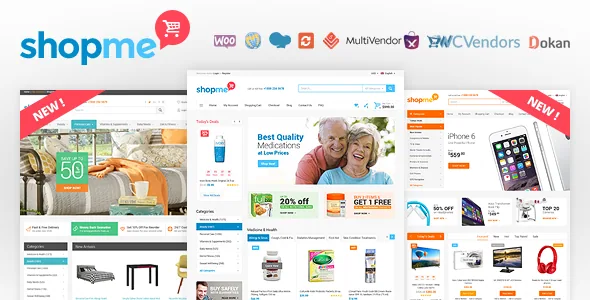
ShopMe's own feature list repeats the same point in capitals: the theme is compatible with WCVendors, MultiVendorX, YITH Multi Vendor and Dokan. A separate line adds WCMp. That is five marketplace plugins named, and it tells you what kind of product this is. ShopMe does not ship a vendor dashboard, commission engine or payout system of its own; it is a WooCommerce storefront designed to look right when one of those plugins is running underneath.
So the first decision is not about the theme at all. Whichever marketplace plugin you already run — or plan to run — needs to be the thing you confirm against the demo. The vendor's list is a declaration of compatibility, not a demonstration that every marketplace screen has been styled. Vendor shop pages, vendor registration forms and the vendor dashboard are the parts most likely to look unstyled, because they come from the plugin rather than the theme.
The same caveat applies to support. The vendor states plainly that it does not provide support for third-party plugins and modules, and points buyers of the separate WooCommerce Prices By User Role plugin to its own listing for help. Budget for two support relationships if the marketplace plugin is central to your build.
Merchandising controls the vendor lists in unusual detail
Most ecommerce themes mention a shop layout and move on. ShopMe's feature list is specific: show 3, 4, 5 or 6 products per row, four different product box styles, a grid or list option for category pages, and a second product image shown on hover. Those are the levers that decide how dense a catalogue feels, and having them as settings rather than hard-coded templates means a category of small accessories and a category of large furniture can be presented differently.
The surrounding shop features are the ones shoppers now expect: a quick view popup so a product can be inspected without a page load, wishlist and compare, live Ajax search, recently viewed and "you might also like" blocks, product ratings, share icons, and cloud zoom with a lightbox on the product image. There is also a deals-of-the-day module, which suits a store that runs scheduled promotions rather than one that sells at a fixed price.
Product pages can be set with or without a sidebar, and the vendor lists unlimited custom tabs — useful if you need a sizing guide, ingredient list or delivery table per product family. Deeper navigation is handled with three-level categories and a mega menu alongside drop-down and side menu options.
Six homepages and six headers, built in WPBakery
The vendor lists 6 homepage layouts, 6 headers and Revolution and Layer sliders, with WPBakery Page Builder named as the compatible builder. Read together, that describes a theme where the page shell is assembled in WPBakery and the sliders are placed as elements inside it. If you or your client already work in WPBakery, the editing path is familiar; if you work in the block editor, note that Gutenberg Optimized is marked No, which describes the vendor's declared optimisation target rather than proving the block editor is unusable.
Six homepage layouts is more useful than it sounds for a multi-vendor store, because the right homepage for a marketplace of independent sellers differs from the right homepage for a single-brand shop. Header variety works the same way: a mega menu header suits a deep category tree, while a slimmer header suits a promotion-led storefront.
Beyond layout, the vendor lists unlimited colours, backgrounds and patterns, boxed and wide layouts, 600+ Google web fonts, hover effects and tooltips, plus three blog layouts. This is a customisation-heavy theme in the traditional ThemeForest sense — expect to spend time in a theme options panel rather than in a handful of block settings.
Languages, currencies and the version range
Multi-language and multi-currency support are both listed, and WPML appears in the compatible-with fields. For a marketplace with sellers in more than one country, currency handling matters as much as translation, and WooCommerce's own currency settings will do much of that work; the theme's contribution is that its strings and layouts are declared ready for translation. How vendor pages behave under translation is not described in the supplied material, so test a translated vendor storefront if that is a requirement.
The marketplace listing, observed on 5 November 2026, declares WooCommerce 6.x through 9.x and WordPress 5.0.x through 6.9.x. A declared range that wide is a statement about what has been tested over the theme's life, not a guarantee that every combination in it behaves identically. Treat the top of the range as the interesting part: if your site runs a recent WooCommerce release, the WooCommerce 9.x declaration is the one that matters to you.
Package contents are PHP, CSS and JS files plus layered PSDs — 35 of them, according to the vendor, fully layered and organised. For a store with a designer involved, the PSDs are the handoff for header treatments and promotional banners; without a designer, they are simply extra files you will not open.
What ships and what does not
Two vendor notes change what you actually receive. The first is that preview images were drawn from stock sources and are not included in the theme files — so the demo's photography is not yours to reuse, and you will need your own product and lifestyle images before the layouts look like the demo. The second is that brand logos in the preview belong to a third party, with the same implication.
Sample data is included, which is the practical counterweight: importing it gives you the homepage structures and shop pages to edit rather than build from scratch. Installation steps belong in the theme's documentation rather than here; the vendor describes the theme as well documented, and that documentation is the right place to check how the sample import interacts with an existing WooCommerce catalogue.
On maintenance, the changelog's most recent entries are dated 4 March 2026: version 1.6.6.1 updated the theme, plugins and theme verification, and 1.6.6 immediately before it was labelled a security patch. Earlier entries mostly update bundled plugins. A recent security patch is a good sign for a theme of this age; it also means you should check which version is in front of you before installing.
Deciding whether ShopMe is the right shell
ShopMe fits a store that is either already committed to one of the marketplace plugins the vendor names, or willing to choose one, and that wants a dense, promotion-friendly catalogue layout with per-row product counts, hover image swaps and a deals module. It suits a team comfortable in a theme options panel and WPBakery, and one that has design assets or a designer to use the PSDs.
It fits less well if you want block-editor-based page building, if your marketplace plugin is not on the vendor's list, or if you expect the theme author to debug vendor dashboards and commission logic — the vendor explicitly draws that line. The honest next step is to open the live demo with your chosen marketplace plugin in mind and check the vendor-facing pages specifically, since those are where a theme's coverage usually thins out.
Questions & answers
Does ShopMe include a multi-vendor marketplace itself?
No. The vendor describes ShopMe as compatible with MultiVendorX, Dokan, WCVendors, YITH Multi Vendor and WCMp. The marketplace functionality comes from one of those plugins; the theme supplies the storefront design around it.
Can I edit ShopMe pages with the block editor?
The vendor names WPBakery Page Builder as the compatible builder and marks Gutenberg Optimized as No. That attribute describes the vendor's optimisation target and is not proof that the block editor is unavailable, so confirm the editing path against the demo or documentation if block-based work matters to you.
Are the demo images included in the theme files?
The vendor states that preview images came from stock and other sources and are not included. Sample data is included, but you will need to supply your own product and banner photography.
Which WooCommerce versions does ShopMe declare support for?
The marketplace listing observed on 5 November 2026 lists WooCommerce 6.x through 9.x and WordPress 5.0.x through 6.9.x. These are vendor and marketplace declarations rather than results from testing on your own server.