Where each setting lives: Elementor pages, Unyson options, Kirki controls
Seocify does not hide everything behind one panel. XpeedStudio describes the theme as built on the Elementor front-end page builder and Revolution Slider, then advertises a "powerful Unyson theme option" and lists Kirki Customizer as a separate feature; the marketplace framework attribute confirms Unyson.
That arrangement decides your routine. Service blocks, case study layouts and pricing sections are Elementor work, edited visually. Headers, typography and other site-wide settings sit in the Unyson panel, with Kirki customizer controls also available. If you have only used Elementor themes whose entire settings surface lives in the customizer, plan for a second place to look.
The changelog shows the split needing attention over time. Version 2.7 in August 2021 records a fix for Elementor compatibility, and version 3.3 fixes a Unyson typography issue. Two control layers mean two places where a WordPress or plugin update can disturb what you configured.
Sliders are a third dependency. The vendor says the theme ships with Revolution Slider, and version 3.8.2 added compatibility for both old and new versions of the plugin plus a dashboard fix — relevant if you are updating a site that already holds slider content rather than starting fresh. Version 3.6, back in April 2023, fixed a broken slider, so the slider is a piece to keep an eye on across releases.
The page set follows agency work, and the one-page option changes the structure
The vendor names the built-in pages specifically: service pages, portfolio pages, case study pages, an about us page and pricing pages. For an SEO or digital marketing agency, the case study page is the one a general corporate theme rarely has, and here it arrives rather than being improvised from blog posts. The changelog adds a related detail: version 1.6 introduced a filter for case studies, so the listing can be narrowed rather than shown as a flat set.
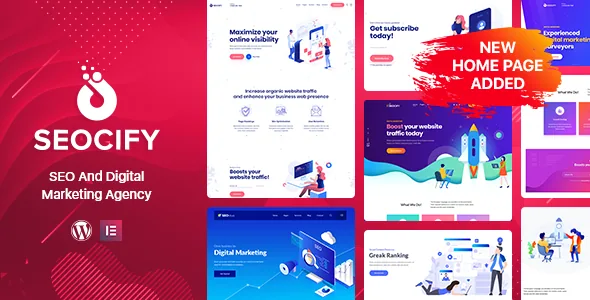
Homepages are more varied than a single layout. The feature list claims an isometric home page design, 5+ homepage styles each with unique headers and content, multi-page and one-page layouts, and 20+ unique design pages. Version 1.5 added four multi-page and two one-page homes, with more demos arriving in later releases.
The one-page route suits an agency that wants a single scrolling pitch before it builds deeper destinations; the multi-page route fits an operation that needs separate service and case study pages. Because each homepage style carries its own header, switching homes is closer to swapping a template set than recolouring one header — worth checking against the inner pages you intend to keep.
Mega menu, dropdowns and icon sets for a service hierarchy
Past the layouts, the feature list adds a mega menu and a multilevel drop-down menu, smooth page scrolling, parallax sections, CSS3 animations and a custom icons library added in version 2.8. These are the mechanics behind an agency site that presents many service categories: a mega menu holds several at once, while the multilevel dropdown handles a narrower tree. Version 1.1.2 adjusted the mega menu width, and version 3.2 fixed a navigation image issue, so both are areas the vendor has revisited.
Icon coverage is stated as Font Awesome 400+ icons and 200+ line icons, with Font Awesome 5 support added in version 2.0.0. It matters when a services page leans on visual markers instead of paragraphs. The theme is also described as powered by Bootstrap 4 with valid HTML5 and CSS3, and the marketplace records it as widget ready, four or more columns and high resolution.
Treat those as vendor statements about construction rather than a report of how they land with your copy. The practical check is your own menu: whether a mega menu with your service names stays readable on a phone.
RTL support grew from a fix into a demo
RTL appears in the changelog as a progression rather than an on-switch. Version 1.1.3 records RTL support, version 1.2 fixed an RTL issue, and version 2.4 added an RTL demo. If you are building for an Arabic or Hebrew audience, the demo gives you a starting point instead of a mirrored stylesheet you assemble yourself.
Demo importing is a separate later addition: version 3.8, dated 11 August 2024, records a one-click demo importer. If you work from a copy older than that release, instructions written for the current version will not match what your install offers.
WPML appears among the marketplace compatibility attributes, so a multilingual agency site is a declared path. Nothing in the available description says the theme supplies translated content of its own; WPML is the tool you bring to the job.
Upkeep the changelog does and does not document
The recent entries say the most about how the theme is maintained. Version 3.8.1, dated 28 October 2025, fixed a licence activation issue and PHP deprecated notices, and version 3.8 handled PHP deprecation plus a Slider Revolution update. Version 3.4 in February 2023 lists a security improvement. None of this is a guarantee for your install, but it shows which parts have needed repair.
An earlier entry is useful context for performance claims: version 2.8 in December 2021 added speed optimisation for desktop and mobile, SEO optimisation, Lighthouse improvements for accessibility and best practices, a custom icon library, and replaced Owl Carousel with Swiper. Those were the state of the theme at that point, not a current benchmark.
The changelog does not say how the theme behaves on your server or whether any single fix covered your plugin combination. It is a record of work done, not a substitute for checking the site after you build it.
Declared compatibility, as listed on 4 November 2026
The marketplace attributes recorded that day list WordPress 6.0.x through 7.0.x, WooCommerce 8.x.x and 9.x.x, Elementor, WPML and Bootstrap 4.x, with Gutenberg Optimized set to Yes and browsers named as Chrome, Firefox, Safari, Edge and Opera. Package files are listed as PHP, CSS and JavaScript, documentation as well documented, and the latest marketplace version as 3.8.2.
The WooCommerce entries deserve a look if you plan to sell through the theme: the listing names the 8.x and 9.x lines rather than an open range, so compare that with the WooCommerce version on your site before building a shop around it.
All of this is a listing declaration and vendor statement, not the result of running the theme on a test install. Read it as a claim to verify against your PHP and plugin versions rather than a guarantee for any particular combination.
Questions & answers
Do I edit Seocify pages in Elementor or in the Unyson panel?
Both, for different things. The vendor describes the theme as built on the Elementor front-end page builder, while theme options and global settings run through the Unyson framework, with Kirki customizer controls listed separately. Expect page layouts in Elementor and site-wide settings outside it.
Does Seocify include case study pages for an agency site?
The vendor's description lists service pages, portfolio pages, case study pages, about us and pricing pages among the built-in pages, and the changelog records a case study filter added in version 1.6. It also claims 5+ homepage styles, multi-page and one-page layouts, and 20+ unique design pages.
Is Seocify suitable for a right-to-left language site?
RTL support is a listed feature, and the changelog records an RTL demo added in version 2.4. That gives you a demo to start from in a right-to-left language; it does not mean every custom layout you build will mirror correctly without checking it.