A theme you configure rather than code
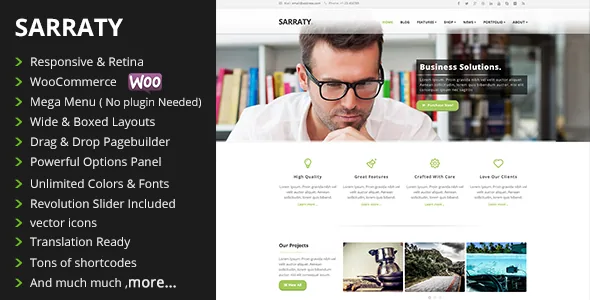
A-Works' description of Sarraty makes a specific promise: the options panel lets you "almost turn on or off every feature in the theme" so you use only what the site needs. That is the theme's identity more than any layout or colour scheme, and the changelog is the best evidence for how literally it was taken.
The releases add switches more often than they add designs. Version 4.72 introduced lazy loading for images and for iframes. Version 4.4 added header opacity, menu dropdown opacity, a sticky footer and controls for blog description length and read-more text. Version 4.48 added a sliding share bar to the options, 4.46 an option to serve the default fonts locally, and 4.42 a field for search bar text.
If you hand sites to clients who should be able to adjust presentation without opening a builder, that is the argument for Sarraty. If you want a thin option layer and your own templates, it is the argument against.
The switches that change page weight and header behaviour
Two settings from 4.72 are worth separating from the cosmetic ones. Image lazy loading and iframe lazy loading are independent toggles, so you can defer images while leaving embedded video or map iframes alone, or the reverse. On a long page with a slider and an embedded video, that is a useful distinction.
The rest are defaults you set once. Header transparency and menu dropdown opacity govern whether the header and its dropdowns sit over a hero image. Sticky footer for short content fills the viewport on a thin contact page so it does not end mid-screen. The vendor frames these as theme-wide options rather than per-page overrides, so decide them before you build out pages.
Portfolio wording and URLs you rewrite in settings
Sarraty ships project and portfolio content, and version 4.43 added the settings that make it fit businesses that do not call their work "projects". You can replace the word in singular and plural, rewrite the Project Overview and Project Details labels, and change the project slug used in URLs.
The slug setting matters most. A consultancy or manufacturer can present case work under its own vocabulary and have the URL follow, rather than keeping project in every address. Version 4.55 added control over which tags appear on portfolio pages, and 4.42 added a custom featured image for single project pages.
The marketplace tags list portfolio and agency alongside corporate and multipurpose, so the project section is meant to carry weight. Settle the vocabulary first; changing it later is a settings edit, but any copy written against the old label needs a pass.
Mega menu from the standard WordPress menu screen
The feature list names "Mega Menu ( No Plugins Needed )", and the changelog shows what that meant in practice. Version 4.0 moved the mega menu onto the default WordPress menu, and 4.10 added a non-linkable option for top-level titles. You build the menu where you build any other WordPress menu instead of installing a separate menu plugin and maintaining a parallel structure.
Page layout is a different tool. The drag-and-drop builder is WPBakery Page Builder, listed in compatibility for the 6.0.x and 6.1.x lines and updated to 6.7.0 in version 4.77; the vendor's feature list also calls it Visual Composer, the builder's older name. Revolution Slider handles banners and is bundled, with each slider release noted in the changelog. Version 4.75 added a setting to use WPBakery's own row settings instead of the theme's, which is the switch to try when rows misbehave.
What the demo import does not give you
The vendor states that the included XML demo data does not include menus, sidebars or sliders. Importing gets you pages and styling; navigation, widget assignments and slider content are yours to rebuild before the site resembles the preview.
Version 4.47 added One Click Demo Import plugin support, which makes the import itself smoother without changing what arrives in the file. For a fixed-price build, that gap is real setup time and belongs in the estimate or the handover plan.
The 2021 record, and how to read it
As observed on the marketplace on 4 November 2026, the latest version is 4.77 with the vendor's last update dated 23 July 2021. That release declares compatibility with WordPress 5.8 and WooCommerce 5.5.1, and 4.76 declares PHP 8 compatibility. The declared WordPress range tops out at 5.7.x, and the software compatibility attribute lists WooCommerce through 5.1.x, WPBakery 6.0.x and 6.1.x, WPML and Bootstrap 3.x.
Those are declarations made in 2021, not results on your stack. The changelog's shop history is real and traceable, from WooCommerce 2.5 in 2016 to 5.5.1 in 2021, including a fix for cart totals when cross-sells are present; the intent is visible, but it predates current shop releases. If the site runs a current WordPress or WooCommerce, test on a staging copy before committing.
The declared browser list still names Internet Explorer 9 through 11 alongside Firefox, Safari, Opera, Chrome and Edge. Treat the IE entries as a hint about when the list was last assembled.
Where the configuration-first approach fits
Sarraty suits a business that already knows its content shape: case work under its own label, a mega menu with several service or department groups, and possibly a shop later. You get presentation decisions in one panel and page layout in WPBakery.
It suits you less if you need the theme to have tracked WordPress past the summer of 2021, or if you want the designed pages built in the block editor instead. In both cases the version record, not the feature list, is the deciding fact.
Questions & answers
Does Sarraty's project section have to be called "project"?
No. Settings added in 4.43 let you replace the word in singular and plural, rewrite the Project Overview and Project Details labels, and change the project slug used in URLs. Version 4.55 added control over which tags show on portfolio pages.
Do I need a plugin for the mega menu?
The vendor lists the mega menu as needing no plugins. The changelog shows it moved onto the default WordPress menu in version 4.0, and 4.10 added a non-linkable option for top-level titles.
Does the demo import build a finished site?
Not fully. The vendor states the XML demo data does not include menus, sidebars or sliders, so those need rebuilding after import; One Click Demo Import support was added in 4.47 for the import step itself.