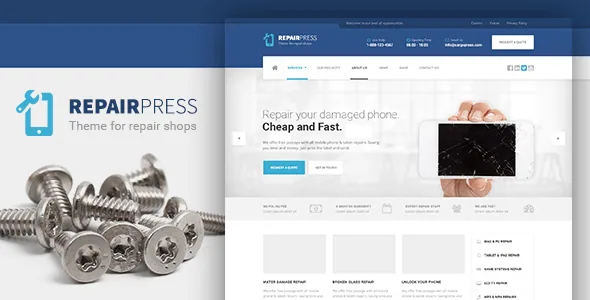
Layouts chosen per page, not drawn from an empty canvas
Most repair-shop sites need the same handful of screens: a front page, a services list, an about page, a contact page, and something to sell accessories from. RepairPress treats each of those as a layout you pick rather than a blank document you compose. According to the vendor, the theme includes several page layouts you change in each page's own editing screen, naming front page, Contact, Services, About and shop as examples.
That is a different working model from themes built around a single design canvas. You decide what the Contact page is, and the theme supplies the structure for it; your job is the text, the photos and the details. For a shop owner or a small agency building one site, this shortens the distance between installation and a page you could plausibly publish.
A one-click demo installer sits on top of it. Importing the demonstration content gives you the layout populated with placeholder structure, so each page shows you where a service description, opening hours or an enquiry form belongs before you write your own copy.
Two editing routes: the theme's builder and Visual Composer
The vendor describes an integrated drag-and-drop page builder as the theme's own content tool, and separately states full compatibility with Visual Composer. Both appear in the product description, and they serve different situations.
If you are starting fresh, the built-in builder is the route you learn with the theme. If you have already built sites in Visual Composer, the compatibility claim means you can keep that workflow rather than learn a second interface. What the listing does not say is whether every layout is built on the same engine, so if you intend to rebuild the demo pages inside Visual Composer specifically, that is worth confirming before you commit your time.
The global side of design is handled in the WordPress Customizer, which the vendor describes as showing a real-time preview of changes before they go live. Colours, the persistent frame and site-wide settings sit there, while the page body is the builder's job.
Fourteen translated languages, plus RTL handling
RepairPress is the kind of local business site that often only ever runs in one language, but the vendor has done more translation work than that suggests. The description lists fourteen professional translations: Dutch, French, German, Italian, Polish, Portuguese, Russian, Spanish, Slovenian, Danish, Turkish, Czech and Swedish, alongside English.
For a repair shop in, say, Rotterdam or Ljubljana, that is a real advantage: the theme's interface strings arrive already translated, so the localisation effort goes into your own service descriptions rather than the theme's labels. The theme is also described as fully translation-ready, so a language outside that list is a translation job rather than a blocker.
Multilingual sites have a second layer. WPML is listed as compatible, which the vendor says can be configured for RepairPress, and right-to-left text direction is described as switching on automatically when WordPress itself is installed in an RTL language. That last point matters for anyone in an Arabic, Hebrew or Farsi market: you should not need to set up RTL styling by hand.
Selling repairs and accessories through WooCommerce
The shop page layout exists for a reason: the vendor says WooCommerce is fully integrated, so you can build a store for parts, cases, screen protectors or flat-rate repair services listed as products. As observed on the marketplace listing on 5 November 2026, the declared compatibility attribute names WooCommerce 6.x and 7.x.
That attribute is a vendor declaration rather than a tested pairing with your install, and it is the item most likely to drift as WooCommerce releases new majors. Check the version against the archive you actually install, particularly if you depend on newer checkout or block-based cart features.
The description also names a set of plugins the theme supports by default: Contact Form 7 for enquiry forms, Custom Sidebars, Advanced Custom Fields, Yoast SEO, WP Rocket and Simple Lightbox. Read those as integration claims rather than bundled downloads. The practical ones for a repair business are the contact form — most of these sites live or die on a working "get a quote" enquiry — and whichever caching or SEO plugin your host already recommends.
The demo photos are blurred placeholders
One detail in the vendor's description deserves attention before you plan a launch date. The images in the live demo are copyrighted to their respective owners and arrive blurred inside the demo content that ships with the theme.
That means the demo is a structural reference, not a photo library. Your site will only look like the preview once you supply your own photography — a workbench, a technician mid-repair, a counter, product shots of the accessories you actually stock. Budget for that shoot or for licensed stock, and treat the blurred imports as placeholders to be replaced rather than assets to keep.
The upside is that no demo image is quietly baked into your design, so replacing them is a content task rather than a redesign.
Declared platform range and what ships in the files
As observed on 5 November 2026, the marketplace listing declares WordPress support from 6.2.x through 7.0.x, browsers as Firefox, Safari, Opera, Chrome and Edge, a responsive layout, widget-ready sidebars and high-resolution output. The theme is built on the Underscores framework, and the vendor's short metadata name is RepairPress PT.
Gutenberg Optimized is marked No. Read that narrowly: it records the editing path the vendor prepares layouts and documentation for, and it does not establish that block content fails to render or that the block editor is unavailable in WordPress.
ThemeForest files are listed as layered PSD, PHP, CSS and JS files. The layered PSDs are worth noting if a designer is adapting the design, since you get the source artwork rather than only the rendered theme. Documentation is described as well documented. The listing records a current marketplace version of 2.2.1; that is the vendor's release number, not a statement about any particular archive you install.
Who the per-page model serves, and who it constrains
This theme suits a repair business or a small studio building one site for one business: you get a defined set of page structures, a demo you can populate quickly, a shop for accessories, and translations already in place for fourteen languages. The upfront design decisions have mostly been made for you, which is the point.
It constrains you if the site needs to be unusual — a custom booking funnel, a device-specific repair-quote calculator, a layout that no existing page structure resembles. Those are build jobs on top of a theme rather than options inside it, and the theme's own builder may or may not be the right tool for them.
The reasonable way to decide is to open the live demo and test the interaction you actually need: submit the contact form, run a product through the shop, and switch to your own language if it is not English. Structure you can see is worth more than a feature list.
Questions & answers
Does RepairPress work without Visual Composer?
The vendor describes an integrated drag-and-drop page builder as the theme's own tool and lists Visual Composer compatibility separately, so Visual Composer is an alternative route rather than a stated dependency for every layout. The listing does not say which layouts are built on which engine; confirm that with the vendor if you intend to rebuild demo pages in Visual Composer.
Can I sell accessories or parts with this theme?
WooCommerce is described as integrated, and there is a dedicated shop page layout. The marketplace compatibility attribute observed on 5 November 2026 names WooCommerce 6.x and 7.x, which is a vendor declaration rather than a tested pairing with your install.
Are the demo images included for use on my site?
No. The vendor states the demo images are copyrighted to their respective owners and appear blurred in the demo content that ships with the theme. Plan to supply your own photography or licensed images.
Do I need WPML to run RepairPress in a non-English language?
No. Fourteen professional translations are listed, and the theme is described as fully translation-ready for other languages. WPML is separately listed as compatible for sites that need to run several languages at once; RTL text direction is described as activating automatically when WordPress is installed in an RTL language.


