The portfolio post type now belongs to the theme
The change worth knowing first is buried in a changelog line rather than the feature list. Release 1.6.0 records that the portfolio post type "is now built-in (no longer requires external plugin)." Project entries now register from the theme itself, so a portfolio is not contingent on installing and maintaining a companion plugin.
That matters in two directions. Starting fresh, there is one less moving part in the content model. If you already run an earlier Proton and later disable plugins while troubleshooting, the portfolio entries no longer hinge on whichever plugin used to provide the type.
The same release moved plugin installation outside the theme "for faster plugin updates." Plugin housekeeping simply becomes a separate step from the theme update. Read these as vendor statements about what changed in that release, not as a description of your own install.
How project work is presented
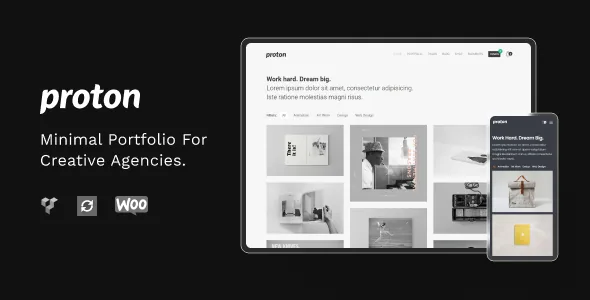
Three column counts are offered for portfolio grids — 2, 3 or 4 — so the density can follow how many pieces you actually have. "Alternative Portfolio Style" and "Masonry Portfolio" appear as separate presentations: the first changes the uniform grid treatment, the second staggers image heights, which rewards a mixed set of crops over a tidy one.
Two browsing details sit on top of the layouts. Ajax Load More appends further projects without a full page reload, which suits a long archive you want people to scroll. Portfolio images open in a fancybox gallery, so a project's stills can be viewed in an overlay instead of each needing its own page.
Image size matters for masonry in particular. The vendor lists the theme as retina ready, so supply files large enough for high-density screens rather than upscaling later. The vendor also lists Portfolio and Portfolio Item as separate panels in Theme Options, with project pages able to inherit their defaults rather than being configured one by one.
The shell: headers, skin and holding pages
Three header layouts are included, and Theme Options carry panels for Header, Footer, Style, Typography, Social Media, Blog, Blog Single and Shop. A dark, modern skin is the intended look, which suits photography where a dark surround flatters image contrast.
Further refinements in the vendor list: a parallax footer, footer and sidebar widgets, and seven icon sets. Coming Soon and Maintenance Mode pages are built in, so a portfolio can be assembled in private without a separate plugin for the holding screen. Typography runs through 600+ Google Fonts chosen from theme options, and five blog types plus dedicated About Me and Services pages cover the supporting content a studio usually needs.
One vendor note deserves repeating before you plan photography: sample images in the live preview are for demonstration only and are not included with the purchase.
Translation and the shop layer
WPML appears in the compatibility attributes, and the feature list separately adds translatable-ready files with po/mo files included. Those are different things — a multilingual plugin claim versus the translation files for the theme's own strings — and it helps to plan them as two tasks.
The marketplace attributes, as listed when observed on 4 November 2026, name WooCommerce 6.x through 9.x and WPBakery Page Builder. The 1.6.0 changelog is newer and states WooCommerce 10.x compatibility plus WPBakery Page Builder 8.7.2. The two records were written at different times, so treat the changelog as the more recent statement and check it against the plugin versions you actually run.
On the shop side the vendor lists a WooCommerce page, cart page, My Account page and shop widgets. Proton was not designed around commerce, but a print shop attached to a portfolio is a realistic use, and those pages give you a starting point. A listed integration does not mean every demo depends on it.
What the 1.6.0 security entries cover
Version 1.6.0 lists several sanitisation changes: Google Analytics output passed through wp_kses, custom JavaScript output sanitised to prevent cross-site scripting, portfolio template $_GET parameters sanitised, footer copyright run through wp_kses_post, embed video and gallery descriptions escaped in portfolio singles, and a capability check plus input sanitisation added to the demo importer.
Read that as the vendor describing what they hardened in one release. It is not an audit result, not a clean-scan claim, and nothing to assume about older versions. It is a reasonable sign the theme is still maintained with security in mind.
One practical consequence: if you have added custom JavaScript through the theme options, check that it still outputs as expected after updating, because the sanitisation now runs over that field.
The editing workflow, and the Gutenberg field
The vendor marks Gutenberg Optimized as "No" in the compatibility attributes. That value does not prove the block editor is unusable in Proton — it says the theme's own layouts were not built for blocks. Page composition here is WPBakery Page Builder, which appears in the compatibility list and is updated release by release in the changelog, most recently to 8.7.2.
So the decision is easy to state. If you want pages assembled from WPBakery elements with a Theme Options panel behind them, Proton is shaped that way. If your team already drafts in the block editor and expects theme templates to follow block patterns, the vendor's positioning points elsewhere, and the live demo is where to see how the two coexist.
The stored attributes also list WordPress 4.9.x through 6.9.x, Firefox, Safari, Opera, Chrome and Edge, and PHP, CSS and JavaScript files in the package. Those are listing-level claims describing what the vendor asserts, not results from running the theme on your server.
Questions & answers
Does Proton's portfolio need an extra plugin?
According to the 1.6.0 changelog, no. The portfolio post type is built into the theme as of that release; earlier versions relied on an external plugin. Plugin installation in general was also moved outside the theme in the same version.
Can I use Proton for a small shop?
The vendor lists WooCommerce pages, cart, My Account and shop widgets. The marketplace attributes name WooCommerce 6.x–9.x while the 1.6.0 changelog states 10.x support, so match the release to your own plugin version. Treat the shop as a supporting layer attached to a portfolio rather than the theme's design centre.
Do the demo images come with the theme?
No. The vendor states that sample images in the live preview are for demonstration only and are not included. Plan to supply your own project photography.
Can I build pages with the block editor instead of WPBakery?
The vendor records Gutenberg Optimized as No, which means the theme's own layouts are not block-based. It does not establish that the block editor is disabled, and pages you create yourself may still use it. Check the demo if block-based editing matters to your workflow.