A review site first, a community second
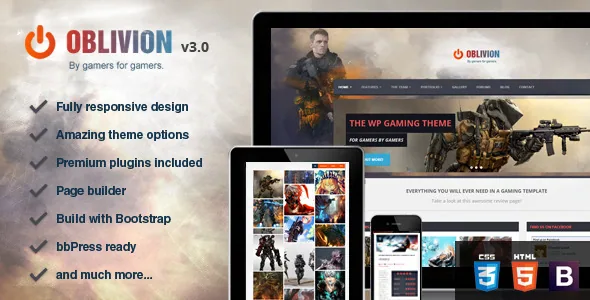
The vendor's own one-line summary of Oblivion is narrower than the theme's subtitle suggests: it is a template for "review sites or portfolios for your games." That framing shows up in the feature list, where a rating system and its widget are listed as first-class features rather than as an add-on.
So the build the theme is shaped around is a catalogue of games, each scored, each with artwork and media, and each linkable to a community where readers talk about them. If your project is a general gaming blog with no scoring, the theme still works, but you are paying for structure you will not use.
The marketplace record observed on 4 November 2026 declares WordPress 5.5.x as the software version, and the vendor's last update is dated 6 July 2018. That is the theme's frame of reference, not a statement about how it behaves on your install, and it should shape when in the evaluation you look at it.
What the rating system gives a review post
The feature list reads "Rating System , widget included." In practice that means scores are entered per post and the theme supplies a widget to surface rated content, and the changelog shows the scoring has been maintained over time: version 3.x-era entries record fixes for the empty-stars markup and for scores that render when no overall rating exists, and a later change lets a popular-posts widget order entries by comments or by rating instead of only by date.
The vendor's description stops at that level of detail. There is no claim about a score taxonomy, review schema markup, half-star precision or multi-criteria breakdowns in the supplied text, so treat those as things to confirm in the demo rather than assume.
The practical question is how you want scores to relate to your content. A single overall number per game is the straightforward reading of the feature line. If your reviews need separate marks for graphics, sound and longevity averaged into a total, verify that the post editor actually exposes those fields.
Forums and profiles depend on plugins, and the vendor says so
Community features are listed twice: "bbPress ready, create your own community!" and "New: BuddyPress support!" The changelog is more specific than the feature list. One entry adds a forum sidebar option and states plainly that "Buddypress and BBpress required for this to work."
That sentence is worth reading as scope guidance. Oblivion styles and integrates with those plugins; it does not replace them. Your forum threads, activity streams, groups and member profiles come from bbPress and BuddyPress, and the theme's job is to make them look and behave like part of the site.
The changelog also records the friction that comes with that approach. BuddyPress CSS fixes, avatar upload sizing, activity-stream spacing and a group-listing meta fix all appear across releases, and one entry names compatibility with the Ultimate Member plugin. A community build on Oblivion is therefore a plugin-supported build, and the version of bbPress and BuddyPress you run matters as much as the theme.
Building game pages from blocks
Pages are assembled with the theme's own drag-and-drop builder, described as having "loads of blocks." Two of those blocks are called out as additions in their own right: parallax blocks and video blocks, alongside animated images and icons.
That combination is the practical toolkit for a game record. A parallax block carries full-bleed key art, a video block holds a trailer or gameplay capture, and the animation options handle screenshot and icon entry. The changelog fills in some boundaries: one note says parallax on mobile activates on click and that a block with no preview image will show as black, which is a setup detail you would otherwise discover late.
The builder is not the block editor. The marketplace attributes mark Gutenberg Optimized as No, and the listing names Visual Composer 5.1.x under Compatible With. Read those together as a description of an older editing model with a shortcode-and-panel workflow, not as proof that the block editor is unavailable in WordPress itself.
Two bundled scripts to factor into the decision
The feature list declares LayerSlider's parallax slider and an Isotope gallery as included, with the vendor assigning them a combined value. Those are third-party scripts bundled with a purchase rather than built by the theme author.
For a gaming site both are relevant. LayerSlider handles the sliding hero a game portal usually wants, and Isotope powers the filterable game grid that lets a visitor narrow by genre or platform.
The worth of a bundled script is tied to the version bundled with it. The changelog records an Isotope fix for posts, a portfolio block converted to Isotope, and repeated LayerSlider and gallery fixes, which shows active maintenance through 2018 but says nothing about parity with current releases. If you plan to rely on either script's newer capabilities, check the version that actually ships.
Running the site in more than one language
Two separate claims sit on the feature list: "WPML Ready" and "Translate ready - .po files included." They serve different jobs. WPML is a plugin for running parallel language versions of the site; the .po files are what a translator edits to localise the theme's own strings, such as labels and buttons.
You need both if the site is genuinely multilingual. Localising theme strings alone leaves your reviews and pages in one language; WPML alone leaves the theme's interface text untranslated until someone supplies the strings.
The changelog adds two more details with a long shelf life. RTL support was added in July 2015, and child theme support arrived in the June 2018 release. The second matters for anything you plan to customise: a child theme lets your modifications survive a theme update instead of being overwritten.
What a 2018 cut-off means before you commit
The distinctive features here are not in question; the age is. The vendor's last recorded update is July 2018, the declared software version is WordPress 5.5.x, and the compatibility attributes still list IE9 and IE10 among supported browsers. None of that is a verdict on a current install, but it sets expectations: this is a theme whose maintenance record ends eight years before the marketplace observation date.
The dependencies sharpen the risk. If you enable WooCommerce, bbPress or BuddyPress, you inherit those plugins' current versions and their template expectations. Oblivion's own changelog shows updated Woo templates and BuddyPress fixes in its later releases, which means the integration is template-level and sensitive to plugin changes.
A sensible evaluation puts a staging copy of the theme next to current versions of whichever of those plugins you need, and checks the review post screen, the forum sidebar, the Isotope grid and the page builder before committing content. The theme's own help route is a support forum, and the vendor states that questions there are answered rather than in item comments.
What ships, and what does not
The ThemeForest file list names PHP, CSS and JS files only. The vendor separately mentions an XML dummy content file for the demo and describes the documentation as extensive, and the marketplace marks the item as well documented and widget ready.
The vendor is explicit about imagery: "the images that can be seen in the preview images will not be included in the download." For a gaming theme that is a real line item, because the preview's appeal rests on licensed game art and screenshots. Budget for your own artwork, publisher assets or properly licensed stock before the layout is populated.
Beyond that, the listing's own description of the item is the best guide to visual fit. It calls Oblivion a gaming theme built with HTML5 and CSS3 techniques, aimed at review sites and game portfolios, and the live preview is where you judge whether the design still reads the way you want.
Questions & answers
Do I need bbPress or BuddyPress to use the community features?
If you want forums, activity streams or member profiles, yes. The vendor's changelog states that the forum sidebar option requires both BuddyPress and bbPress. The theme styles and integrates those plugins rather than replacing them, so their versions are part of your build.
Can I build game pages with the WordPress block editor instead?
The marketplace marks Gutenberg Optimized as No and the theme ships its own drag-and-drop builder with parallax and video blocks. That attribute describes whether the theme's own layouts were tuned for block editing; it is not a statement that the block editor is switched off in WordPress.
Are the preview images included with the theme?
No. The vendor says the preview images are for demonstration and are not part of the download. Game art, screenshots and hero imagery need to come from your own licences or publisher assets.
Does the theme's age mean it cannot run on a current WordPress version?
The vendor's declared software version is WordPress 5.5.x and the last recorded update is July 2018, so the theme was not documented against recent releases. That is a reason to test on staging with your actual plugin set, not proof that it fails.