A site that is one long page, built in WPBakery
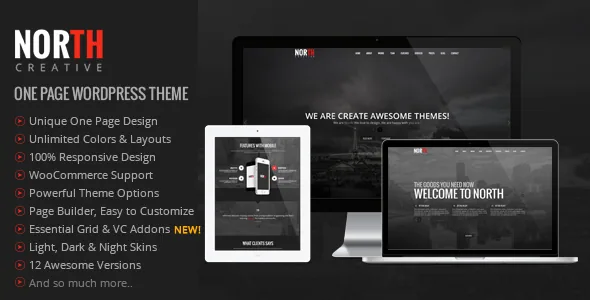
North's vendor description states the design intent plainly: the theme is a WordPress port of a one-page HTML template, and its feature list credits a "Unique and Easy One Pager building system based on Page Builder (Visual Composer)." There is no separate one-page settings screen. You stack builder rows and elements, and scrolling becomes the navigation.
That shapes the work more than the word "parallax" does. A section is a row you add, style and reorder, so the visual rhythm of the page — where a fullscreen image sits, how far apart the text blocks fall — is decided inside the builder. The theme supplies the parallax behaviour, smooth scrolling and the scroll-driven animation controls the vendor lists; the sequence of sections is yours.
The same theme is described in its marketplace metadata as a "One & Multi Page" theme, so the single long page is the centrepiece rather than a hard limit. Fullwidth and sidebar blog page layouts are listed separately among the features.
Why the theme and the North Core plugin move together
The changelog records a structural change in 2019 that still governs how a North site is set up. Version 4.1 moved shortcodes, custom post types and widgets into a new, required plugin called North Core; version 4.5 repeated that these had been moved out of the theme and that updating North Core alongside the theme was crucial.
The practical consequence is that the theme folder is not the whole site. Portfolio items, team members and the element set that makes up the page live in the plugin, so a theme update on its own does not necessarily carry the features you rely on. If you build a child theme, keep templates and styles there but treat North Core as a dependency you also manage.
The maintenance notes support that reading: release entries across many years list plugin updates next to bug fixes, and after one early 2019 update the changelog told users to save the Theme Options once.
The bundled plugin stack behind the demo
According to the vendor's feature list, the theme ships with Visual Composer plus the Templatera and Ultimate VC Addons plugins, and with both Revolution Slider and Layer Slider. That is a lot of third-party code inside one purchase, and it explains why the demos look the way they do — full-screen slides, addon element blocks and reusable templates are produced with those tools rather than with the theme alone.
Treat the bundling claim as a vendor statement about the marketplace package. Slider plugins built with older Bootstrap-era markup are also the part most likely to need attention over time; the changelog shows sliders and page-builder addons updated repeatedly across the theme's life.
One internal inconsistency is worth knowing before you compare notes with support: the theme description says it is powered by Bootstrap 3.2, while the feature list names Bootstrap 3.1. Both are old, and the discrepancy is a documentation detail rather than something that changes what you edit.
Twelve versions, three colour schemes
Rather than a handful of unrelated demos, the vendor describes "12 Awesome Versions" and names three layouts: Light, Dark and Night. Read as starting points, each version is a different arrangement of live sections — slider-led, portfolio-led, pricing-led — and the Light/Dark/Night schemes change how photography and text sit against the page.
Colour choice affects more than taste here. On a page where large background images scroll behind the content, the dark treatments change how a hero image reads and how legible overlay text stays as the section moves. If your brand assets assume a light background, the Light version is the safer place to start and the other two are alternatives to inspect against real imagery.
Fonts come from Google Fonts per the feature list, and Font Awesome icons are used across the elements. Both are switches you set once and then live with, so the version you choose should already suit your typography.
Portfolio entries, expanding or pointing elsewhere
Portfolio is where North adds behaviour beyond the scrolling page. The changelog documents Ajax expandable portfolio posts — clicking an item opens its content in place, and the vendor notes this appears on each demo and can be disabled. A later entry adds an External URL portfolio post type, so an item can link straight to another site instead of opening on yours.
For an agency or studio, that pairing covers two common cases: in-page case studies for work you want shown locally, and outbound tiles for press, client sites or an existing portfolio elsewhere. The vendor also lists a filterable, Isotope-based portfolio, which sorts items without a page reload.
One-page navigation got attention too. A 2018 entry adds support for the OnePager page template on subpages and fixes active navigation highlighting, so the menu can follow the section you are reading rather than sitting on a static item.
Timing controls and the rest of the element set
Slider and carousel speed settings arrived in version 4.2 for the Full Screen Slider, Services Carousel and Testimonials Carousel page builder elements. That matters because a one-page site is mostly motion: a fullscreen slider that rotates too fast forces the visitor to wait for a slide to finish, while a testimonial carousel on an older, slower setting may barely move. A separate 2018 release added a Carousel tab with speed and autoplay controls to the Portfolio and Blog Carousel elements.
The wider feature list is a familiar creative-agency set — pricing tables, animation options, shortcodes, widget-ready sidebars and a working contact form — with Font Awesome icons and Google Fonts supplying the visual pieces. WooCommerce support is declared, and the marketplace attributes observed on 3 November 2026 list compatibility with WooCommerce 5.x.x through 7.x.x, alongside Contact Form 7, WPBakery Page Builder and WPML.
Declared software support on that date runs from WordPress 6.2.x to 6.7.x, and the most recent changelog entry (5 November 2025) is a WordPress 6.7 compatibility update. Those are vendor and marketplace declarations, not the result of installing the theme on a current site. Gutenberg Optimized is marked "No"; that describes how the theme is tailored, not evidence that WordPress's block editor is switched off.
Questions & answers
Can I keep normal blog pages and posts alongside the one-page layout?
Yes. The vendor lists fullwidth and with-sidebar blog page layouts, and the theme's marketplace metadata describes it as a one and multi page theme. The one-page template is one arrangement of the site, not a replacement for ordinary posts.
Do I need WPBakery if the compatibility list mentions it?
The one-page building system the vendor describes is based on Visual Composer, now WPBakery Page Builder, and it is the builder the bundled addons extend. The compatibility attribute listing WPBakery does not say which version the theme expects, so confirm that before you plan the build.
Does the theme work with Elementor?
No Elementor support appears in the vendor feature list or in the marketplace compatibility attributes observed on 3 November 2026. The declared builder integrations are Visual Composer/WPBakery with Templatera and Ultimate VC Addons.