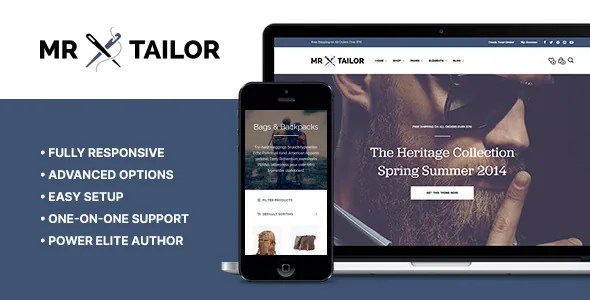
The header is assembled, not chosen
Get Bowtied's description makes a point of refusing a common shortcut. Rather than shipping a handful of fixed header templates or styles, Mr. Tailor lets you adjust, customise, enable or disable individual header elements. The vendor frames that as unlimited options.
For a shop build, this changes the order of work. You are not scrolling a header picker and accepting what comes with it. You switch on the pieces your storefront needs and arrange them, which means the top of the page can be tuned to a product range instead of a template author's idea of one.
The named parts in the vendor's list are concrete: a sticky header with an alternative logo, header transparency, header background images, an adjustable header size, a top bar you can switch off, social icons, multi-column drop-down menus, and image backgrounds inside those drop-downs. A centred logo alternative sits alongside the standard placement, and navigation font size and colour are separately adjustable.
Two of those interact in a way worth planning for. Sticky header with alternative logo means the bar that follows the scroll can carry a different mark than the one at the top, which is useful when a wide logo would crowd a compact sticky strip. Header transparency, meanwhile, only reads well over something worth showing through it, so it usually implies a hero image or slider directly beneath.
Sidebar, grid and gallery: the shop surface settings
The vendor groups a set of controls under shop customisation, and they are the ones that decide how a catalogue feels. The sidebar can be on-screen or off-canvas. You set the number of products per column and per page. You choose between different loading animations for products. The product page sidebar is optional rather than always on.
That last option is the one that most changes a product page. Turning the sidebar off gives the gallery and description the full width; keeping it gives space for cross-sells, filters or policy notes.
Two smaller items round out the shop surface. A zooming feature is described for the product image gallery, which matters most for stores selling things people want to inspect closely — fabric, finish, stitching. Social media sharing options are also listed.
Wishlist functionality appears in the WooCommerce feature list as optional. Treat it as something you enable and configure, not a default part of every storefront. Breadcrumbs are another toggle rather than a fixed behaviour.
Decide the editing route before layout work starts
This is where the listing asks you to be deliberate. The declared compatibility attributes name WPBakery Page Builder, Elementor and Elementor Pro, and also the Block Editor. Gutenberg Optimized is recorded as yes. The theme's own feature text, though, is written around header, shop and typography panels rather than any one builder.
The practical reading is that the marketplace lists the editors the theme is declared compatible with, not a recommendation of one. Pick your editor early and confirm how the demo layouts you want were actually built before you commit, because a page assembled in one builder does not carry over to another.
For customisation beyond panels, the vendor says a child theme is included for advanced customisation, and the ThemeForest file list records PHP, CSS, SCSS and JS files. SCSS in the package is the useful detail for anyone who prefers editing source styles over overriding compiled CSS.
The vendor also mentions a built-in portfolio, multiple blog layout options, Google Fonts integration, and adjustable colour, size, weight and line-height in the font controls. Those are ordinary theme-panel features; the header and shop controls above are where this theme makes more specific choices.
Translation and the vendor's cookie claim
The vendor states the theme is translation-ready and lists WPML as compatible. Those cover two different jobs: translation-ready means the theme's own strings can be translated, while WPML handles a multilingual storefront. Neither translates your product names, category copy or checkout wording for you.
The privacy statement is unusually specific. Get Bowtied writes that Mr. Tailor does not set cookies itself and is fully compatible with GDPR plugins, including plugins that load Google Fonts locally. Read that as a statement about the theme, not about your whole site. WooCommerce, analytics, embedded media and any marketing scripts you add decide most of what a consent tool has to manage, and the vendor's claim does not extend to them.
Declared browser support covers Chrome, Firefox, Safari, Opera, Edge and IE11.
What the listing settles and what it leaves to you
The setup conveniences worth knowing about are named plainly: quick installation, one-click demo import and automatic updates. Those are vendor descriptions of the workflow, not a record of how a particular demo import behaves on your host.
The open question that affects a build most is the editing route. With WPBakery, Elementor and the Block Editor all named in the compatibility attributes, the answer for your project depends on how the demo content you want was constructed — and the listing does not state that per demo. Confirm it against the live preview or the vendor's documentation before you plan the page templates.
The second open question is the version record. Compatibility attributes list WooCommerce 6.x through 10.x and a long run of WordPress versions, but declared ranges are not the same as tested combinations on your PHP version and plugin set.
Questions & answers
Does Mr. Tailor require WPBakery or Elementor?
The listing does not name a required builder. WPBakery Page Builder, Elementor, Elementor Pro and the Block Editor all appear in the declared compatibility attributes, and Gutenberg Optimized is recorded as yes. Which one the demo layouts were built with is the thing to confirm before you commit to page templates.
Can I turn off the shop sidebar entirely?
The vendor describes the product page sidebar as optional and the shop sidebar as either on-screen or off-canvas. Both are presented as settings rather than fixed layouts.
Is the theme itself responsible for cookie consent?
Get Bowtied states that Mr. Tailor does not set cookies and is compatible with GDPR plugins, including ones that load Google Fonts locally. That covers the theme; WooCommerce, analytics and other plugins you install still need to be accounted for in your consent setup.
What is included in the theme files?
The marketplace file list records PHP, CSS, SCSS and JS files, and the vendor says a child theme is included for advanced customisation. Installation itself is covered in separate setup documentation.


