The portfolio format matrix is the actual product
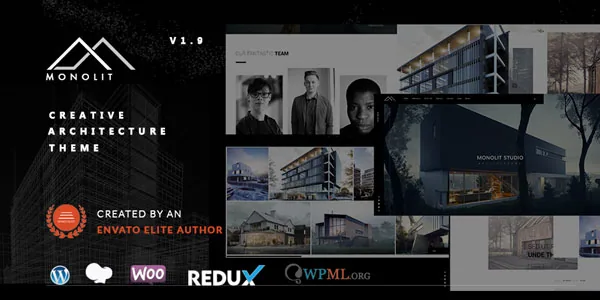
A portfolio theme lives or dies on its index page, because that is where a visitor decides whether to keep looking. Monolit's vendor description treats this as the main event rather than an afterthought: seven portfolio page layouts are listed, named as horizontal, vertical, parallax and masonry, with the rest unspecified.
Those four named formats are not interchangeable skins on the same content. A masonry grid rewards a large set of projects with varied image proportions and little text. A horizontal scroll layout turns the index into a sequence, which works when you want visitors to move through projects in a curated order and is awkward when there are forty of them. Parallax indexes suit fewer, larger images where depth is part of the pitch.
The single-project side has its own count: nine portfolio single-page styles, which the vendor says are built with WPBakery. That gives you a per-project choice of page structure, which is useful when one job needs a long photographic story and another needs a compact fact sheet with a floor plan. It also means the nine styles are starting points you configure, not nine templates that stay in sync. Editing one project's layout does not rewrite the others.
Five ways to open the homepage, and the mobile catch
The vendor lists five homepage styles: slider, slideshow, static image, a video background using YouTube or Vimeo, and a landing page. For an architecture or furniture studio, that is really a question about the first screen — a single hero image states a point of view, a slider buys you several, and a video background sells atmosphere.
The documented detail worth planning around is that the video background falls back to an image on mobile. That is a sensible behaviour, but it changes the brief: whichever still image you choose as the fallback is what most phone visitors will actually see, so it needs to work as a hero in its own right rather than being a frame nobody checked.
The landing page style is a fifth option rather than a fifth slider variant, which suggests a different content shape — one page that carries the studio's claim and contact route without a full site behind it. Monolit's demo URL points at a landing page, so that is the style the vendor chose to lead with.
How WPBakery and the theme's own elements fit together
Pages are assembled in WPBakery Page Builder, which the vendor says is bundled with the theme, and the feature list adds "advanced custom elements for WPBakery Page Builder" on top of the standard element set. Those custom elements are what make the portfolio formats buildable inside the builder instead of requiring template files.
The theme's JavaScript loadout is documented as Owl Carousel, Isotope, Light Gallery, jQuery Easing and Font Awesome, with Isotope described as an included premium plugin. Isotope is the library behind filterable and masonry-style grids, so its presence lines up with the masonry and filtered portfolio layouts rather than being incidental.
One structural point follows from the builder approach. A portfolio single layout is a page structure you build and save, so a studio with a consistent presentation can create one strong layout and reuse it, while a studio with varied projects can branch per project. The flexibility is real but manual — it is not a system that restructures existing projects when you change your mind about the design.
Bootstrap appears in the marketplace compatibility list for versions 4.x and 5.x. That matters if you plan custom markup, since it tells you which grid and utility classes the theme's own output follows.
Per-template headers and the one-page mode
Monolit lets you set header options per post, per page, per portfolio item, and per category and tag archive. That is a finer level of control than a single global header, and on a gallery-led site it earns its place: an image-heavy project page may want a transparent header sitting over the hero, while a text-heavy blog post wants a solid one that does not compete with the copy.
Category and tag archives are included in that list, which is the detail easy to miss. If you organise projects into categories like residential, commercial or furniture, those archive pages can carry their own header treatment instead of inheriting whatever the global setting says.
The theme also offers a one-page scroll mode. On a studio site, that mode suits the landing-page homepage and short, single-argument pages; it sits less comfortably beside a large project archive, where visitors expect to jump between items rather than scroll a single document. The vendor lists touch and swipe support too, which matters for the horizontal and carousel-driven layouts on tablets.
The shop route and a compatibility mismatch to confirm
WooCommerce is supported, and the vendor describes it in selling terms — prints, products or services — with a product image gallery as the named retail feature. That gallery is a reasonable fit for a furniture studio publishing a collection, since the products are visual objects and the image set is the merchandising.
There is a discrepancy worth noting. The vendor's feature list and 2.3.0 changelog both claim WooCommerce 9.x and 10.x compatibility, while the marketplace's compatibility attribute, observed on 4 November 2026, lists WooCommerce 5.x.x through 9.x.x. The two records do not agree at the top of the range. The marketplace attribute may simply be stale, but nothing in the supplied material explains the gap, so if you plan to sell through the theme on a recent WooCommerce release, test that path on staging before you build the catalogue around it.
If ecommerce is peripheral — a handful of prints alongside the portfolio — the stability of the portfolio layouts matters more than the shop's ceiling.
Maintenance history, read as a record rather than a promise
Monolit's changelog starts at version 1.0 in May 2016, so this is a theme kept alive across roughly a decade of WordPress releases. Recent entries are specific: 2.3.0 in December 2025 added compatibility with WordPress 6.9, PHP 8.4+ and WooCommerce 9.x/10.x, and 2.3.1 in May 2026 fixed translation loading with WordPress 6.7+ and made WPBakery compatibility improvements.
Older entries are also worth reading for what they reveal about the theme's history. Version 2.0.7 in February 2023 fixed an unauthenticated reflected XSS vulnerability, and several 2019–2020 releases carried the same note about deleting the Monolit Add-Ons plugin, updating the theme, then reinstalling the plugin from Appearance → Install Plugins. That note is a reminder that this theme has a companion plugin whose version travels with the theme, which is the kind of detail that causes confusing breakage when someone updates half of it.
WPML compatibility is described by the vendor as tested and certified. That is the vendor's wording about a third-party plugin; the supplied evidence does not show which WPML version. The theme also ships a .pot file, so translation work can start without WPML if you only need one additional language.
What comes in the package, and the images that do not
The vendor states that a child theme is included and that demo data is available as an XML file alongside one-click demo import, so you can start from a complete example site and replace its content rather than building from blank templates. The ThemeForest file list names PHP, CSS and JS files.
Other items the vendor lists as included are Isotope, the WPBakery builder, Font Awesome icons, 600+ Google web fonts and the .pot translation file. The demo photography is the exception. The vendor credits demo images to Behance and Obliquo Design, which reads as a sourcing credit rather than a licence grant — for a portfolio theme where the imagery is the substance, budget for your own shoot or licensed images before launching.
One inheritance from the theme's origins: the vendor notes the WordPress theme grew out of a separate Monolit HTML template, designed by kwst and developed in WordPress by cththemes. That explains the design-first character of the thing, where the layouts lead and the shop, blog and options panel support them.
Questions & answers
Can I edit Monolit pages in the WordPress block editor?
The marketplace records Gutenberg Optimized as No, and the vendor's documented editing path is WPBakery Page Builder, which the theme bundles along with its own custom elements. That attribute alone does not prove the block editor is unusable, but nothing in the supplied material describes block-based templates or block patterns, so plan on the builder as your page-editing route.
Are the nine portfolio single-page styles applied to every project automatically?
No. The vendor describes them as styles built with WPBakery, which makes each one a page structure you configure. You can reuse a layout you like across projects, but changing one project's design does not propagate to the others, so a redesign of the portfolio detail templates is hands-on work per project or per saved layout.
Does the video homepage background play on phones?
The vendor states that the YouTube and Vimeo video background falls back to an image on mobile, so phone visitors see a still image instead. Choose that fallback image deliberately, since it carries the first screen for a large share of your traffic.