Fitment data is the shop's spine, not a filter widget
Most automotive themes treat a vehicle selector as a dropdown that pipes a query into the product archive. Enovathemes describes Mobimax around a built-in make, model, trim and year system, and the changelog shows how much engineering went into it. Release 1.5 rewrote that system "with new logic to work for BIG product DB with high performance" — the vendor's own wording, and a rare admission that catalogue scale was the problem being solved.
That matters because a parts shop's hardest question is not layout. It is whether a shopper can get from "I drive a 2016 model X" to the four products that actually fit. A theme that stores fitment as part of the product record answers that differently from one that leaves you stitching together tags and categories.
How the AJAX filter behaves across a browsing session
The changelog records a drag-and-drop attribute filter added alongside an AJAX product filter, then later additions of filter memory, filter reset and category memory. Read together, those three entries describe a filter that survives navigation: you narrow the catalogue, open a product, come back, and your selections are still there — and you can clear them deliberately rather than reloading the page.
The same thread shows filter breadcrumbs arriving later, plus a filter that accepts product category as a parameter and a year range rather than a single year. None of this is verified here by testing; it is what the vendor documents in its release notes, which is a reasonable guide to the theme's priorities even if the current build should be checked on your own catalogue.
VIN lookup and getting fitment in and out of WooCommerce
Two changelog entries are more unusual than the feature list suggests. Releases 3.4 and 3.5 add a new provider for a VIN API, which points at vehicle identification number lookups feeding product matching. The vendor does not describe the provider's commercial terms or rate limits in the material available, so treat VIN support as an integration hook to evaluate rather than a turnkey service.
The second is quieter and arguably more useful for a real shop: version 1.2 modified WooCommerce product CSV import and export to include vehicle data. If your catalogue lives in a spreadsheet from a supplier, or you migrate from another platform, that means fitment can travel with the price, SKU and stock fields instead of being re-keyed by hand.
The front-end builder, header builder and what a client inherits
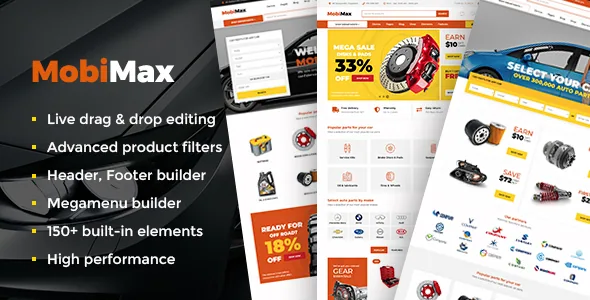
Mobimax offers a drag-and-drop front-end builder, a header and footer builder, a multi-layout megamenu builder and 150+ built-in elements, with Revolution Slider bundled. The marketplace compatibility list names WPBakery Page Builder, which is consistent with the visual-composer lineage that the older changelog entries refer to.
For handover, the structural items matter more than the element count. A child theme is included, so customisations can sit in a separate folder from the parent files. The header and footer builders mean the persistent parts of a shop — cart, search, vehicle selector, category menu — are assembled in the theme rather than hard-coded, which is the part you will be asked to change most often.
Declared compatibility, as observed on 4 November 2026
The marketplace attributes recorded on that date list WooCommerce from 5.x through 10.x, WordPress from 4.9.x through 7.0.x, and integrations including WPML, Contact Form 7, Gravity Forms, WPForms, Jetpack, Events Calendar and Events Calendar Pro. Gutenberg is marked optimized in the attributes, and the theme's own text describes Gutenberg compatibility alongside a builder-first workflow.
Two entries deserve scrutiny. Declared browsers include IE11, which shows how far back the compatibility list reaches and does not imply current browser testing. And the vendor's own feature text still says "WordPress 5.X compatible" while the attribute list extends far beyond it — the attribute list is the newer statement, but neither is a substitute for confirming behaviour on your target WordPress and WooCommerce versions.
Where Mobimax makes sense
If you sell parts that only fit specific vehicles, the fitment model, the memory-carrying filter and the CSV handling of vehicle data are the reasons to pick this theme over a general WooCommerce theme with a filter plugin bolted on. If you sell accessories that fit everything, that machinery is unused weight and the decision should turn on the builder and demo you actually like.
One practical caution for existing sites: an old release note instructs sites upgrading through version 1.5 to update the theme and the companion addons plugin first, then run a one-off conversion script from the download pack and delete it afterwards. That is a narrow legacy instruction, but it shows fitment data has changed shape before. If you inherit an older Mobimax install, check which release it is on before assuming current behaviour.
Questions & answers
Does Mobimax store make, model, trim and year data on each product?
Enovathemes describes a built-in make, model, trim and year system and says release 1.5 reworked it for large product databases. The changelog also shows vehicle data added to WooCommerce CSV import and export, which implies fitment is attached to the product record rather than held in a separate lookup. How it is stored in the database is not detailed in the available material.
Is the AJAX product filter usable without extra plugins?
The filter is described as a theme feature, with release notes covering attribute filtering, category parameters, year ranges, filter memory, reset and breadcrumbs. The exact split between theme code and plugin code is not documented in what is available, so confirm on the demo whether it covers the attributes your catalogue needs.
Which page builder does Mobimax use?
The vendor text describes a drag-and-drop front-end builder with 150+ elements, and the marketplace compatibility list names WPBakery Page Builder. Older changelog entries refer to Visual Composer, the former name of that builder. Gutenberg is also marked optimized in the attributes, though the vendor's workflow description is builder-led.


