A wrapper can carry its own skin colour
Most medical themes give you one accent colour and a few tinted section presets. GoodLayers describes something narrower and more flexible in Mediz: custom skin colours are created for page builder wrappers, and the vendor's example is a page with three wrapper sections, each using a different skin.
That fits the way clinic pages are actually put together. A plain content section, a tinted appointment band and a dark contact strip can each hold their own palette instead of inheriting one global accent, so a dentist page and a hospital page in the same theme do not flatten into the same colour rhythm. The skins are tied to wrappers, so the control belongs to whoever assembles the page layout rather than to a settings screen someone visits once.
PixeBuilder is recommended, the classic builder still ships
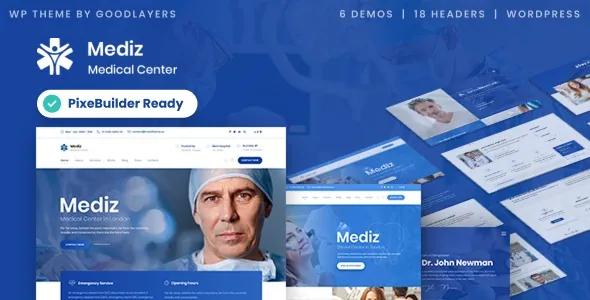
The theme is described as ready for PixeBuilder, the builder GoodLayers recommends, while continuing to work with the classic GoodLayers page builder. Both are editing surfaces inside the same theme, so the choice is not forced by an upgrade path.
If you already have pages assembled in the classic builder, the vendor lists a "Migrate to PixeBuilder" control that converts them whenever you choose, which means the switch can wait until after launch. Starting fresh, you pick one surface and stay in it — and that decision shapes which demo content is usable, because the importer keeps the two sets separate.
Demo content is split by builder, not by specialty
The one-click importer presents two menus. The PixeBuilder menu contains a single hospital demo, already built in PixeBuilder. The classic menu holds the six original GoodLayers demos: Hospital, Hospital 2, Dentist, Dentist 2, Clinic and Beauty Clinic.
Read that carefully before planning. The dentist layouts sit only in the classic set; a PixeBuilder start means the hospital demo is your reference. GoodLayers also says the importer uses a multi-thread image import technique to speed the process up.
One package point the vendor states plainly: the photographs on the preview site are not included in the theme package, and the ThemeForest file list names PHP, CSS and JavaScript files. Medical or clinic photography is something you license separately.
The page builder follows you into posts and portfolio items
Page building is not confined to top-level pages. The vendor lists page builder support inside single posts and inside portfolio single items, plus a header background that can be set per post and per portfolio entry.
In practice a practitioner's service update can use builder layout options instead of a fixed content field, and a case study can be composed in sections with its own header image. That flexibility has a cost: two authors working in the same post editor have more room to produce pages that do not match each other. If your clinic publishes regularly, the extra control is worth having a house pattern for.
Admin panel and layout settings
GoodLayers puts the theme's configuration at 700+ options, and the count is a fair signal that Mediz expects to be set up rather than used out of the box. Full, boxed and 100% fluid page widths cover the layout decision, and item spacing is set from the admin panel rather than per element.
Navigation has breadth: the vendor names 18 header layouts with adjustable logo and navigation spacing, a floating navigation variant, and a secondary navigation that can render as a slide or an overlay. Six footer layouts are included, and the footer or copyright block can be switched off on individual pages — useful for a booking-focused landing page where a full footer fights the call to action.
Styling overrides live here too. Additional CSS has a theme option, and a separate mobile CSS box takes phone-specific rules. Font handling runs through Google Fonts plus an uploader for EOT or TTF files, and unlimited sidebars can be created and assigned per page or post.
Content layouts, declared compatibility and one gap to check
Beyond the medical demos, the vendor lists 16 blog layouts, 16 portfolio layouts, 7 gallery layouts, 8 post formats and two lightbox styles — the publishing side a clinic uses for patient guidance or practitioner profiles.
As observed on the marketplace listing on 4 November 2026, the software version attribute spans WordPress 5.8.x through 7.0.x, and the compatibility attribute names WooCommerce 10.x.x, 9.x.x, 7.x.x and 6.x.x alongside WPML. The feature text describes WooCommerce and WPML as fully supported and lists RTL support with a right-to-left stylesheet included. Those are declared ranges, not a record of testing against your plugin stack or PHP version.
The WooCommerce list skips the 8.x series. If your shop runs that version, treat it as unconfirmed and verify before you commit, rather than assuming the neighbouring versions cover it.
Questions & answers
Does switching to PixeBuilder mean rebuilding existing pages by hand?
GoodLayers lists a Migrate to PixeBuilder control that converts existing pages whenever you choose, so the documented path is conversion rather than a manual rebuild. The description does not say how converted pages handle elements with no PixeBuilder equivalent, so run the migration on a staging copy first.
Can I get the dentist demo with PixeBuilder?
Not from the importer as described. The PixeBuilder menu holds one hospital demo; Dentist and Dentist 2 are in the classic builder set along with Hospital, Hospital 2, Clinic and Beauty Clinic.
Are the preview images part of the theme package?
No. The vendor states that images on the preview site are not included in the theme package, and the marketplace file list names PHP, CSS and JavaScript files only.