The timetable and booking forms are the point
A practice site is judged on one journey: someone decides which practitioner to see, when. p-themes builds Medin around that. The marketplace description names four practice-facing modules — a timetable schedule for doctors, booking forms, calculators and two kinds of gallery — before it mentions layout variants at all.
The timetable is the one with a stated opinion in the vendor description, which calls it an "interesting UI solution for custom needs" rather than a table of opening hours. That suggests a schedule treated as a display element in its own right, not a paragraph on a contact page. Whether it renders per doctor, per department or per week is not specified, and neither are its editing screens, so confirm the structure on a staging install before a clinic's real consulting hours go into it.
Booking forms carry the same gap. The listing confirms they exist and stops: no field list, no note on where submissions are stored, no mention of confirmation emails or calendar integration. If a booking has to reach a specific practitioner's inbox or a practice management system, test that path rather than assume it ends in the right place.
Calculators and the two galleries
The calculators are listed among the theme's features without any statement of what they compute. BMI, treatment cost estimates, body measurement and dosage each imply different fields, units and disclaimer wording. The description names body contouring, cryotherapy and weight loss among the practices Medin targets, but never ties a particular calculator to any of them.
Two gallery types are counted and left unnamed. Clinics usually want two quite different things from galleries: a before-and-after comparison, and a facility or team grid. One is a paired layout, the other a grid of rooms and staff. Since the vendor stops at the count, check the demo for which presentations you actually get.
What you can rely on is that these are listed as theme features rather than plugins you must source separately. Photography is another matter. The vendor states plainly that images from the demo are not included in the package, so the clinic interiors, portraits and treatment shots in the preview are placeholders you replace.
Seven layouts, and which clinic identity you write for
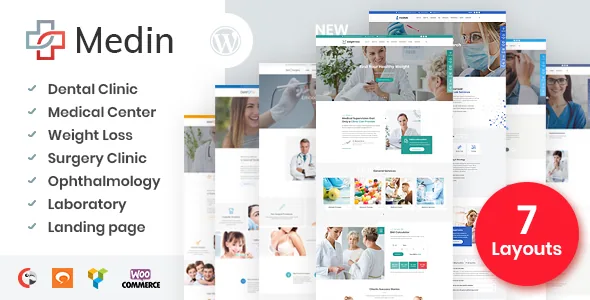
The vendor counts seven homepage layouts: weight loss, dentist, laboratory, plastic surgery, medical center, ophthalmology and a landing page. The same list appears twice with slightly different labels — "Skin Surgery" and "Clinic" in one place, "Plastic Surgery" and "Medical Center" in the other — so treat it as seven directions rather than seven cleanly separated products.
Those directions imply different content. A weight-loss practice leads with programmes and visible results; a laboratory leads with test panels and turnaround times; an ophthalmology clinic leads with procedures and equipment. A single practice that spans two of those has to choose which story the homepage tells and push the other to inner pages.
For a group with genuinely separate service lines, the layout set works more like a multi-site answer: one install, one front page per service, separate content paths. The cost is maintenance across several homepages, each with its own timetable placement, booking form and gallery. Decide which situation you are in before picking a layout, because it determines how much of the theme you end up using.
Editing in WPBakery, with Gutenberg declared alongside
The description is explicit that Visual Composer, now WPBakery Page Builder, is integrated rather than bought separately, and the marketplace compatibility list names WPBakery Page Builder. The changelog over several releases is dominated by composer updates, which shows where the vendor's layout work sits. The predefined pages mentioned — About Us, Contacts, Gallery, Services — are described as designed templates in that system.
The same listing declares Gutenberg compatibility and marks Gutenberg Optimized as Yes. That is a statement about the block editor, not about the demo homepages being rebuildable block by block; a compatibility attribute never proves that. The reasonable reading is that WPBakery carries the theme's own designed pages while the block editor handles standard posts and pages. If your team works in the block editor and will not touch a shortcode-based builder, weigh that before purchase.
Colour control sits outside the builder. The vendor offers basic colour schemes, and the changelog records Customizer colour options added in 1.5 and extended in 1.5.1 — so the palette is a theme setting rather than a per-element builder decision.
RTL, Polylang and live chat as declared features
Three entries in the general feature list are about serving patients rather than designing pages. RTL support covers right-to-left layouts for Arabic, Hebrew, Persian or Urdu clinics, and the changelog records an RTL fix alongside WordPress 5.8 in 1.8.1, so it has been maintained rather than abandoned. Polylang compatibility is declared for multilingual sites. Live chat compatibility is declared against a free WordPress chat plugin the vendor does not name, so confirm which one has been checked if chat is part of your intake.
WPML also appears in the marketplace compatibility attributes, next to WooCommerce 5.x.x through 9.x.x; the changelog adds a payment module in 1.6.0. Read those together cautiously. A listed integration does not show that a given layout's booking form, timetable or calculator has been translated, nor that a shop is wired into every demo. For a clinic taking bookings in two languages, the honest test is a staging install with Polylang or WPML and a walk through the booking path in the second language.
What the listing declares, and what it does not
The marketplace records WordPress 5.4.x through 6.9.x as the declared software range, with Bootstrap 4.x and 5.x in the compatibility attributes even though the vendor copy still says Bootstrap 4. The package contents are listed as PHP, CSS and JS files, and the vendor separately advertises an HTML version included with the WordPress purchase — a bundle claim rather than a description of our archive.
Those declarations were observed on 4 November 2026. They are listing claims, not results from running Medin on your PHP version, plugin set or hosting, and the timetable and booking behaviour remains the part worth testing first.
Questions & answers
Can Medin work for a single-doctor practice rather than a clinic group?
Structurally, yes. Pick the closest of the seven layouts and leave the others unused; the multi-layout structure only becomes a burden if you genuinely run several front pages. The timetable and booking modules are the parts that scale down, though their field-level behaviour still needs checking because the vendor description does not specify it.
Does Medin support multilingual clinic sites?
Polylang compatibility is declared in the vendor feature list and WPML appears in the marketplace compatibility attributes. Neither statement covers translation of booking forms, timetable entries or calculator labels, so verify those on staging if patients will book in more than one language.
Are the demo photographs included in the theme?
No. The vendor states that images from the demo are not included in the source package. The listed files are PHP, CSS and JS, so budget for your own practice photography, staff portraits and treatment imagery before judging the layouts.