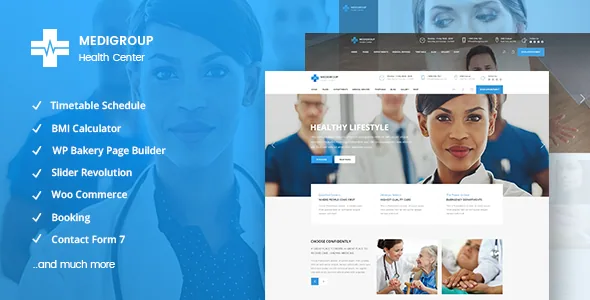
The doctor record, not the homepage, is the organising idea
Plenty of business themes call themselves medical and then hand you a coloured homepage with a stethoscope icon. Medigroup's feature list points somewhere more specific. The vendor describes a Doctors Profile custom post type, and separately a "Doctors" variant of the team shortcode. Those two lines together say something useful: practitioners are stored as their own content type, and there is a presentation element built for that type rather than a generic staff grid.
A small changelog entry makes the same point from the other direction. Version 2.1 records a fix for Doctor working days translation. You do not ship a fix for working-days strings unless working days live inside the doctor record as structured fields. The practical consequence for you is that a multi-practitioner site becomes a matter of entering records once and placing shortcodes, rather than rebuilding a card layout for each physician by hand.
The rest of the theme's vocabulary follows this medical framing. The vendor's list of suitable projects names veterinarian, plastic surgeon, optician and pediatrician practices, which is a claim about demo breadth rather than about content depth — worth reading alongside the demo itself.
Booking, working hours and BMI: components, not an engine
Four items in the feature list are worth grouping because they behave the same way. Booking functionality has a shortcode and a widget. Working Hours has a shortcode and a widget. The BMI Calculator is listed as a shortcode. Each is something you place into a page or a sidebar area through the existing editor, not a section you configure in a separate module.
That dual form matters more than it sounds. A widget puts working hours in a footer or a side area; a shortcode puts it in the body of a page built in WPBakery. Same data source, two placement routes. If your site plan already assumes a sidebar or a set of widgetised areas — and the vendor lists custom sidebars plus header top and bottom widget areas — the widget route is the shorter path.
The word the vendor uses for booking is functionality, and the changelog stays consistent with a form rather than a scheduling system. Version 1.7 records fixing a booking form where the button overlapped fields on smaller screens; version 1.1 records fixing sending of all fields on the appointment form. Those are form-level fixes. Nothing in the supplied material describes calendar availability, per-practitioner slots, confirmations, or payment for an appointment. If a real booking engine is the requirement, plan to supply one and treat Medigroup's form as the presentation layer.
Importing the demo, and the images you cannot keep
The vendor's central editing claim is one-click import of the demo content, followed by customising the elements. Read that as a starting point, not a finished site. Import gives you the page structures and the shortcode placements; it does not give you the photographs.
The vendor is explicit about this. The description states that the theme's authors do not own the copyright for the images used in the demos, that those images are presentational only, and that they cannot be used on your own site without a stock image licence purchased separately. For a medical site this is not a trivial footnote, because the strongest part of a clinical demo is usually the photography — consulting rooms, staff portraits, clinical imagery.
So the realistic workflow is import, then replace visuals before launch. Budget for either a stock licence or a photo session with actual practitioners. Portrait shots of named doctors carry more legal weight than decorative banners, since a stock face presented as a staff member is misleading regardless of licensing.
What WPBakery commits you to
The vendor lists WPBakery Page Builder and Slider Revolution as bundled plugins, quoting values of $46 and $26. Treat those as the vendor's account of what the theme is built around rather than as a statement about any particular archive. Version 2.1's changelog shows both being kept current, with WPBakery updated to 8.7.2 and Revolution Slider to 6.7.41.
The design decision that follows is straightforward. Your pages are shortcode and builder-element compositions. The feature list backs this up with a long inventory of elements — card slider, tab slider, video banner, pricing tables, progress bars, pie charts, process and infographic elements — all described as shortcodes. The medical-specific items sit in the same framework, which is why booking and working hours arrive as shortcodes too.
The changelog does record a 2019 entry about Gutenberg plugin compatibility and a fix for post formats toggling in the presence of the block editor, but the documented editing path across thirteen versions is WPBakery. If your team already works in that builder, that is a fit. If the plan is a block-based editorial workflow, the material here describes a different route, and how blocks behave in this theme is a question for the demo rather than something the vendor text answers.
Structure options that shape a practice site
Away from the medical elements, the theme's layout controls are mostly about chrome rather than content. The vendor lists two header types with separate logos for regular, sticky and mobile headers, plus dark and light logo variants, and the ability to change header skin section by section. Footers go up to four columns, with regular and uncovering variants and a separate footer bottom area.
Two of these are more useful for a clinic than they first appear. Separately styled mobile headers matter because a large share of patient enquiries arrive on a phone. Per-section header skin switching is what lets a dark hero banner sit above a light content area without hand-editing styles.
Declared compatibility from the marketplace attributes, recorded on 4 November 2026, covers WordPress 6.5.x through 7.0.x, WooCommerce 9.x and 10.x, WPBakery and WPML. Version 2.1 added a WPML config file, which is the concrete sign that translation support is being maintained rather than merely listed — relevant if your practice site needs more than one language. That attribute range describes declared support, not a record of testing every combination.
Reading the changelog for where maintenance goes
Version 2.1, dated 20 February 2026, is the most informative entry in the log for a new buyer. It adds WooCommerce 10.x compatibility, improves PHP 8.3 compatibility, updates the Mikado BMI Calculator to 1.2, corrects the simple line icon tokens to v2.4.0, and removes the twitter-connect script. It also fixes a blog slider that showed empty slides on mobile in some cases.
Two patterns are worth noting. First, the development effort reaches into the small medical utilities: updating the BMI calculator plugin is a maintenance decision specific to this theme's audience. Second, social integrations have been in flux. Version 2.0 fixed the Instagram API connection, and 2.1 removed the Twitter connect script — so if the vendor's listed Twitter and Instagram social widgets are part of your plan, check what actually renders in the current demo before depending on them.
The gaps between releases are visible too. After 2.0 in September 2021 the next entry is 2.1 in February 2026. That is a long quiet period followed by a substantial catch-up release, which is a reasonable thing to know when you weigh how actively the theme will be maintained going forward, without turning it into a prediction.
Questions & answers
Does Medigroup handle real appointment scheduling?
The vendor describes booking functionality alongside a booking form shortcode and widget. The changelog entries about that form concern field submission and mobile layout, not availability or calendar logic. Nothing supplied describes per-doctor slots, confirmations or paid appointments, so assume you supply the scheduling engine and use the theme's form for presentation.
Can I use the images that come with the demo?
No. The vendor states that the images in the demos are for presentation only, that the authors do not hold copyright for them, and that you must license them from a stock image source yourself before using them on your site.
Does a nulled Medigroup carry the bundled WPBakery and Slider Revolution licences the vendor mentions?
The vendor lists those plugins as included with values of $46 and $26. That is the vendor's bundle claim for its own product. Bundle terms are the vendor's to state, and plugin updates through the original authors' own channels typically depend on valid licences, so verify plugin update routes separately from the theme files.
Do the medical elements work outside WPBakery pages?
Booking, working hours and the BMI calculator are each listed as shortcodes, and booking and working hours also as widgets. Widgets place in widgetised areas such as sidebars and header or footer regions. The BMI calculator is described only as a shortcode, so it needs a place where shortcodes render.